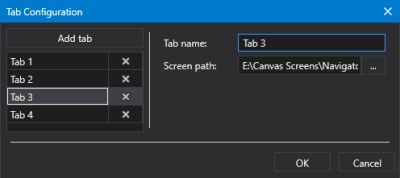
Sample Tab Configuration dialog box
|
Sample Tab Configuration dialog box |
 to open Tab Configuration dialog box. to select a screen from the Open Files dialog box, where you can access a CygNet APPS or BSS folder or a local or network Windows file-system folder. The nested view is only available if a screen is configured for the tab. If no screen is specified, the nested view does not display.
 (Delete tab) to remove a selected tab.
|
|
|

