Canvas and Canvas View display the last several documents you have opened so that you can use those links to quickly access regularly used screens. The Recent files list can contain two groups of files:
- a Pinned group — Up to 10 screens that have been pinned for indefinite access
- a Recent group — Up to 10 recently opened screens
The Pinned list displays the file name, location, and a pin button to unpin the screens from this list.
The Recent list will display the file name, location, last time the file was opened, and a hidden pin button to pin screens you want to keep listed indefinitely.
If you close a screen, and then move it to another location, such as by using Windows Explorer, the link to that file will no longer work, and a warning will indicate that Canvas cannot open the file. You must use the Open dialog box to browse to the file to open it. After you open and save the file in its new location, that link is added to the list. The old file location will remain in the Recent list until you have opened 10 other files.
Recent Screens Context Menu
The Recent Screens section of the Open page of the Backstage view has a small context menu to allow easy management of the files in the list. Right click any file name to perform the following actions:
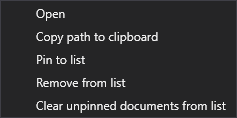
Recent Screens Context Menu
- Open — Open the selected screen
- Copy path to clipboard — Copy the path of the selected screen to the clipboard
- Pin to list — Pin the selected file in the Recent list to the Pinned list
- Unpin from list — Pin the selected file in the Pinned list to the Recent list
- Remove from list — Delete the selected file from either list
- Clear unpinned documents from list — Remove all unpinned files from the Recent list
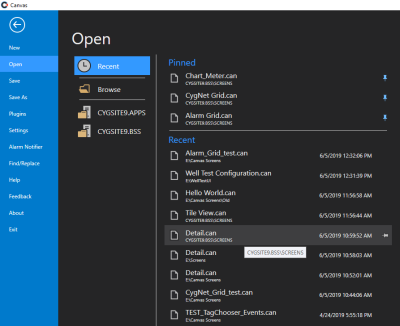
Open recent screens
 To open a screen in the Pinned or Recent list
 to access the Backstage view.
 (pin) on the right, or right-click and select Pin to list. The file is moved to the top of the Pinned group.
 (pin) again, or right-click and select Unpin from list to unpin the file. The file is moved to the Recent group if it still meets the aging requirements, or it is removed from both lists.
