Shape
 The Shape control is a CygNet-aware tool, which supports the drawing of geometric shapes, such as ellipses, triangles, rectangles, polygons, lines, lines with arrowheads, and other custom paths on your screens. You can use one of several predefined shapes or line types or specify a geometric syntax to draw a custom path or line style. A shape's fill color, text color, and line color can be explicitly configured or sourced from the point state color defined for the associated point. Colors in the control can be overridden when a custom color palette is selected for the screen. The control can display static text, such as a label, or dynamic text based on point or facility attributes. Dynamic text is built using tokens, which can represent real-time CVS point properties, point configuration properties, and facility properties. The control can be configured with a valid point configuration but prevented from retrieving any CygNet data, allowing the display of static text while still allowing CygNet data context available from script. Font sizing, text styling, and text weighting are also configurable. Date, time, and value formatting for the text displayed on the control is supported. The control can be hidden if the associated point is invalid. This control supports tooltips, which can be displayed as tokenized text, a Canvas object, or the tooltip can be scripted to retrieve and display values for related points or CygNet notes. The mouse cursor that appears when the mouse hovers over the control is configurable. A context menu is available in run mode with access to CygNet point and alarm data, including alarm acknowledgment, current and history values, point and facility configuration, and trending point data on a default chart.
|
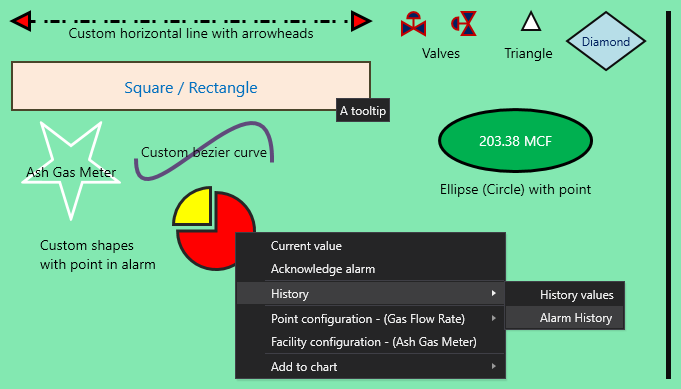
A screen with several sample shapes including
a custom shape showing point in alarm and context menu
|
Property Inheritance
Property Inheritance
Property inheritance is a widely used concept in Canvas. The application supports an explicit relationship between screens, objects, and controls, where certain property values, such as SiteService and facility tags, are passed from one element to another via an inheritance framework. Screens, objects, and controls can be configured as property senders or property receivers and provide configuration options where you can explicitly define the source of the SiteService and facility. Depending on how you have your screens, objects, and controls set up, the SiteService and facility may come from any one of the following sources:
- from itself — indicated by selecting <Self> and then explicitly configuring the property
- inherited from the screen — indicated by selecting Screen, which is always present as a sender
- inherited from another control — indicated by selecting the Name of the sending control
Broadcasting
Screens and objects support an additional notification option to broadcast their SiteService and facility selection changes to other open screens running in the Canvas or Canvas View application. If configured, a <Broadcast> option is available to source the screen's SiteService and facility properties from another open screen.
For example, a text tool can be configured to get its facility from the screen and the screen can be configured to get its facility from a tag chooser. Or Screen_A might source its facility from Screen_B, which gets its facility from a tag chooser.
Receiver or Sender
The shape tool supports property inheritance as a receiver of its SiteService and facility:
|
Self
Screen
|
Self
Screen
Other controls
|
none
|
none
|
The shape tool does not send its SiteService or facility to other controls.
Related Topics

