The Shape control uses Windows Presentation Foundation (WPF) to create standard and custom shapes on your Canvas screens. A Canvas shape is defined using an XML-based markup language similar to Scalable Vector Graphics (SVG) technology to draw a two-dimensional vector graphic. SVG is a text-based, open Web standard for describing images that uses a geometric syntax or path data to cleanly render lines, curves, and arcs at any size.
You can create your own custom SVG images (using a third-party tool or SVG editor), extract the path information from the SVG file, and then add the path data to the Shape control. Canvas then interprets the path data (and other configurable properties) to create the custom shape on your screen.
This topic provides some information about how to create your own custom shapes.
 To create a custom SVG shape
While Canvas uses WPF paths to create these custom shapes, the syntax is the same as that used for SVG paths. Any tools or editors available for editing an SVG can be used to extract the path data which Canvas uses to draw the shape.
There are numerous resources on the web about SVG, SVG image creation, and path syntax. A quick search will yield many educational web pages and free drawing tools that allow you to create your own images and save them in the appropriate format.
Some helpful links to get started:
- Microsoft .NET WPF — Path Markup Syntax
- W3schools.com — SVG Tutorial, Introduction
- W3schools.com — SVG Tutorial, SVG Path
- Web-based shape editor — Paths
SVG images can be created with any text editor, but it is often more convenient to create SVG images with a drawing program, like Inkscape, a free and open-source vector graphics editor for creating images. You can also import, convert, and export various file formats, including SVG, AI, EPS, PDF, PS and PNG.
To extract the path data from an .svg file
- Use a drawing tool or SVG editor to create a custom shape and save it as an .svg file.
- Open the .svg file in a text editor such as Notepad and find the <path> element in the xml code. This is the alphanumeric path syntax Canvas needs to render the shape.
- Copy the path between the quotes in the d attribute to the clipboard.
Example
|
The following code is revealed when opening an .svg file in a text editor:
|
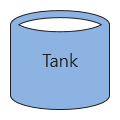
The following shape is created by copying the path data from the .svg file (the red text) and pasting it into the Shape geometry property in a shape control:
Note: The path data only draws the shape. The fill color, border color, and the text ("Tank") properties have been configured separately in the Shape control property pane. |
Path Syntax
Simple shape outlines are drawn with curved or straight lines that can be used as a clipping path. Paths use a compact coding with alpha commands to indicate meaning. For example, M (for "move to") precedes initial numeric x and y coordinates, and L (for "line to") precedes a point to which a line should be drawn. Further command letters (C, S, Q, T, and A) precede data that is used to draw various Bézier and elliptical curves. Z is used to close a path. Follow the suggested hyperlinks above to learn more about path syntax.
To configure a custom shape
- Create a new screen and add a shape control.
- In the Properties pane, do the following:
- Find the Shape category.
- In the Shape type property, select Custom shape.
- Paste the path data for your custom shape into the Shape geometry property.
- Configure other custom shape properties as desired: Custom line style, Line style, Line width, and Stretch.
- Find the Value category.
- Configure the Fill color, Text color, and Line color properties, as desired.
- Configure any other general shape properties as desired (Font, Tooltip, Display, Value, Context menu, etc.)
- Find the Shape category.
- Save the screen.
- Run the screen to test your configuration.


