 The Detail control is a CygNet-aware tool, which displays real-time data for a single point in multiple formats within the same control. The control contains six elements:
| 1. – 3. | three tokenized text strings (top, middle and bottom). The control can display a static text string, such as a label, or a dynamic text string based on point or facility attributes. Dynamic text is built using tokens, which can represent real-time CVS point properties, point configuration properties, and facility properties. In run mode, the tokens are replaced with the attribute's value. | |
| 4. | an alarm icon that can be configured to change color based on point state and change image based on alarm priority | |
| 5. | a small sparkline with configurable line color, x- and y-axis, date ranges, both relative and absolute, and live data updates | |
| 6. | an arrow that is scripted to flip the detail control when clicked and display a Canvas object of your choosing on the reverse side of the detail control. The object on the reverse side will receive its point and facility configuration from the detail control. |
The last three elements (alarm icon, sparkline, and flip icon) can be toggled on or off.
Several other configurable properties are supported, including:
- The control's color elements can be set to one of the following options: a) automatically follow the selected application theme regardless of the underlying color palette used, b) sourced from the point state color defined for the associated point, or c) be explicitly configured. (The sparkline's color is not theme specific.)
- Colors displayed in the control can be overridden when a custom color palette is selected for the screen.
- Date, time, and value formatting for the text displayed on the control is supported.
- The control can be hidden if the associated point is invalid.
- Font sizing, text styling, and text weighting are also configurable.
- This control supports tooltips, which can be displayed as tokenized text, a Canvas object, or the tooltip can be scripted to retrieve and display values for related points or CygNet notes.
- A context menu is available at runtime with access to CygNet point and alarm data, including alarm acknowledgment, current and history values, point and facility configuration, and trending point data on a default chart. Custom context menu items can be scripted allowing customized control behavior.
Detail Example
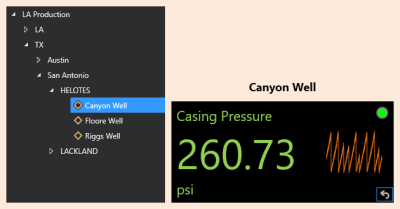
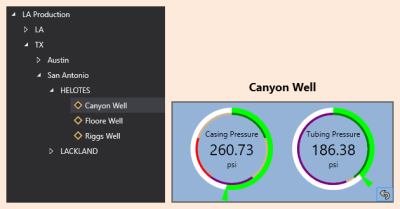
The following image shows a tag chooser and two detail controls.
|
The image on the left shows a detail control with the facility passed in from the tag chooser (Canyon Well). |
Property Inheritance
Property Inheritance
Property inheritance is a widely used concept in Canvas. The application supports an explicit relationship between screens, objects, and controls, where certain property values, such as SiteService and facility tags, are passed from one element to another via an inheritance framework. Screens, objects, and controls can be configured as property senders or property receivers and provide configuration options where you can explicitly define the source of the SiteService and facility. Depending on how you have your screens, objects, and controls set up, the SiteService and facility may come from any one of the following sources:
- from itself — indicated by selecting <Self> and then explicitly configuring the property
- inherited from the screen — indicated by selecting Screen, which is always present as a sender
- inherited from another control — indicated by selecting the Name of the sending control
Broadcasting
Screens and objects support an additional notification option to broadcast their SiteService and facility selection changes to other open screens running in the Canvas or Canvas View application. If configured, a <Broadcast> option is available to source the screen's SiteService and facility properties from another open screen.
For example, a text tool can be configured to get its facility from the screen and the screen can be configured to get its facility from a tag chooser. Or Screen_A might source its facility from Screen_B, which gets its facility from a tag chooser.
Receiver or Sender
The detail control supports property inheritance as a receiver of its SiteService and facility:
| Receive from | Send to | ||
|---|---|---|---|
| SiteService | Facility | SiteService | Facility |
| self screen |
self screen other controls |
none | none |
The detail control does not send its SiteService or facility to other controls.


