 The Navigation Button is a CygNet-aware tool that can be used to add buttons to your screens that implement hyperlinking to other Canvas screens without scripting. The navigation button supports the same operational modes as the Hyperlink method on the Screen object: Open, Modal open (a subordinate popup window), Open and close, Replace, Replace with navigation, and Close. The control shares all properties, events, and methods with the standard Canvas Button control.
Navigation Button Example
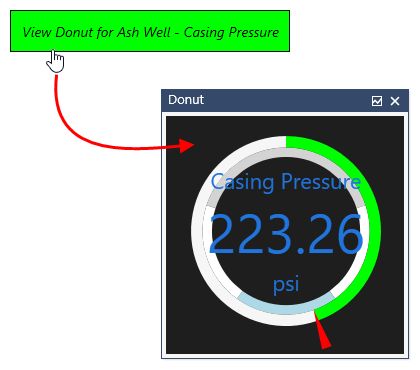
The following image shows a navigation button that must be clicked to open a window or popup.
|
Sample Navigation Button opening |
Property Inheritance
Property Inheritance
Property inheritance is a widely used concept in Canvas. The application supports an explicit relationship between screens, objects, and controls, where certain property values, such as SiteService and facility tags, are passed from one element to another via an inheritance framework. Screens, objects, and controls can be configured as property senders or property receivers and provide configuration options where you can explicitly define the source of the SiteService and facility. Depending on how you have your screens, objects, and controls set up, the SiteService and facility may come from any one of the following sources:
- from itself — indicated by selecting <Self> and then explicitly configuring the property
- inherited from the screen — indicated by selecting Screen, which is always present as a sender
- inherited from another control — indicated by selecting the Name of the sending control
Broadcasting
Screens and objects support an additional notification option to broadcast their SiteService and facility selection changes to other open screens running in the Canvas or Canvas View application. If configured, a <Broadcast> option is available to source the screen's SiteService and facility properties from another open screen.
For example, a text tool can be configured to get its facility from the screen and the screen can be configured to get its facility from a tag chooser. Or Screen_A might source its facility from Screen_B, which gets its facility from a tag chooser.
Receiver or Sender
The navigation button supports property inheritance as a receiver of its SiteService and facility:
| Receive from | Send to | ||
|---|---|---|---|
| SiteService | Facility | SiteService | Facility |
| self screen |
self screen other controls |
none | none |
The navigation button does not send its SiteService or facility to other controls.


