Reordering using Drag and Drop
Reordering items in a list in a Canvas control is easy with drag and drop.
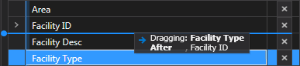
Reordering using drag and drop
- Click on the name of the item you wish to move (column, row, facility attribute, menu item, etc.).
- Drag the item to the correct location in the list.
- Drop the item. A tool tip will provide guidance as you move the item.
The resulting list will be reordered as desired.