Configuring Logging Settings
Use the Help page in the Backstage view to view and configure basic logging settings, including:
- Log files folder — Open the folder where the log files are stored
- Logging level — Configure the desired logging level for Canvas and Canvas View
Logs can be viewed in the Log Viewer pane, or by opening each file in a text editor such as Notepad.
Each option is described below in greater detail.
Log Files Folder

|
The Log files folder contains log files created by the Canvas applications during each working session. Logged information is written to a comma separated file, for example, Canvas001.csv. As each new log file is created, it is incremented with a new number, for example, Canvas002.csv, Canvas003.csv, etc. The lowest number is the most recent log file.
|
Logging Level
Canvas and Canvas View support configurable logging levels:
- On the Help page in the Backstage view, select the desired logging level for the application from the drop-down menu: Normal, Detail, or Debug.
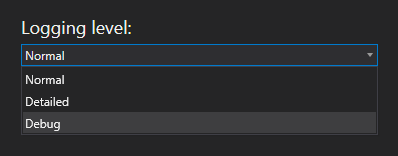
Logging level configuration
Five log message types are supported, from least verbose to most verbose:
- Info (0) — basic information about the application, lowest level of logging
- Error (1) — errors
- Warning (2) — warnings
- Detailed (3) — details
- Debug (4) — debugging information, highest level of logging
There are three configurable logging levels for the Canvas applications:
|
Log Message Level |
|
Description |
|---|---|---|
|
Normal |
1 |
Includes Info and Error log messages. This is the default logging level. |
|
Detailed |
3 |
Includes the following log message types: Info, Error, Warning, and Detailed. |
|
Debug |
4 |
Includes all log message types: Info, Error, Warning, Detailed, and Debug. This is the highest level of logging available. If Debug logging is selected, exceptions will always write out the stack trace. The screen load times are also available via the log file if Debug logging is enabled. |
The selected logging level is saved and applied next time you open Canvas and Canvas View.


