DDS Component-Level Security
Component-level security can be applied to remote devices, data groups, UIS commands, and text import devices. By applying DDS component-level security you can:
- Deny all users except field personnel to view the configuration of a device, but allow operators to update just the devices under their jurisdiction.
- Allow all users to request data group data from a device, but allow only technicians to send data to a device.
- Allow all users to execute a "poll" command, but allow only operators and foreman to execute an emergency shutdown command.
You must have at least Level 2 authorization for the service’s ACCESS event to change the properties of a record.
Component-Level Security - Remote Device
Remote device component-level security is administrative security. It governs who may change a device’s configuration (link/unlink facilities, add/delete data groups, map UDCs, and add/edit/delete UIS commands) and who may delete the device. (DDS service-level security determines who can add devices to the DDS).
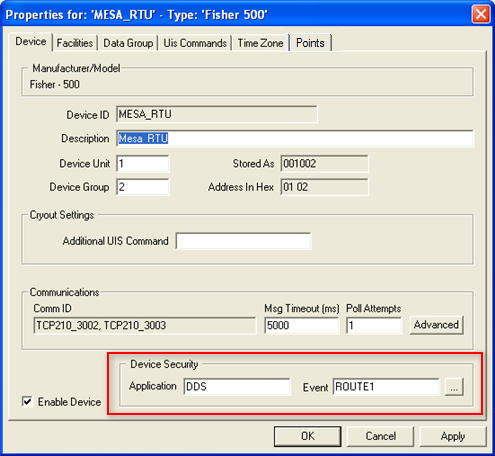
The Application and Event name for remote device component-level security is specified on the Device page in the device properties. These names can be custom. If you create a custom Event name, tasks and authorization levels are the same as those of the DDS ACCESS Event. For example, you have to have Level 1 authorization to view the device properties.
|
| Device Security shows the Application and Event that govern remote device component-level security. This security is administrative. |
To Configure Remote Device Component Security
- In the ACS, create an Application and Event for the remote device and define permissions for the Event.
- In the DDS, right-click on the device and click Properties.
- On the Device page, click … in the Device Security area.
- Select the Application and Event created in step 1.
- Click OK to apply the selection.
- Click OK to save the change to the device.
Component-Level Security – Data Group
Data group component-level security is operational. It governs who may view transaction history data, who may request new data from a device, and who may send data to a device. The Application and Event name for data group component-level security is specified in the data group’s properties box. These may be user-defined.

|
| Application and Event that govern data group component-level security. This security is operational. |
Regardless of the Application and Event name assigned to the security properties in the data group, the operational tasks (and the authorization level required to perform a task) are the same as those governed by ACCESS Event.
Note: The DDS Events table lists the default authorization levels required to perform tasks. The device template file can be modified to change the security parameters of the data group and its elements. See Custom Data Group security below.
The utility DDSDataGroupCopy.exe is useful for copying security settings for a data group in one device to the same type of data group in another device.
To Configure Data Group Component Security
- In the ACS, create an Application and Event for the data group and define permissions for the Event.
- In the ACS, make sure that the user(s) have at least Level 1 authorization for the device’s administrative security Event.
- In the DDS, right-click on the device and click Properties.
- Click on the Data Group page.
- Click on the data group to which security is to be applied and then click the Properties button.
- Select the Application and Event created in step 1.
- Click OK to apply the selection.
- Click OK to save the change to the device.
Component-Level Security – UIS Command
UIS command component-level security is operational. It governs who may execute a command. Command security is independent of data group security. You may not have authorization to send a data group, but you may have authorization to execute a command that includes that data group.

|
| Application and Event that govern UIS command component-level security. This security is operational. |
Regardless of the Application and Event name assigned to the security properties in the UIS command, the operational tasks (and the authorization level required to perform a task) are the same as those governed by the DDS ACCESS Event.
The utility DDSCommandCopy.exe is useful for copying the security settings for a UIS Command in one device to the same command in another device.
To Configure UIS Command Component Security
- In the ACS, create an Application and Event for the UIS command and define permissions for the Event.
- In the ACS, make sure that the user(s) have at least Level 1 authorization for the device’s administrative security Event.
- In the DDS, right-click on the device and click Properties.
- Click on the UIS Commands page.
- Click on the command to which security is to be applied and then click the Properties button.
- Select the Application and Event created in step 1.
- Click OK to apply the selection.
- Click OK to save the change to the device.
Custom Data Group Security
You can modify a device template file to further restrict data group security. You can define what security level a user must have to send data and you can force them to get data before sending it. This security can be applied to the data group elements as a whole or individual elements of the group.
To implement this, you must edit the .dtf and add the attribute "secLev" (security level) to the applicable attribute. (See Device Template Files for more information about editing templates.) The attribute value must be a numeric value (0-5) corresponding to the security levels in the ACS. When you add this attribute to a data group, the user’s authorization level in regards to the attribute value governs the action you can take:
| Authorization Level < secLev Value | Authorization Level = secLev Value | Authorization Level > secLev Value |
|---|---|---|
|
You cannot send the data group/data group element to the device. |
You must do a "get" before you can "send" the data group/data group element to the device. |
You can send the data group/data group element without doing a “get.” |
In the example below, the secLev attribute has been applied to both the dgElements element and the AtmPres element.
|
<StatParms niceName="Stat Parms" dgProtocol="Native" baseOrd="1" maxCnt="12" ordLabel="Run#"> |
Since attribute value for the dgElements is “4,” if a user has an authorization level of 3 for the data group's application and event, the user cannot send data. If a user has an authorization level 4, the user must issue a "get" before the data can be edited and sent. The user will not be able to edit the Atmospheric Pressure element because it has an authorization level of 5.
Component-Level Security – Text Import Device
Text import component-level security is both administrative and operational. It governs who may change the Text import device’s configuration (map columns, specify data validation, specify file format, etc.) and who may execute the import.

|
| Database Administrative Security shows the Application and Event that govern Text Import component-level security. This security is administrative and operational. |
Regardless of the Application and Event name assigned to the security properties in the point record, the tasks (and the authorization level required to perform a task) are the same as those governed by the DDS ACCESS Event.
To Configure Text Import Component Security
- In the ACS, create an Application and Event for the Text Import device and define permissions for the Event.
- In the DDS, right-click on the device and click Properties.
- On the Device page, click … in the Database Administrative Security area.
- Select the Application and Event created in step 1.
- Click OK to apply the selection.
- Click OK to save the change to the device.


