Alarm Configuration Considerations
Any point in CygNet can be setup for alarming; however, this does not mean that the Control Room Operators are responsible for all of those points. Additionally, Control Room Operators may only be responsible for certain alarm types of a particular point but those types vary from point to point. Therefore, a means to separate the alarms that a Control Room is responsible for is required, not simply separating points and alarm types (i.e. High Alarm, High Warning, Low Warning, Low Alarm, etc…).
The Alarm Priority setting, and the associated Alarm Priority Category, of a point can be used to separate the alarms Control Room Operators are concerned about. This provides the necessary granularity at the individual alarm level for proper filtering. For example, different groups of alarms can be established for Control Room Management (CRM) Alarms versus Non-CRM Alarms.
The following diagram presents an example categorization of alarms:
|
Alarm Categories |
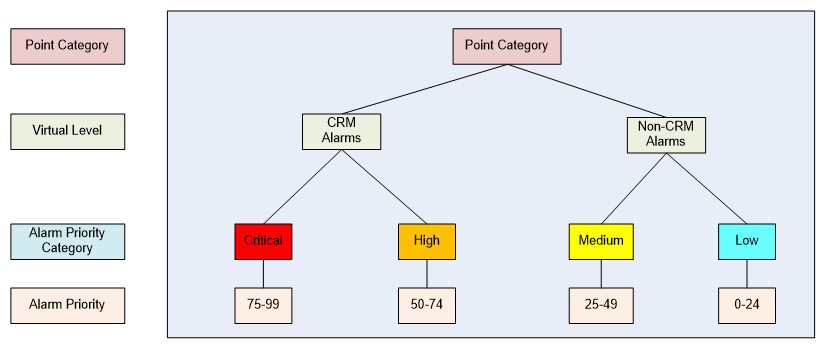
As shown, by manipulating the Alarm Priority of a particular alarm type, an alarm can be associated with either a CRM Alarm or Non-CRM Alarm category, regardless of alarm type. For example, if an Operator is required to respond to a High Alarm Type and to a Low Alarm Type, then the Alarm Priority would be set such on each setting of the point that they are in the CRM group.
The numerical value of the Alarm Priority can further be used to sort the alarms, placing the higher priority alarms on top of the CAS list. The Alarm Priority Category of the alarm allows for KPI calculations and filtering of the entire group.
See Alarm Priority, Alarm Priority Category, and Alarm Category for additional information about Alarm Priority and Alarm Priority Category.


