Using the CAM Storage Service
You will need to create a dedicated Group Service to store CAM-related files (KPI job definition files, count job files, query job files, report job files, filter files, and other necessary CAM files). See Installing CygNet Alarm Manager, Step 1 for more information about this service.
The following image shows the default child storage nodes (folders) and the contents of each node in a default CAM STORAGE service, for example, \\SITE.STORAGE\AlarmManagement\.
|
STORAGE Service Sub Groups |
STORAGE Service Leaf Nodes — Queries |
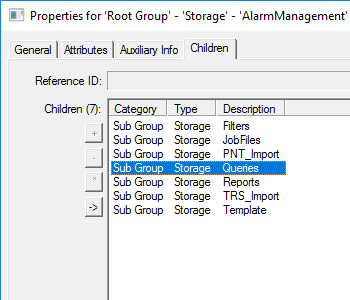
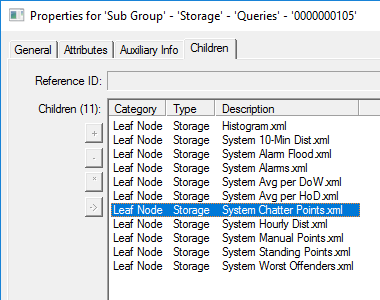
The default \\SITE.STORAGE\AlarmManagement\ group contains the following sub groups and files. The sub group names are configurable; see CAM Module Configuration for more information. Copy and modify any file as necessary.
| Sub Group/ Folder |
Description |
|---|---|
|
Filters |
A default storage folder containing a set of sample filter files. The AlarmManagementSetup.exe will install the following sample filter files. The filters in these files can be copied to your own KPI job definition files and modified as necessary. See Filtering CAM Operations for more information about single- and multi-filter files.
|
|
JobFiles |
A default storage folder containing the KPI job definition files. The AlarmManagementSetup.exe will install the following sample job files. See Filtering CAM Operations for more information about single- and multi-filter files.
|
|
PNT_Import |
A default storage folder containing the CAM KPI Points.csv file. See Sample Points and TRS Entries for more information. |
|
Queries |
A default storage folder containing a set of sample Query KPI job definition files. The QUERY operation offers the same abilities as reports but without the formatted output. A QUERY will output to a file and will just return an XML string. The raw data can be used for building screens and workflows. The major difference between a QUERY and a REPORT is that a QUERY can only contain a single Report section. The AlarmManagementSetup.exe will install the following sample job files.
|
|
Reports |
A default storage folder containing reports generated by the KPI engine. See CygNet Alarm Manager Reports and the Stored Reports Screen for more information. |
|
TRS_Import |
A default storage folder containing the trs.csv file. See Sample Points and TRS Entries for more information. |
|
Template |
A default storage folder containing the template.xlsx file. See Configuring the CygNet Alarm Manager Template File for more information. |


