Change Rate Alarm Calculation
The Change Rate alarm calculation uses the CHANGE_RATE alarm calculation and can only be implemented with the CygNet Enhanced Point Scheme. On each update, if the point value changes more than the maximum allowed times for a given interval, the system will set the alarm bit. The alarm bit will be set when the maximum allowed number of changes occurs, even if the full time interval has not completed.
See Understanding the CVS Metadata File for more information about the elements and attributes that define a CygNet Point Scheme.
For more information, see Alarm Calculation Types.
Change Rate
The number of entries stored for this calculation is specified by the histvaluecount attribute in the CvsMetadata file for a CygNet Enhanced Point Scheme.
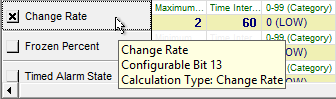
The following image shows the area of an Analog Alarm Settings page of a PNT Editor with an enabled Change Rate alarm using the Change Rate calculation type:
|
Alarm Calculation Configuration — Change Rate |
Calculation Parameters
The calculation parameters for this alarm are user-provided:
- Maximum Changes (calcparm1) — maximum allowed number of changes within the time interval before the alarm bit is set.
- Time Interval (sec) (calcparm2) — time interval in seconds.
- If update count > maximum allowed number of changes, alarm is set.
- If update count ≤ maximum allowed number of changes, alarm is not set.
Example
- calcparm1 = 2
- calcparm2 = 60
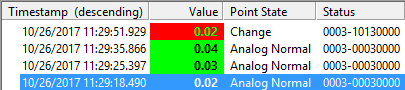
In this example, the Change bit is set because the number of changes (3) within the time interval of 60 seconds is greater than the maximum allowed number of changes (2).
|
Alarm Calculation Results — Change Rate |