Default Alarm Calculations
There are several default calculation types that are associated with point types and are included in the CygNet Standard Point Scheme.
See the following subsections for details:
The system will store a maximum of 60 entries for these calculation types. If more than 60 values come in within the specified time interval, the alarm will never be triggered. The number of historized calculation type values stored in the CVS for a CygNet Standard Point Scheme is fixed at 60 entries and cannot be edited.
For more information, see Alarm Calculation Types.
Deviation Value
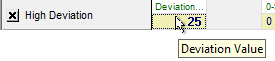
The Deviation alarm uses the Deviation Value (DEVIATION_VAL) calculation. On each update, the system calculates the change in engineering units from the previous value and sets the alarm bit if the change equals or exceeds the threshold. This alarm calculation uses Calculation Parameter 1 only.
The following image shows the area of an Analog Alarm Settings page of a PNT Editor with an enabled High Deviation alarm using the Deviation Value calculation type:
|
Alarm Calculation Configuration — Deviation Value |
Calculation Parameter
The calculation parameter for this alarm is user-provided:
- Deviation Value (calcparm1) – maximum allowed threshold change before the alarm bit is set.
Equation
|
Deviation Value = fabs(Updated Value - Previous Value) |
- If Deviation Value ≥ maximum allowed change, alarm is set.
- If Deviation Value < maximum allowed change, alarm is not set.
Example
- calcparm1 = 25
In this example, the High Deviation bit is set because the absolute change in value (-79.052) is greater than the calcparm value of 25.
|
fabs(212.841 -285.893) = -79.052 |
|
Alarm Calculation Results — Deviation Value |


Digital Value Equal
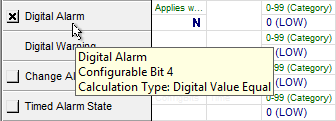
The Digital alarm uses the Digital Value Equal (DIGITAL_EQUAL) calculation. On each update, if the value matches the state (value) selected by the user, then the alarm bit is set, otherwise it is cleared. This alarm calculation uses Calculation Parameter 1 only.
The following image shows the area of a Digital Alarm Settings page of a PNT Editor with an enabled Digital Alarm using the Digital Value Equal calculation type:
|
Alarm Calculation Configuration — Digital Value Equal |
Calculation Parameter
The calculation parameter for this alarm is user-provided:
- Applies when Off? (Y/N) (calcparm1) – Digital state (value)
- On update, if current value = digital state (value), alarm is set.
- On update, if current value ≠ digital state (value), alarm is not set.
If the single parameter is set to N, the alarm bit will be set when the value is set and cleared when the value is unset.
If the single parameter is set to Y, the alarm bit will be set when the value is unset and cleared when the value is set.
Example
- calcparm1 = N
In this example, the Digital Alarm bit is set because the updated state matches the calcparm state (value) (N).
|
Alarm Calculation Results — Digital Value Equal |

Maximum Value
The High Alarm and High Warning alarms use the Maximum Value (MAX_VALUE) calculation. On each update, the system will check the value and set the alarm bit if it is equal to or more than the threshold. This alarm calculation uses Calculation Parameter 1 only.
The following image shows the area of an Analog Alarm Settings page of a PNT Editor with an enabled High Alarm using the Maximum Value calculation type:
|
Alarm Calculation Configuration — Maximum Value |

Calculation Parameter
The calculation parameter for this alarm is user-provided:
- Setpoint Value (calcparm1) — threshold value at which the alarm is set when the updated value equals or exceeds the setpoint.
- On update, if current value ≥ setpoint value, alarm is set.
- On update, if current value < setpoint value, alarm is not set.
Example
- calcparm1 = 150
In this example, the High Alarm bit is set because the updated value (165.1762) exceeds the calcparm1 value (150).
|
Alarm Calculation Results — Maximum Value |

Minimum Value
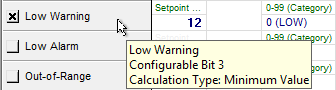
The Low Alarm and Low Warning alarms use the Minimum Value (MIN_VALUE) calculation. On each update, the system will check the value and set the alarm bit if it is less than or equal to the setpoint value. This alarm calculation uses Calculation Parameter 1 only.
The following image shows the area of an Analog Alarm Settings page of a PNT Editor with an enabled Low Warning alarm using the Minimum Value calculation type:
|
Alarm Calculation Configuration — Minimum Value |
Calculation Parameter
The calculation parameter for this alarm is user-provided:
- Setpoint Value (calcparm1) — threshold value at which alarm is set when the updated value is at or below this value.
- On update, if current value ≤ setpoint value, alarm is set.
- On update, if current value > setpoint value, alarm is not set.
Example
- calcparm1 = 12
In this example, the Low Warning bit is set because the updated value (11.84) is less than the calcparm1 value (12).
|
Alarm Calculation Results — Minimum Value |

String Filter
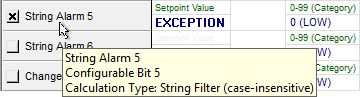
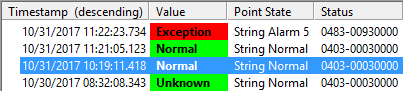
The String Alarm has two calculation options: String Filter case-insensitive (STRING_VAL_CI) and String Filter case-sensitive (STRING_VAL_CS). On each update, if the new value matches the calcparm1 comparison string (without regards to case for case-insensitive, and with regards to case for case-sensitive) the alarm bit is set, otherwise it is cleared. This calculation supports wildcards. This alarm calculation uses Calculation Parameter 1 only.
The following image shows the area of a String Alarm Settings page of a PNT Editor with an enabled String Alarm 5 using the String Filter (case-insensitive) calculation type:
|
Alarm Calculation Configuration — String Filter (case-insensitive) |
Calculation Parameter
The calculation parameter for this alarm is user-provided:
- Setpoint Value (calcparm1) — user-provided comparison string.
- On update, if current value = setpoint value, alarm is set.
- On update, if current value ≠ setpoint value, alarm is not set.
Example
- calcparm1 = EXCEPTION
In this example for a STRING_VAL_CI calculation, the String Alarm bit is set because the updated value (Exception) matches the calcparm1 value (regardless of case).
|
Alarm Calculation Results — String Filter (case-insensitive) |
Value Range
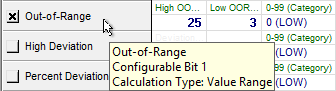
The various Out-of-Range alarms use the Value Range (VALUE_RANGE) calculation. On each update, the system will check the value and set the alarm bit if it is outside the allowed range.
The following image shows the area of an Analog Alarm Settings page of a PNT Editor with an enabled Out-of-Range alarm using the Value Range calculation type:
|
Alarm Calculation Configuration — Value Range |
Calculation Parameters
The calculation parameters for this alarm are user-provided:
- High OOR Value (calcparm1) — maximum engineering units threshold.
- Low OOR Value (calcparm2) — minimum engineering units threshold.
- On update, if current value ≥ maximum threshold or ≤ minimum threshold, alarm is set.
- On update, if current value is within the range between maximum and minimum thresholds, alarm is not set.
Example
- calcparm1 = 25
- calcparm1 = 3
In this example, the Out-of-Range bit is set because the updated value (2) is outside the range defined by calparm1 and calcparm2.
|
Alarm Calculation Results — Value Range |


