Frozen Alarm Calculations
There are three Frozen alarm calculation types. These alarm calculation types can only be implemented with the CygNet Enhanced Point Scheme. See Understanding the CVS Metadata File for more information about the elements and attributes that define a CygNet Point Scheme.
See the following subsections for details:
The number of entries stored for this calculation is specified by the histvaluecount attribute in the CvsMetadata file for a CygNet Enhanced Point Scheme.
For more information, see Alarm Calculation Types.
Frozen Percent
The Frozen (Percent) alarm uses the Frozen Percent (FROZE_PCT) calculation. Whenever the time interval is reached, the system will calculate the percentage change from the newest value older than the time interval and set the alarm bit if the percentage change is less than the threshold.
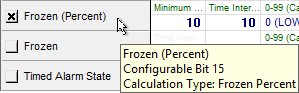
The following image shows the area of an Analog Alarm Settings page of a PNT Editor with an enabled Frozen (Percent) alarm using the Frozen Percent calculation type:
|
Alarm Calculation Configuration — Frozen Percent |
Calculation Parameters
The calculation parameters for this alarm are user-provided:
- Minimum Percentage Threshold (calcparm1) — minimum required percentage difference over the time interval.
- Time Interval (sec) (calcparm2) — time interval.
Equation
|
Percent Change = fabs((Updated Value/Previous Value) -1) X 100 |
- If the Percent Change < minimum allowed percentage change, alarm is set.
- If the Percent Change ≥ minimum allowed percentage change, alarm is not set.
Example
- calcparm1 = 10%
- calcparm2 = 10 seconds
In this example, the Frozen (Percent) alarm bit is set because the percentage change (4.167%) is less than the minimum percentage threshold (10%).
- Updated Value = 75
- Previous Value (newest older than time interval) = 72
|
Percent Change = ((75/72) -1) X 100 = 4.167% |
|
Alarm Calculation Results — Frozen Percent |

Frozen Value
The Frozen alarm uses the Frozen Value (FROZE_VAL) calculation. Whenever the time interval is reached, the system sets the alarm bit if the point’s value has not changed in this time period, and clears the alarm every time a point is updated with a different value. The time interval is relative to the time that the CVS received the point value, not relative to the time of the point value’s timestamp. This alarm calculation uses Calculation Parameter 1 only.
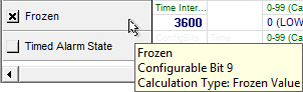
The following image shows the area of an Analog Alarm Settings page of a PNT Editor with an enabled Frozen alarm using the Frozen Value calculation type:
|
Alarm Calculation Configuration — Frozen Value |
Calculation Parameter
The calculation parameter for this alarm is user-provided:
- Time Interval (sec) (calcparm1) — the time span used to determine whether or not the point's value has changed.
- If the previous value = current value after expiration of time interval, alarm is set.
- If the previous value ≠current value after expiration of time interval, alarm is not set.
Example
- calcparm1 = 3600
In this example, the Frozen alarm bit is set because the point's value has not changed within the time span specified (3600 sec) in calcparm1.
|
Alarm Calculation Results — Frozen Value |

Frozen Value with Delay
The Frozen Value Delay alarm uses the Frozen Value with Delay (FROZE_VAL_DELAY) calculation. Whenever the time interval is reached, the system calculates the change in engineering units from the newest value older than the time interval and sets the alarm bit if the change is less than the threshold.
Calculation Parameters
The calculation parameters for this alarm are user-provided:
- Minimum engineering units threshold (calcparm1) — minimum threshold over the time interval specified in the second parameter.
- Time Interval (sec) (calcparm2) — time interval.
Equation
|
Change in Value = ABS(Newest Value Older than Time Interval - Updated Value) |
- If Change in Value < calcparm1, alarm is set.
- If Change in Value ≥ calcparm1, alarm is not set.
Example
- calcparm1 = 10
- calcparm2 = 10
In this example, the Frozen Value Delay alarm bit is set because the change in value (9) is less than the minimum threshold in calcparm1 (10).
- Updated Value = 41
- Previous Value (newest older than time interval) = 50
|
Change in Value = 50 - 41 = 9 |
|
Alarm Calculation Results — Frozen Value with Delay |



