Alarms Overview
Alarms in CygNet involve five services:
- Common Alarm Service (CAS) — This service is the repository for alarms
- Point Service (PNT) — This service stores alarm configuration information (setpoints, alarm reporting, alarm delay, and alarm deadband settings)
- Alarm Event Logging Service (ELSALM) — This service is the repository for alarm history
- Current Value Service (CVS) — This service retrieves the values for the points and sets/resets alarm bits
- General Notification Service (GNS) — This service stores and processes notification messages, which are triggered by the setting and clearing of alarm bits
When a current value service, such as the Universal Interface Service (UIS), retrieves a value for a point, it checks the point’s configuration to find out:
- if any alarm bits are enabled
- for those bits that are enabled, if the value meets or exceeds the alarm setpoint (also called its threshold)
- if alarms are to be reported to the CAS
- if the alarm bit triggers a notification from the GNS
- if there is an alarm delay and the amount
- the alarm priority and alarm priority category
- the alarm category
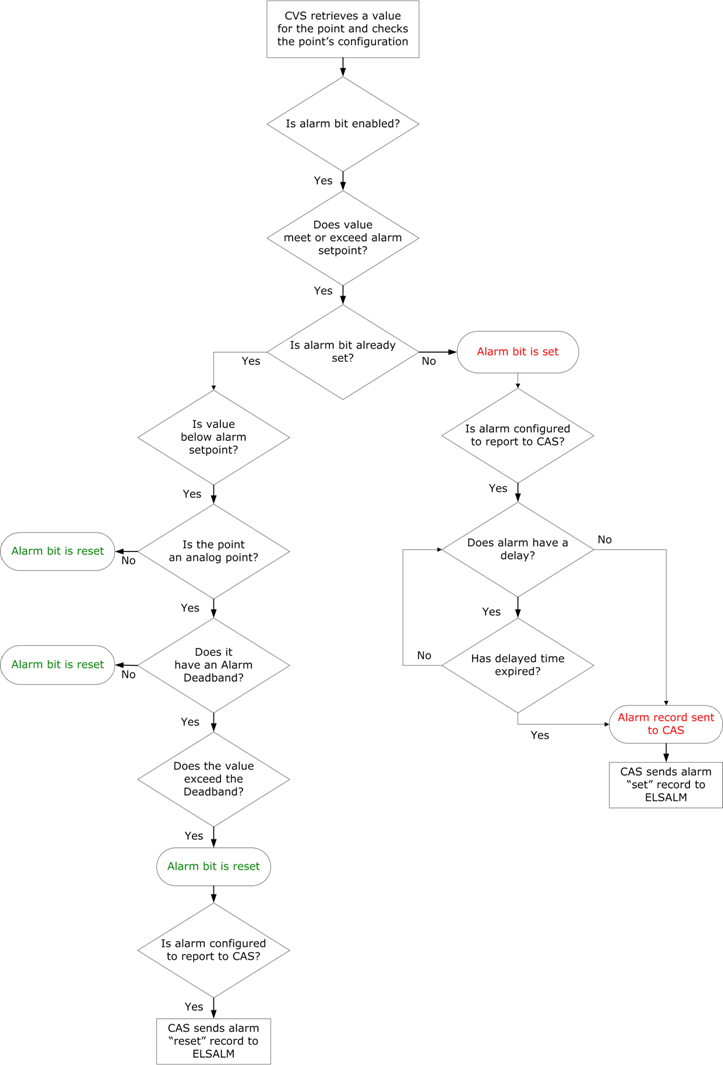
If an alarm bit is enabled and the current value meets or exceeds the alarm setpoint, the CVS "sets" the alarm. If the alarm is to be reported to the CAS, the CVS sends an alarm record to the CAS after the delay period, if applicable, has expired. Once the CAS receives the alarm record, it sends the information to the ELSALM. The ELSALM is the repository for alarm history.
When the CVS determines that a point’s value no longer exceeds an alarm setpoint, it "resets" the alarm; that is, it clears the alarm bit. If the alarm has been reported to the CAS, the reset alarm will remain in the CAS, until it is cleared from the alarms table.
Unlike other SCADA systems, the CygNet Common Alarm Service is not an alarm event log, but more an alarm state reporting service. If a point is in an alarm state, the CAS reports it as being in that state, until it is no longer in that state. Any one point will display in the CAS either once, or not at all. If the current value of a point is changed, which does not change the alarm condition being displayed in the CAS View control, the displayed timestamp of the CAS entry does not change because the time represents the first time the alarm condition was detected and has since not changed.
Alarm Workflow
|
Click the thumbnail to see |
More:
 Alarm Priority, Alarm Priority Category, and Alarm Category
Point State and Status Bit Details


