Columns for the View
A variety of column headings from special categories can be displayed in the alarm view. There is no limit on how many selected attributes you want to display in the alarm view, although it will be difficult to view all of them if too many columns are selected. Also, if you do not have a PNT service running, and you select an attribute from a non-running point service, then the column headings will be displayed, but the attributes for them will not; the columns will be blank.
|
Alarm Columns Dialog Box |
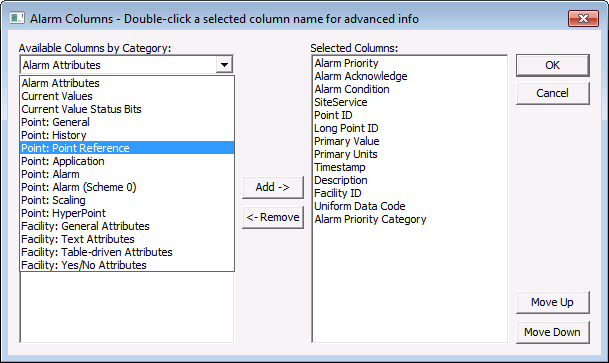
To Customize the Alarm Columns
- Right-click in the alarm view and select Columns.
- From the Alarm Columns dialog box, select a category attribute (see table below for Available Attributes).
- Select the attribute and click Add to move an attribute heading over to the Selected Attributes column. Click Move Up and Move Down to position the column heading to the left or right in the alarm view. Click Remove to remove an attribute column heading from the alarm view. When finished, click OK.
- To rename a column heading attribute, double-click on it in the Alarms Columns dialog box. (You cannot add a new site attribute since site attributes are defined in the CygNet Standard Point Scheme; you can only rename an existing column attribute.)
- Enter the number of screen pixels (not characters) in the Minimum Column Width.
- Enter the new attribute heading in the Override Column Title.
- Click OK.
- Click OK.
Available Attributes for Column Headings in the Alarm View
There are a number of available attributes grouped by point and facility categories that you can use for column headings. Many of these attributes are available as properties in the point configuration record (PNT Editor).
| Attribute Category | Available Attributes for Column Headings |
|---|---|
|
Alarm Attributes |
Alarm Condition Alarm Hidden Alarm Priority Highest Alarm Priority Highest Category Alarm Priority Highest Category Desc Alarm Priority Highest Since Ack Alarm Priority Highest Since Ack Cat. Alarm Priority Highest Since Ack Cat.Desc Alarm Suppression State Facility Tag (CAS) Point State Reported Time Set/Reset State |
|
Current Values |
Alarm Acknowledge Alarm Priority Category Alarm Priority Category Description Alarm Record Version Alternate Units Alternate Value Description Point State Background Color Point State Blink Method Point State Foreground Color Point State Name Point State Single Color Point State Token Point Status Primary Units Primary Value Status Timestamp Units User Status Value |
|
Current Value Status Bits |
Is Configurable Bit 01-15 Set Is External Value Bit Set Is Unreliable Bit Set Is User Bit 01-16 Set |
|
Point: General |
Active Status Allowed Updates Allowed Updates Description Calc Parameter Error Exists Comment Display Attribute Display Attribute Desc Enhanced Alarm Config Error Exists Facility ID Full Tag General Point Config Error Exists GNS ID Entry Error Exists Initial Type Initial Type Desc Initial Value Key Field Entry Error Exists Long Description Long Tag Manual Input Enabled Point Data Type Point Data Type Desc Point Has Comment Point Has Enhanced Alarm Configuration Point ID Point Scheme Point Scheme Description Security Application Service Site SiteService Spare System Desc System Name Tag Uniform Data Code Uniform Data Code Desc |
|
Point: History |
Compression Deviation Compression Type Force Current Value Force Evaluation on Update Force History * Force History On Update * Force Period * History On Line Days * Keep Values Within Days Maximum Reporting Interval Minimum Evaluation Time Report on Next Update Report VHS |
|
Point: Reference |
External ID External ID Type External ID Type Desc Point Has External ID Point Reference Type Point Reference Type Desc Reference Long Point ID Reference Point ID Reference Service Reference Site |
|
Point: Application |
Any User Flag Set Any Verified Flag Set General 1-3 Indexed 1-3 Last Questionable Change Timestamp Last Verified Change Timestamp Questionable Flag Table Driven 1-3 Table Driven1-3 Desc User Flag 1-8 Verified Flag 1-4 |
|
Point: Alarm |
Alarm Category Alarm Category Description Alarm Deadband Configurable Bit 01-15 Alarm Priority Configurable Bit 01-15 Calc Parm 1 Configurable Bit 01-15 Calc Parm 2 Configurable Bit 01-15 Enabled Configurable Bit 01-15 GNS ID Configurable Bit 01-15 Report CAS Configurable Bit 01-15 Report GNS Configurable Bit 01-15 Reporting Delay Digital OFF String Digital ON String Does Any Config Bit have a GNS ID Does Any Config Bit have Rptg Delay Enum Table Name History Deadband Is Any Config Bit Enabled Is Any Config Bit Reporting to CAS Is Any Config Bit Reporting to GNS Maximum Setpoint Minimum Setpoint Report Alarm Delay Report Delay Value Units Report Value Units Description Suppress Alarms Enabled Suppress Alarms End On Date/Time Suppress Alarms End On Normal |
|
Point: Alarm (Scheme 0) |
Alarm Deadband Alarm Priority Digital Alarm Enabled Digital Alarm GNS ID Digital Alarm When Off Digital OFF String Digital ON String Enum Alarm 1-6 Enabled Enum Alarm 1-6 GNS ID Enum Alarm 1-6 Value Enum Table Name High Alarm Enabled High Alarm GNS ID High Alarm Value High Deviation Enabled High Deviation GNS ID High Deviation Value High OOR Enabled High OOR GNS ID High OOR Value High Warning Enabled High Warning GNS ID High Warning Value History Deadband Low Alarm Enabled Low Alarm GNS ID Low Alarm Value Low OOR Enabled Low OOR GNS ID Low OOR Value Low Warning Enabled Low Warning GNS ID Low Warning Value Maximum Setpoint Minimum Setpoint Report Alarm Delay Report CAS Report GNS String Alarm 1-6 Enabled String Alarm 1-6 GNS ID String Alarm 1-6 Value |
|
Point: Scaling |
Decimal Places Decimal Places Flag High Engineering Value Low Engineering Value Raw High Raw Low Scale Coefficient a0-a5 Scale Value Use Two Point Scaling |
|
Point: HyperPoint |
Hyper Point Library Long ID Hyper Point Script Format Hyper Point Script Format Description Hyper Point Type Hyper Point Type Description Hyper Point Enabled Script Enabled Script Version |
|
Facility: General Attributes |
Facility Category Facility Category Desc Facility Description Facility ID (FAC) Facility Is Active Facility is Referenced by DDS Facility is Referenced by DDS or PNT Facility is Referenced by PNT Facility Security App Facility Service Facility Site Facility Site.Service Facility Tag Facility Type Facility Type Desc |
|
Facility: Text Attributes |
Facility Attribute 0-39 Facility Comment Facility Info 0 Facility Info 1 |
|
Facility: Table-driven Attributes |
Facility Table 0-59 Facility Table 0-59 Desc |
|
Facility: Yes/No Attributes |
Facility Yes/No 0-19 |
* Obsolete. See Filter Attributes: Point History for more information.


