Service Audit Levels
Each service has its own range of valid audit levels that vary by keyword. Audit levels are inclusive, each level automatically audits operations defined in previous levels. See the Auditing Keywords in each service configuration file for valid configuration keyword options. If a level is set higher than the maximum allowed level, then auditing will run at the maximum level. When a service has multiple auditing level keywords, the AUDIT_LEVEL keyword sets the default value for the other service keywords in addition to any auditing functions it may perform.
Examples
- For the ACS, AUDIT_LEVEL is the only auditing keyword for the service. If set to 0, no audits are recorded. If set to 1, adds, updates, and deletes of all applications, events, groups, and user permissions are recorded. Level 1 is the highest level of auditing for this keyword for this service.
- For the DDS, AUDIT_LEVEL sets the default for all of the other DDS auditing level keywords. It has no auditing functions itself. If AUDIT_LEVEL is set to "1" and the rest of the keywords are commented out, all DDS audit levels would be "1." If the other keywords are enabled and have a value, the value for each keyword takes precedence over the default.
- This rule applies to other services with more than one auditing keyword: CAS, FAC, FMS, GRP, HSS, OPCIS, PNT, RSM, SVCMON, UIS, and VHS.
Note: The Audit Service (AUD), the Event Logging Services (ELS/ELSALM), and the Note Service (NOTE) cannot be audited.
See the audit levels for each CygNet service in the tables below
ACS
| Keyword | Level | Operations Audited | Recommended Audit Level |
|---|---|---|---|
| AUDIT_LEVEL | 0 | No audits. | |
| 1 | Adds, updates, and deletes of all applications, events, groups, and user permissions. | See Auditing Keywords in the ACS configuration file. |
ARS
| Keyword | Level | Operations Audited | Recommended Audit Level |
|---|---|---|---|
| AUDIT_LEVEL | 0 | No audits. | |
| 1 | Adds, updates, and deletes of all services that occur from a user edit. | See Auditing Keywords in the ARS configuration file. | |
| 2 | Adds and updates to license records through the License Manager utility. |
BSS
| Keyword | Level | Operations Audited | Recommended Audit Level |
|---|---|---|---|
| AUDIT_LEVEL | 0 | No audits. | |
| 1 | All changes to files. | See Auditing Keywords in the BSS configuration file. |
CAS
| Keyword | Level | Operations Audited | Recommended Audit Level |
|---|---|---|---|
| AUDIT_LEVEL | 0 | Sets the default audit level for all CAS audits to 0 (no audits). | |
| 1 | Sets the default audit level for all CAS audits to 1. | See Auditing Keywords in the CAS configuration file. | |
| AUDIT_LEVEL_METADATA | 0 | No audits. | |
| 1 |
Adds, updates, and deletes of attributes metadata (only denotes a change was made, not the specifics of the change). |
See Auditing Keywords in the CAS configuration file. |
DDS
| Keyword | Level | Operations Audited | Recommended Audit Level |
|---|---|---|---|
| AUDIT_LEVEL | 0 | Sets the default audit level for all DDS audits to 0 (no audits). | |
| 1 | Sets the default audit level for all DDS audits to 1. | ||
| 2 | Sets the default audit level for all DDS audits to 2. | ||
| 3 | Sets the default audit level for all DDS audits to 3. | See Auditing Keywords in the DDS configuration file. | |
| AUDIT_LEVEL_DEVICE | 0 | No audits. | |
| 1 | Adds and deletes of a device. Generic information regarding changes to device properties and metadata. | ||
| 2 | Specific information regarding changes to device properties and metadata. | See Auditing Keywords in the DDS configuration file. | |
| AUDIT_LEVEL_FACILITY | 0 | No audits. | |
| 1 | Adds and deletes of facility references. | See Auditing Keywords in the DDS configuration file. | |
| AUDIT_LEVEL_DATAGROUP | 0 | No audits. | |
| 1 | Adds and deletes of data groups Generic information regarding changes to data group properties and metadata. | ||
| 2 | Specific information regarding changes to data group properties and metadata. | ||
| 3 | Adds, updates, and deletes of UDC mappings. | See Auditing Keywords in the DDS configuration file. | |
| AUDIT_LEVEL_UISCMD | 0 | No audits. | |
| 1 | Adds and deletes of UIS Commands. Generic information regarding changes to command components, attributes, properties, and parameters. | ||
| 2 | Adds and deletes of a UIS Command’s component list. Changes to command attributes. Generic information regarding changes to command properties and parameters. | ||
| 3 | Adds and deletes of a UIS Command’s component properties and parameters (detailed audit reference). | See Auditing Keywords in the DDS configuration file. | |
| AUDIT_LEVEL_TEMPLATE | 0 | No audits. | |
| 1 | Adds, replaces, and deletes of device templates. | See Auditing Keywords in the DDS configuration file. |
FAC
| Keyword | Level | Operations Audited | Recommended Audit Level |
|---|---|---|---|
| AUDIT_LEVEL | 0 | Sets the default audit level for all FAC audits to 0 (no audits). | |
| 1 | Adds and deletes of facilities. Sets the default audit level for all FAC audits to 1. | See Auditing Keywords in the FAC configuration file. | |
| 2 | Updates to the facility attributes from user edits. Sets the default audit level for all FAC audits to 2. | ||
| AUDIT_LEVEL_METADATA | 0 | No audits. | |
| 1 | Generic information regarding changes to facility attributes metadata. | See Auditing Keywords in the FAC configuration file. |
FMS
Auditing in FMS is based on audit modes. See Auditing in CygNet Measurement for more information.
| Keyword | Auditing Mode Options | Record Types Audited |
|---|---|---|
| AUDIT_DEVICE | NODE_ID REPORTING_FAC POLLING_FAC | Node Device |
| AUDIT_GROUP | NODE_ID REPORTING_FAC | Node Group |
| AUDIT_GROUP_ENTRY | FMS_ID | Group Entry |
| AUDIT_GROUP_CATEGORY | FMS_ID | Group Category |
| AUDIT_VALIDATION_RULE | FMS_ID | Validation Rules |
| AUDIT_ESTIMATION_RULE | FMS_ID | Estimation Rules |
| AUDIT_SYSTEM_SETTING | FMS_ID | System Setting |
| AUDIT_UNIT_SET | FMS_ID | Unit Set |
| AUDIT_AUDIT_CAT | FMS_ID | Audit Category |
| AUDIT_NORMALIZATION_VIEW | FMS_ID | Normalization Def |
| AUDIT_DATA_QUALITY | FMS_ID | Data Quality |
| AUDIT_GAS_COMP_SPLIT | FMS_ID | Gas Composition Split |
GNS
| Keyword | Level | Operations Audited | Recommended Audit Level |
|---|---|---|---|
| AUDIT_LEVEL | 0 | No audits. | |
| 1 | Adds and deletes of GNS IDs. | See Auditing Keywords in the GNS configuration file. | |
| 2 | Updates to the GNS ID attributes. |
GRP
| Keyword | Level | Operations Audited | Recommended Audit Level |
|---|---|---|---|
| AUDIT_LEVEL | 0 | Sets the default audit level for all GRP audits to 0 (no audits). | |
| 1 | Sets the default audit level for all GRP audits to 1. | See Auditing Keywords in the GRP configuration file. | |
| 2 | Sets the default audit level for all GRP audits to 2. | ||
| AUDIT_LEVEL_COMPHIER | 0 | No audits. | |
| 1 | Adds, updates, and deletes of component hierarchy roots and associated attributes using CygNet Group Manager. | See Auditing Keywords in the GRP configuration file. | |
| 2 | Adds, updates, and deletes of component entries and associated attributes using CygNet Group Manager. | ||
| AUDIT_LEVEL_NAVHIER | 0 | No audits. | |
| 1 | Adds, updates, and deletes to navigation hierarchy roots and associated attributes using CygNet Group Manager. | See Auditing Keywords in the GRP configuration file. | |
| 2 | Adds, updates, and deletes of navigation entries and associated attributes using CygNet Group Manager. | ||
| AUDIT_LEVEL_BUILD | 0 | No audits. | |
| 1 | Rebuilds of component and navigation hierarchies using CygNet Group Manager. | See Auditing Keywords in the GRP configuration file. | |
| 2 | Changes to the nodes of component and navigation hierarchies from a build using CygNet Group Manager. | ||
| AUDIT_LEVEL_USER | 0 | No audits. | |
| 1 | Adds, updates, and deletes of component and navigation roots and their attributes by a user (not using CygNet Group Manager). | See Auditing Keywords in the GRP configuration file. | |
| 2 | Adds, updates, and deletes of component and navigation entries by a user (not using CygNet Group Manager). |
HSS
| Keyword | Level | Operations Audited | Recommended Audit Level |
|---|---|---|---|
| AUDIT_LEVEL | 0 | Sets the default audit level for all HSS audits to 0 (no audits). | |
| 1 | Sets the default audit level for all HSS audits to 1. | See Auditing Keywords in the HSS configuration file. | |
| 2 | Sets the default audit level for all HSS audits to 2. | ||
| 3 | Sets the default audit level for all HSS audits to 3. | ||
| 4 | Sets the default audit level for all HSS audits to 4. | ||
| AUDIT_LEVEL_SETPOINT | 0 | No audits. | |
| 1 | Setpoint commands issued by a user (not from a service or MSS). | See Auditing Keywords in the HSS configuration file. | |
| 2 | Inclusive (same as level 1). | ||
| 3 | Reserved for setpoint commands that are not from the MSS. | ||
| 4 | Reserved for all setpoint commands from the defined MSS. |
MSS
| Keyword | Level | Operations Audited | Recommended Audit Level |
|---|---|---|---|
| AUDIT_LEVEL | 0 | No audits. | |
| 1 | Adds, updates, and deletes to the scheduled tasks and blackouts. | See Auditing Keywords in the MSS configuration file. | |
| 2 | All changes to UIS command task, FMS command task, and setpoint task parameters. |
OPCIS
| Keyword | Level | Operations Audited | Recommended Audit Level |
|---|---|---|---|
| AUDIT_LEVEL | 0 | Sets the default audit level for all OPCIS audits to 0 (no audits). | |
| 1 | Sets the default audit level for all OPCIS audits to 1. | See Auditing Keywords in the OPCIS configuration file. | |
| 2 | Sets the default audit level for all OPCIS audits to 2. | ||
| 3 | Sets the default audit level for all OPCIS audits to 3. | ||
| 4 | Sets the default audit level for all OPCIS audits to 4. | ||
| AUDIT_LEVEL_SETPOINT | 0 | No audits. | |
| 1 | Setpoint commands issued by a user (not from a service or MSS). | See Auditing Keywords in the OPCIS configuration file. | |
| 2 | Inclusive (same as level 1). | ||
| 3 | Reserved for setpoint commands that are not from the MSS. | ||
| 4 | Reserved for all setpoint commands from the defined MSS. |
PNT
| Keyword | Level | Operations Audited | Recommended Audit Level |
|---|---|---|---|
| AUDIT_LEVEL | 0 | Auditing disabled for service. | |
| 1 | Generic information regarding changes to points. Sets minimum level for all service auditing to level 1. | See Auditing Keywords in the PNT service configuration file. | |
| 2 |
Specific information regarding changes to points excluding script changes. Note: For changes to the Comments field, only the first 250 characters of the field will be shown. |
||
| AUDIT_LEVEL_METADATA | 0 | No auditing occurs. | |
| 1 | Generic information regarding changes to PNT Service metadata. | See Auditing Keywords in the PNT service configuration file. |
RSM
| Keyword | Level | Operations Audited | Recommended Audit Level |
|---|---|---|---|
| AUDIT_LEVEL | 0 | No audits. | |
| 1 | All start and stop commands. | See Auditing Keywords in the RSM configuration file. | |
| 2 | Adds, updates, and deletes of controlling attributes. | ||
| AUDIT_LEVEL_REDUNDANCY | 0 | No audits for redundancy definitions. | |
| 1 | Any changes to the redundancy relationship definition made by the client. | See Auditing Keywords in the RSM configuration file. |
SVCMON
| Keyword | Level | Operations Audited | Recommended Audit Level |
|---|---|---|---|
| AUDIT_LEVEL | 0 | Sets the default audit level for all SVCMON audits to 0 (no audits). | |
| 1 | Sets the default audit level for all SVCMON audits to 1. | See Auditing Keywords in the SVCMON configuration file. | |
| 2 | Sets the default audit level for all SVCMON audits to 2. | ||
| 3 | Sets the default audit level for all SVCMON audits to 3. | ||
| 4 | Sets the default audit level for all SVCMON audits to 4. | ||
| AUDIT_LEVEL_SETPOINT | 0 | No audits. | |
| 1 | Setpoint commands issued by a user (not from a service or MSS). | See Auditing Keywords in the SVCMON configuration file. | |
| 2 | Inclusive (same as level 1). | ||
| 3 | Reserved for setpoint commands that are not from the MSS. | ||
| 4 | Reserved for all setpoint commands from the defined MSS. |
TRS
| Keyword | Level | Operations Audited | Recommended Audit Level |
|---|---|---|---|
| AUDIT_LEVEL | 0 | No audits. | |
| 1 | Generic information regarding changes to table entries. | See Auditing Keywords in the TRS configuration file. | |
| 2 | Specific information regarding changes to table entries. |
UIS
| Keyword | Level | Operations Audited | Recommended Audit Level |
|---|---|---|---|
| AUDIT_LEVEL | 0 | Sets the default audit level for all UIS audits to 0 (no audits). | |
| 1 | Sets the default audit level for all UIS audits to 1. | See Auditing Keywords in the UIS configuration file. | |
| 2 | Sets the default audit level for all UIS audits to 2. | ||
| 3 | Sets the default audit level for all UIS audits to 3. | ||
| 4 | Sets the default audit level for all UIS audits to 4. | ||
| AUDIT_LEVEL_SETPOINT | 0 | No audits. | |
| 1 | Setpoint commands issued by a user (not from a service or MSS). | See Auditing Keywords in the UIS configuration file. | |
| 2 | Inclusive (same as level 1). | ||
| 3 | Reserved for setpoint commands that are not from the MSS. | ||
| 4 | Reserved for all setpoint commands from the defined MSS. | ||
| AUDIT_LEVEL_UISCMD | 0 | No audits. | |
| 1 | UIS commands issued by a user (not from a service, script, or MSS). | See Auditing Keywords in the UIS configuration file. | |
| 2 | UIS commands that are not from a service or MSS. | ||
| 3 | UIS commands that are not from an MSS. | ||
| 4 | All UIS commands. | ||
| AUDIT_DETAIL_UISCMD
Note: Can be overridden per UIS command in the DDS. |
NONE |
No audits are recorded.
Abbreviated N in the Audit Trail Transaction Properties dialog box of the Audit Service (AUD). |
|
| DEVICES |
Audit records contain only the Device ID directly associated with the UIS command request.
Abbreviated D in the Audit Trail Transaction Properties dialog box of the Audit Service (AUD). |
||
| APPLICABLE |
Audit records contain only the Facility IDs to which the UIS command request directly applies.
Abbreviated A in the Audit Trail Transaction Properties dialog box of the Audit Service (AUD). |
||
| RESOLVED |
Audit records contain all Facility IDs that are linked to the remote device for which the UIS command is executed even if the UIS command is not directly associated with all of these facilities.
Abbreviated R in the Audit Trail Transaction Properties dialog box of the Audit Service (AUD). |
See Auditing Keywords in the UIS configuration file. |
Starting Audit Records for UIS Commands
An additional set of UIS configuration file keywords is supported to allow the generation of preliminary or starting audit records for UIS commands, which are created at the start of UIS command execution when the command is first sent.
These starting audit records are controlled by the AUDIT_DETAIL_UISCMD keyword, in that AUDIT_DETAIL_UISCMD must be enabled for the CMD_PRE_AUDIT keywords to take effect. The starting audit records will have the same level of detail as specified by AUDIT_DETAIL_UISCMD setting, that is DEVICES, APPLICABLE, or RESOLVED.
The relevant UIS keywords are as follows:
| Keyword | Description |
|---|---|
| CMD_PRE_AUDIT |
A switch to enable starting audit records. If AUDIT_DETAIL_UISCMD is set to NONE, no audit records will be generated for any UIS command, even if CMD_PRE_AUDIT is enabled. |
| CMD_PRE_AUDIT_LIST |
Specifies a space-delimited list of UIS command names that will generate starting audit records. If CMD_PRE_AUDIT is enabled, and CMD_PRE_AUDIT_LIST is disabled, all UIS commands will have starting audit records. |
| CMD_PRE_AUDIT_EXCLUDE_LIST |
Specifies a space-delimited list of UIS command names that will not generate starting audit records. If a UIS command name is listed in both CMD_PRE_AUDIT_EXCLUDE_LIST and CMD_PRE_AUDIT_LIST, the UIS command will be excluded from generating starting audit records. |
See Auditing Keywords in the UIS configuration file for more information.
Note: If the AUDIT_DETAIL_UISCMD keyword is set to NONE, no audit records will be generated for any UIS command, even if one of the CMD_PRE_AUDIT keywords is enabled.
Examples
In the following example the AUDIT_DETAIL_UISCMD is set to RESOLVED, so audit records will be generated for all UIS commands and each record will contain all Facility IDs that are linked to the remote device for which the UIS command is executed, even if the UIS command is not directly associated with all facilities.
CMD_PRE_AUDIT is enabled so starting audit records will be generated for only the commands listed in the CMD_PRE_AUDIT_LIST keyword (GASMETERS and STATUS).
|
UIS Config file example |

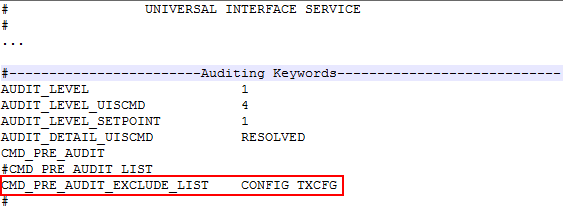
In the next example all commands will generate starting audit records except the commands listed in the CMD_PRE_AUDIT_EXCLUDE_LIST keyword (CONFIG and TXCFG).
|
UIS Config file example |
VHS
| Keyword | Level | Operations Audited | Recommended Audit Level |
|---|---|---|---|
|
AUDIT_LEVEL
Used for both legacy (non-extended data value changes) and extended entry value changes. |
0 | Auditing disabled for service. | |
| 1 | Auditing records contains adds and deletes of points by a user (not by services). | See Auditing Keywords in the VHS configuration file. | |
| 2 |
Updates of individual point attributes by a user (not by services), including adding, deleting, and updating values.
Legacy (non-extended entry)For legacy (non-extended entry) value adds, deletes, and updates, the following data is shown in the audit record:
Extended Entry For extended entry value adds, deletes, and updates, the following data is shown in the audit record:
|
||
|
AUDIT_LEVEL_BLOB
Used for extended entry Blob length changes only. |
0 | Blob length auditing disabled. | |
| 1 | Audit records contain the new Blob length for adds, the old Blob length for deletes, and the old or new Blob length (missing if no change) for updates. | See Auditing Keywords in the VHS configuration file. |
VHS Extended Entry Auditing Notes
- Values and points are only audited when a single item is added, deleted, or updated. This isn’t possible for Blobs since only one Blob can be added, deleted, or updated at a time.
- Blobs won't be audited if added, deleted, or updated by a CygNet service.
- See VHS Extensibility for more information.


