Configuration and Gas Analysis Items that Trigger Recalculation
Configuration or gas analysis values can be edited directly in the Configuration control grid or, for a selected record entry, via the Configuration or Gas Analysis editing dialogs. Because configuration and gas analysis information is used to calculate historical data, changing certain configuration or gas analysis item values will often affect associated historical record values. When you save edits to these configuration and gas analysis item values, a recalculation of any related historical gas metering records will take place if both of the following statements are true.
- The historical record is based on a modified configuration item or gas analysis value (listed below).
- You choose to recalculate historical record values when edits to configuration or gas analysis item values are saved (dialog box below).
The Select Recalculation Process dialog box will appear when you Save edits to configuration or gas analysis item values that affect the calculation of historical records in your system. Choose the appropriate recalculation process for your workflow purposes.
|
Select Recalculation Process |
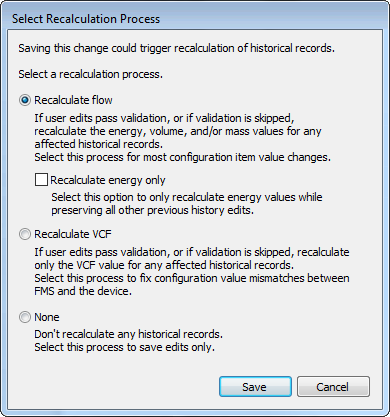
See Creating or Editing Configuration Entries for more information about editing and saving configuration item values.
See Creating or Editing Gas Analysis Entries for more information about editing and saving configuration item values.
See CygNet Measurement Data Calculation for more information about the calculation process.
See VCF in the CygNet Measurement Concepts topic for more information about the impact of this factor.
Gas Analysis Items that Affect Calculation of Historical Records
If you select to recalculate flow or VCF, recalculation of affected historical device records will be triggered when any of the following conditions are met.
Note: Items are listed in the order in which they appear on the Gas Analysis Entry dialog box.
- Any of these gas analysis values change:
- Relative density
- Water content - water vapor content per volume
- Heating value volume - Wet, Dry, As delivered (as configured in the device definition)
- Heating Value Volume
- Heating Value Mass
- Any Mole percent (units)
- Methane
- Ethane
- Propane
- […]
- Carbon dioxide
Configuration Items that Affect Calculation of Historical Records
If you select to recalculate flow or VCF, recalculation of affected historical device records will be triggered when any of the following conditions are met.
Note: Items are listed in the order in which they appear on the Configuration Log Entry dialog box.
- Primary calculation method change (this is rare)
- IV definition change (orifice meter)
- Any of these gas quality values change:
- Any Mole Percent (units)
- Methane
- Ethane
- Propane
- […]
- Carbon dioxide
- Heating Value Basis (Wet, Dry, As delivered)
- Heating Value
- Heating Value Volume
- Heating Value Mass
- Relative density
- Viscosity
- Depending on the calculation method, if any of these properties change:
- AGA 3 - 1985, 1992, or 2013 (Orifice)
- DP taps type
- Tap location
- Orifice Plate Properties
- Material
- Bore size
- Reference temperature
- Meter Tube Properties
- Material
- Inside diameter
- Reference temperature
- Low Flow Cutoff
- Differential pressure
- Volume flow rate
- Misc
- Base compressibility of air
- Isentropic exponent
- Pipe expansion coefficient
- Orifice expansion coefficient
- AGA 7 (Turbine/Ultrasonic)
- K factor volume
- Low Flow Cutoff
- Pulse interval
- Volume flow rate
- AGA 11 (Coriolis)
- K factor mass
- Coriolis pressure effect
- Coriolis calibration pressure
- Low Flow Cutoff
- Mass flow rate
- Pulse interval
- Volume flow rate
- VCone/Wafer Cone (Cone)
- Cone properties
- Material
- Diameter
- Reference temperature
- Meter tube properties
- Material
- Inside diameter
- Reference temperature
- Low Flow Cutoff
- Differential pressure
- Volume flow rate
- Misc
- Isentropic exponent
- Cone expansion coefficient
- Pipe expansion coefficient
- Discharge coefficient
- Independent of the calculation method, if any of these properties change:
- Base Conditions*
- Temperature
- Pressure
- Pressure Sensor
- Atmospheric pressure
- Sensor type
- Calculation Method
- Compressibility (if FPV is enabled and if the FPV method changes)
- Factors
- Meter factor
- Well stream factor
- Calibration factor
- Water vapor corrector factor
- Miscellaneous
- Fluid type
- Fixed temperature (if “Use live temperature” is not enabled)
- “Use AGA 3 expanded range” enabled
- “Use AGA 8 expanded range” enabled
*See CygNet Measurement Data Calculation for more information about recalculation implications of editing base condition values (base temperature or base pressure).
Note: These items are subject to change.


