Reviewing Calibration Events
Note: This option applies only to gas meters with job type = Auto-calibration.
From the Jobs control, you can view a range of calibration events and associated values side-by-side with a corresponding job report. Use this informational view to verify event-based changes to apply to the report. Once applied, CygNet Dispatch will be able to pick up the adjustments when it is synchronized with the FMS.
Retrieving and Reviewing Calibration Events
In the Jobs control, load the desired jobs for a gas meter Node. Right-click on a selected job, with job type = Auto-calibration, to access the context menu, and then click Review calibration events to access the Review Calibration Events dialog box containing event and report information. Alternatively, press Ctrl+R to initiate the review.
This is where you can view, review, and apply potential changes based on the calibration events associated with the job.
|
Review calibration events |
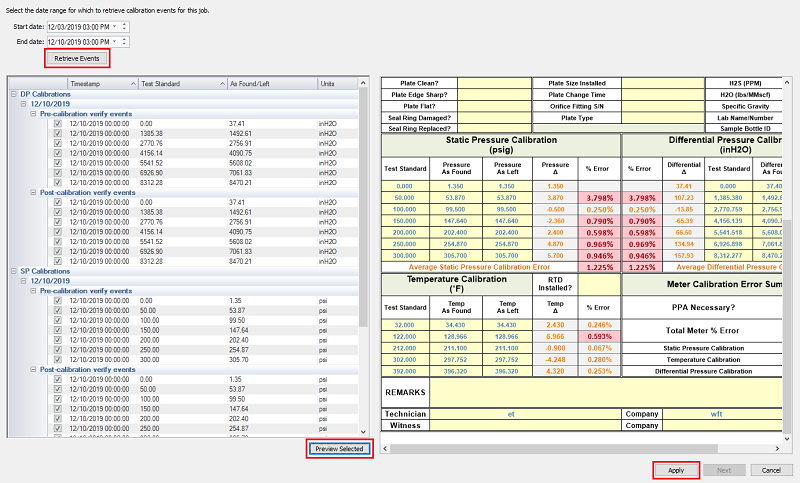
In the dialog, filter the events available for review by selecting a date range to consider. Enter a Start date and End date and then click Retrieve Events to view the included events. The action retrieves a list of all job calibration events within the requested range and their associated pre- and post-calibration values, so that you can review the results for possible application to the job report.
Event Review Pane
Retrieved job calibration event data is listed by date and timestamp for differential pressure (DP), static pressure (SP), and temperature (Temp) records. A Test standard column appears for each record, sorted by pre- and post-calibration data sets, adjacent to the columns for As Found/Left data values and their Units. Results can be sorted by the Timestamp or Test standard columns. Click the column header to sort results by its values. Click the column header again to reverse the order in which results are shown (arrow direction indicates sorting order).
The calibration event review pane represents the following data fields.
| Field | Description |
|---|---|
| Rows | |
|
[DataItemName Calibrations] |
Displays the data item calibration events under consideration Possible values are as follows.
|
|
[Date] |
Displays the date for each calibration event |
|
[... verify events] |
Identifies events available for review, sorted by calibration status Possible status values are as follows.
Use the + and - buttons to expand and contract event lists for easier viewing. Click the check boxes to select/clear event records you want to review for potential application to the report. |
| Columns | |
|
Displays the timestamp of each calibration event |
|
|
Identifies the testing standard value for the calibration event |
|
|
Displays the "as found" (for pre-calibration values) or "as left" (for post-calibration values) field value corresponding to each calibration event |
|
|
Displays the units associated with the calibration event Possible units are as configured on the Unit Set Definitions page in the FMS Explorer Administrative Options. |
|
Previewing Calibration Events
You can preview the effects of selected calibration events prior to actually applying the data changes to the job report. Use the Preview selected button below the event review pane to see how the selected calibration events would affect the current report values, allowing you to review and understand the potential impacts of the changes prior to applying them.
Applying Calibration Events
After verifying the available calibration event results, click Apply to save the selected events to the job report, where they become available for potential Precalculate and Approve actions. When CygNet Dispatch is synchronized with the FMS (via CygNet Bridge), Dispatch report data will be updated.


