Running Perform Database Maintenance Commands
 Use the Database Maintenance button to access the dialog box to run the Perform Database Maintenance command. This command triggers the service to execute the configured database maintenance tasks, utilizing retention periods configured for your system. You can also run the command manually from this page.
The retention period values for command and transaction logs must be configured prior to running the Perform Database Maintenance command. Use the Extended Options button on the Commands menu to access configuration details. See Configuring Extended Command Options and Configuring Database Maintenance Retention Periods for more information.
The command can also be initiated by scheduling the Perform Database Maintenance command in the Master Scheduling Service (MSS) in CygNet Explorer (most common usage), or via scripting.
See FMS Commands and Perform Database Maintenance for more information about this command.
See Scheduling FMS Command Tasks in the MSS for more information about scheduling commands.
See FMS ActiveX Controls and CxHmiFms for more information about using commands via FMS ActiveX controls on CygNet Studio or CygNet Vision screens.
See CxFms for more information about scripting commands.
Managing Perform Database Maintenance Commands
Prior to running a Database Maintenance Command, verify or configure the retention periods referenced by the command.
Verify retention periods determined by keyword values in the FMS service configuration file (CygNet\Services\FMS\fms.cfg).
See FMS Configuration File Keywords for more information.
Click Commands > Extended Options on the Commands menu to access the Database Maintenance dialog box to view, add, edit, or delete retention periods for the Perform Database Maintenance command. See Configuring Database Maintenance Retention Periods for more information.
Running a Database Maintenance Command
Most Detect New Devices commands will be run via scheduled tasks. See Scheduling FMS Command Tasks in the MSS for more information.
Use the following procedure to select additional parameters and run a Perform Database Maintenance command manually.
To Run a Database Maintenance Command
- Configure or verify retention periods via the Extended Options button. See Configuring Database Maintenance Retention Periods for more information.
- On the Commands menu, click Database Maintenance to access the Run FMS Command dialog box for the Perform Database Maintenance command.
|
Run FMS Command |
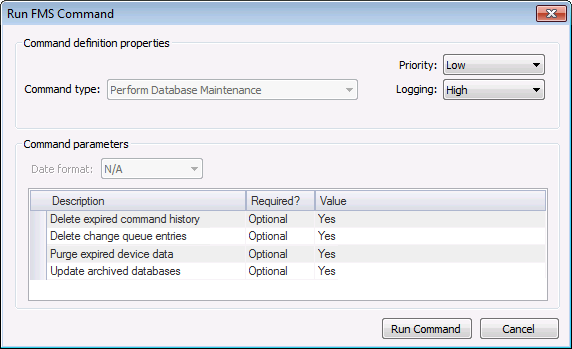
- Define the command definition properties.
- Select a processing Priority from the drop-down menu. Options include Low, Medium, High, User, and Admin.
- Select a Logging level from the drop-down menu, to determine the level of logging details reported when viewing command logs. Options include Low, Medium, and High. See Viewing Command Logs for more information.
- Define the command parameters.
- Parameters for the Perform Database Maintenance system command are described in the Command parameters box, which includes the Description, a Required indicator, and the Value field. For each parameter, the Value can be set to Yes or No to decide whether or not to include the selected parameter in the command. These parameters are optional.
Note: Additional parameters exist to configure retention periods for the Database Maintenance system command. Because they are too numerous to be described in the Command parameters box, retention parameters are configured through the Extended Options button on the Commands menu, in normalization views, and in the FMS service configuration file. If they are not specifically configured, the retention periods will use default values. See Configuring Database Maintenance Retention Periods and FMS Configuration File Keywords for more information.
- Click Run Command.

Database Maintenance Command Definition Properties
The following command definition properties apply to Database Maintenance commands.
| Property | Description |
|---|---|
|
Command type |
For system commands, this property will be read-only and will display the selected command type. See FMS Commands for more information about command types. |
|
Priority |
Select a processing queue Priority for the command from the drop-down menu. Options from least to greatest priority are as follows.
Default value is Low level processing queue priority. |
|
Logging |
Select a Logging level for the command results from the drop-down menu. Options are as follows.
Default value is Low level logging when scheduling a command in the MSS. Default value is High level logging when creating or running an ad-hoc command in FMS Explorer. |
Database Maintenance Command Parameters
The following command parameters apply to Database Maintenance commands.
| Description | Required | Value |
|---|---|---|
|
Delete expired command history |
Optional |
If used, deletes from the database all command history records that are older than the specified number of days. Prior to running a database maintenance command, verify or configure the database maintenance retention periods. Retention period is configured per command type by users with proper security access, via the Extended Options button on the Commands menu. See Configuring Database Maintenance Retention Periods for more information. Options are Yes or No. |
|
Delete change queue entries |
Optional |
If used, deletes change queue entries from the database, according to limits set by the change queue keywords configured in the FMS configuration file (CygNet\Services\FMS\fms.cfg). See FMS Configuration File Keywords for more information. Options are Yes or No. |
|
Purge expired device data |
Optional |
If used, deletes all expired device data from the database. Prior to running a database maintenance command, verify or configure the device data retention period (DATA_RETENTION database info keyword) configured in the FMS configuration file (CygNet\Services\FMS\fms.cfg). See FMS Configuration File Keywords for more information. Options are Yes or No. Notes: When expired device data is purged from the database, the last configuration record (with a timestamp prior to the remaining history records) will be retained. |
|
Update archived databases |
Optional |
If used, updates archived database files to the current database version. Options are Yes or No. |

