Running Estimate Station Data Commands
Note: This functionality is only available in systems licensed for FULL mode.
 Use the Station Estimation button to access Estimate Station Data commands that trigger the service to perform station data estimates.
Station data that requires estimation can be missing, late, or of low data quality. Of these data types, late data estimation must be initiated by running the Estimate Station Data command, whereas missing data and low quality data is estimated as soon as the record enters the measurement system. The command triggers a search for station data that needs to be estimated, and the estimation engine associated with the Node defines what data will be estimated, and how to perform the estimation process.
See FMS Commands and Estimate Station Data for more information about this command.
See Scheduling FMS Command Tasks in the MSS for more information about scheduling commands.
See FMS ActiveX Controls and CxHmiFms for more information about using commands via FMS ActiveX controls on CygNet Studio or CygNet Vision screens.
See CxFms for more information about scripting commands.
Estimation Command Definition Properties
The following command definition properties apply to Estimation commands.
| Property | Description |
|---|---|
|
Command type |
For system commands, this property will be read-only and will display the selected command type. See FMS Commands for more information about command types. |
|
Priority |
Select a processing queue Priority for the command from the drop-down menu. Options from least to greatest priority are as follows.
Default value is Low level processing queue priority. |
|
Logging |
Select a Logging level for the command results from the drop-down menu. Options are as follows.
Default value is Low level logging when scheduling a command in the MSS. Default value is High level logging when creating or running an ad-hoc command in FMS Explorer. |
Estimation Command Parameters
Estimation rules must be defined prior to running an estimation command. Estimation rules are configured through the Admin menu. To configure estimation rules, or to delete them, see Managing Estimation Engines.
Managing Estimation Commands
Click Admin > Estimation on the Commands menu to access the Estimation Engines dialog box to add, edit, or delete estimation rules.

Running an Estimation Command
Click Estimation on the Commands menu to access the Run FMS Command dialog box to run an Estimate Station Data command.
To Run an Estimation Command
- Open the Commands menu in FMS Explorer.
- Click Station Estimation to access the Run FMS Command dialog box.
|
Run FMS Command |
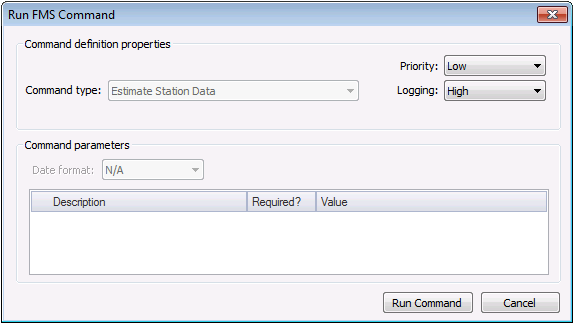
- Select a processing Priority from the drop-down menu. Options include Low, Medium, High, User, and Admin.
- Select a Logging level from the drop-down menu, to determine the level of logging details reported when viewing command logs. Options include Low, Medium, and High. See Viewing Command Logs for more information.
- Define the command parameters. The parameters for the Estimate Station Data system command are too extensive to be described in the Command parameters box, so they are configured through the Estimation button on the Admin menu. See Managing Estimation Engines for more information.
- Click Run Command.

