Viewing Record Details
FMS Explorer provides detailed information for many FMS records, providing concise information about record changes. This is helpful when auditing or reviewing records.
The Record Details dialog box can be accessed via the Record details button found in the following locations.
| Record Detail Type | Where Found in FMS Explorer |
|---|---|
|
Estimation Engine |
|
|
Validation Engine |
|
|
Configuration Log |
Controls Menu > Configuration Control > Configuration Data View > Edit Controls Menu > Configuration Control > Gas Analysis Data View > Edit |
|
Group Category |
|
|
Group Entry - General |
View Node Properties - General Groups |
|
Group Entry - Station |
View Node Properties - Station Groups |
|
Node Device |
View Node Properties - Gas Meter View Node Properties - Chromatograph View Node Properties - Liquid Device |
|
Node Group |
View Node Properties - Group Properties |
Click the Record details button to access the Record Details dialog box and view details for the selected item.
|
Record Details |
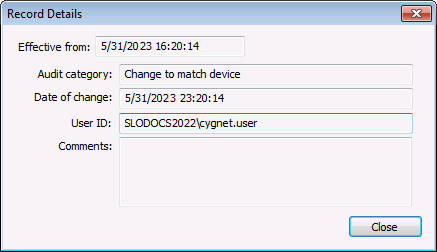
The following fields appear in the Record Details dialog box.
| Field | Description |
|---|---|
|
Effective from |
Displays the effective start date and time of the historized record. |
|
Audit category |
Displays the Audit category selected for the type of record change. Audit categories are configured on the Admin menu. See Auditing in CygNet Measurement for information about FMS auditing. |
|
Date of change |
Displays a timestamp showing when the record was changed. |
|
User ID |
Displays the ID of the user who made the change. |
|
Comments |
Displays any comments entered when the record was created or modified. |
|
Close |
Click Close to exit the dialog box. |


