Frequently Asked Questions About CygNet Mobile
Answers and solutions to these common installation and administration questions follow:
- Why is the CygNet Mobile Notification Plugin failing to validate?
- What is an HTTP Error 401.2 and how can I fix it?
- Why is the Mobile Administration site reporting licensing issues?
Why is the CygNet Mobile Notification Plugin failing to validate?
If you install the Notification Plugin but it does not validate, verify that you have installed the Microsoft Visual C++ 2017 Redistributable Package (x64) and all other system requirements.
What is HTTP Error 401.2 and how can I fix it?
If you encounter HTTP Error 401.2 error, enable Anonymous Authentication using the Internet Information Services (IIS) Manager.
To enable Anonymous Authentication
- Open the IIS Manager.
- In the navigation menu on the right, click on the root node.
- In the list on the right, under IIS, double-click Authentication.
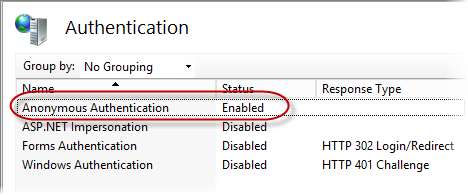
Anonymous Authentication Enabled
- In the Authentication list, if Anonymous Authentication is not already Enabled, right-click on it and select Enable.
For more information, refer to Microsoft online documentation for IIS Anonymous Access.
Why is the Mobile Administration site reporting licensing issues?
If you observe Mobile Administration site issues even though the software installation was successful, the IIS Load User Profile property for the application may not be set to True.
Other symptoms of this may include no default values for the Mobile Administration site, an empty or almost empty log file for the CygNet Bridge (CygNet Bridge Services) module, and an internal 500 error when you attempt to directly access the CygNet Mobile APIs.
To verify and/or change the Load User Profile property setting
- Open the IIS Manager.
- In the navigation menu on the left, click Application Pools.
- Right-click on CygNet Bridge in the Application Pools list, and then select Advanced Settings.
- In the Advanced Settings dialog, verify that Load User Profile is set to True.
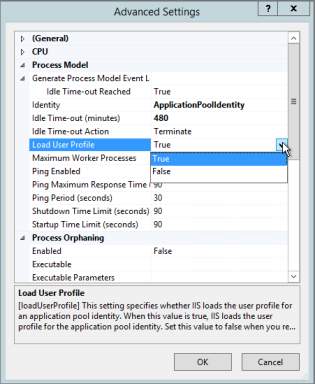
Setting Load User Profile to True
- If Load User Profile is set to False, right-click on it and select True.

