SetPoint Button Tool – Events
Specific events have been added to the SetPoint Button Tool which provide the screen builder the opportunity to write VBScript that executes in the CygNet Studio scripting environment when an event fires. The following sample screen lists the order in which the events fire when a screen is first loaded and the Run Group Rollup (MANUAL) SetPoint Button is clicked.
|
HyperPoint Script Trigger and Monitor Screen Example |
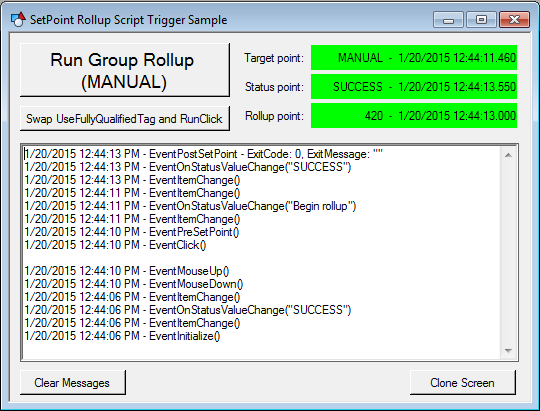
See the Group Rollup HyperPoint script example on the SetPoint Button Applications topic for a more detailed description of this CygNet Studio screen and the use-case it demonstrates.
Events
The following table lists and describes events of the SetPoint Button Tool.
|
Event |
Description | ||||||||||||||||||||||||||||||||||||||||||||||||||||||||||
|---|---|---|---|---|---|---|---|---|---|---|---|---|---|---|---|---|---|---|---|---|---|---|---|---|---|---|---|---|---|---|---|---|---|---|---|---|---|---|---|---|---|---|---|---|---|---|---|---|---|---|---|---|---|---|---|---|---|---|---|
|
EventContextMenu runs when one of the custom context menu items that is defined or overridden by this object is clicked. |
|||||||||||||||||||||||||||||||||||||||||||||||||||||||||||
|
EventInitialize runs when TheView is started in Run or Preview mode to allow further initialization for the control. |
|||||||||||||||||||||||||||||||||||||||||||||||||||||||||||
|
EventItemChange runs when a point property associated with the [DisplayItem] property changes. For the Text Tool only, this event runs when manual update mode is enabled or disabled for an associated point. Manual update mode is enabled or disabled via the Manual update mode setting on the General page of the PNT editor or via the Edit Current Value dialog box for a current value service point. |
|||||||||||||||||||||||||||||||||||||||||||||||||||||||||||
|
EventMouseDown runs when the user clicks a mouse button while the cursor is in the control region. See EventMouse Parameters for descriptions of parameters. |
|||||||||||||||||||||||||||||||||||||||||||||||||||||||||||
|
EventMouseMove runs when the user moves the mouse while the cursor is over the control region. See EventMouse Parameters for descriptions of parameters. |
|||||||||||||||||||||||||||||||||||||||||||||||||||||||||||
|
EventMouseUp runs when the user lifts a mouse button after having depressed it in the control region. The mouse may have been lifted outside the control region. See EventMouse Parameters for descriptions of parameters. |
|||||||||||||||||||||||||||||||||||||||||||||||||||||||||||
|
EventOnStatusValueChange runs when the monitored status point’s value changes. This will only run if a status point is configured. |
|||||||||||||||||||||||||||||||||||||||||||||||||||||||||||
|
EventPointChange runs when an unrelated point is updated. This event can significantly reduce initialization time for screens that may contain objects configured for unrelated points. Unrelated points can be registered using an object’s RegisterPointForChangeNotice method, if applicable. |
|||||||||||||||||||||||||||||||||||||||||||||||||||||||||||
|
EventPostSetPoint runs directly after the SetPoint operation completes. This event runs whether or not the SetPoint operation completed successfully. This event has two parameters: ErrorCode and ErrorMessage. If the ErrorCode is 0, then the SetPoint operation was successful.
|
|||||||||||||||||||||||||||||||||||||||||||||||||||||||||||
|
EventPreSetPoint runs directly before the SetPoint operation. |
|||||||||||||||||||||||||||||||||||||||||||||||||||||||||||
|
EventPreToolTip gives a script writer an opportunity to create a custom tooltip via script just before the tooltip is shown, when it is needed, and not during screen initialization, which can reduce loading time. ExampleCopy
EventPreToolTip |


