Toggle Switch Tool - Command Prompt
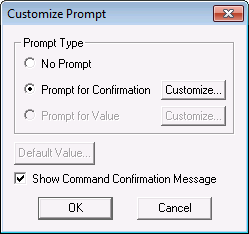
A Toggle Switch can be configured to prompt a user for a confirmation. The prompt is defined by the [CommandPrompt] property, which displays the Customize Prompt dialog box:
|
Customize Prompt |
| [CommandPrompt] Item | Description |
|---|---|
|
Prompt Type |
|
|
Default Value |
Not applicable. The point associated with the switch or knob or slider object sets the position. |
|
Show Command Confirmation Message |
A command confirmation message is a pop-up that confirms that inter-service communication was successful. That is, that the command was successfully sent from the DDS to the UIS. It does not mean that the command was successfully sent to the device. |
Customizing the Prompt
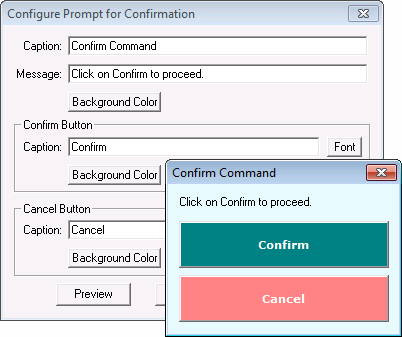
The Confirm Command pop-up title, caption, text, font and colors can be customized by clicking Customize…. Set the desired text, fonts and colors, then click Preview to test the prompt.
|
Command Confirmation Prompt Configuration |