Tools
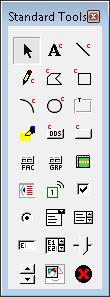
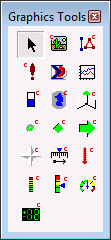
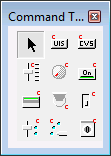
CygNet Studio contains a variety of tools for placing objects on the screen. These include standard drawing tools, graphics tools, and command tools. The toolbars can be anchored to either side of the design environment by dragging the toolbar to the edge of the application window.
|
|
|
||
|
CygNet Studio Tools |
||||
Each object has its own set of properties. Click on any icon in the image above for detailed information about specific tools.
CygNet-Aware Tools
Many CygNet Studio tools are CygNet aware. Some can be configured to show data from a particular CygNet point. For example, a Text Tool object can be configured to show the value, timestamp, status, description, etc. of a point. These tools are referred to as "primary point" tools. They are shown on the icon with a superscript red "C." See Configuring Point Identifiers for more information.
Other tools can be configured to show data from multiple points. These include the Group Grid Tool, the WatchList Tool, the Trend Tool, etc.
The following table lists the primary point tools:
More:


