Trend Tool – Configuring a Legend
Note: You can change configuration settings for this tool in Run mode. However, these settings usually only persist for the current runtime session. When you close the CygNet Studio screen on which the tool resides, the tool settings may revert to those originally configured in Edit mode.
The Legend page specifies the format and placement of the trend legend.
|
Trend Tool - Legend Page |
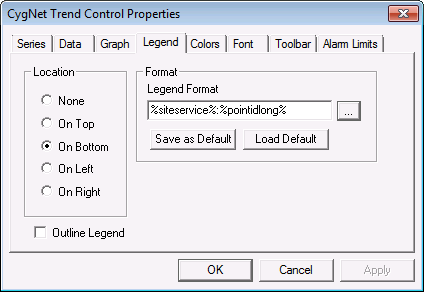
Legend Page Properties
The following table lists and describes Legend page properties.
| Property | Description |
|---|---|
|
Location |
This property defines the area in which the legend is displayed relative to the trend. See also LegendLocation. |
|
Outline Legend |
Check to display an outline around a legend item's series icon. See also LegendOutline. |
| Format | |
|
Legend Format |
This field defines the format by which the legend displays information. The legend text can be dynamic, static, or a combination. Dynamic text is built using tokens, which can represent point configuration or facility attribute record properties. Data formatting can be specified. Type information directly into the field or use the Browse button to select from several token lists. See Using Text Tokens for more information about building dynamic text using tokens. See also LegendFormatStr. |
|
Save as Default |
Click this button to save the contents of the Legend Format field as that field's default for all Trend Tools for a given screen. You can overwrite the default on a Trend Tool-by-Trend Tool basis. |
|
Load Default |
Click this button to repopulate the Legend Format field with that field's default for all Trend Tools for a given screen. This is useful in a case where you've overwritten the default and want to revert to it. |


