Building a Blueprint to Configure Tables
In this topic you will configure the tables and their entries for your system.
|
Table Definitions |
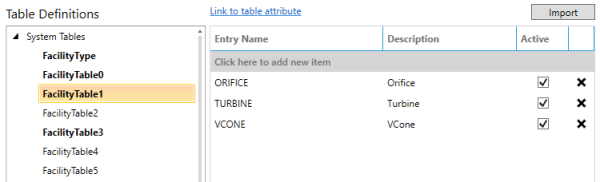
The Table Definitions work area is broken into two sections: the tree on the left and the table entries on the right. The tree is separated into two groups: System Tables and Custom Tables.
System Tables
System tables are those tables that are required by the CygNet system with immutable names, for example, the tables that correspond to the facility table attributes, or the table that defines the list of External ID types for a point. While these tables are required, their entries are configurable. The system tables which have entries defined will be marked in bold text.
Custom Tables
Custom tables are any other table in your system. To add a new custom table, click <Add new table…> in the tree on the left and provide a unique name.
Table Entries
- To add a new entry, select the table from the tree on the left, then click on the gray bar labeled Click here to add new item in the grid on the right.
- To delete an entry, click the
 icon on the far right of the entry row.
Import Tables
You can import tables from an existing system by clicking Import in the top right of the work area.
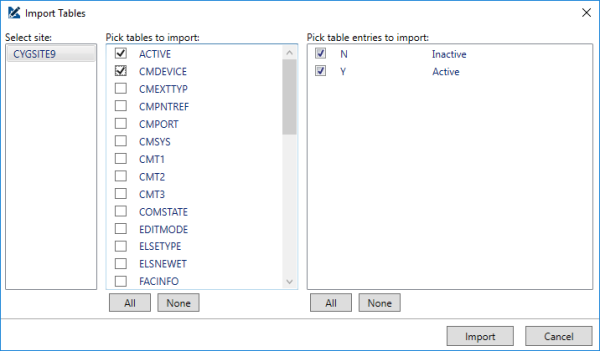
In the Import Tables dialog box, select the Site you wish to import from, then the tables you want to import, then the entries in those tables you want to import. Click Import to add these tables and their entries to your blueprint.
|
Import Tables |