Configuring CygNet Designer
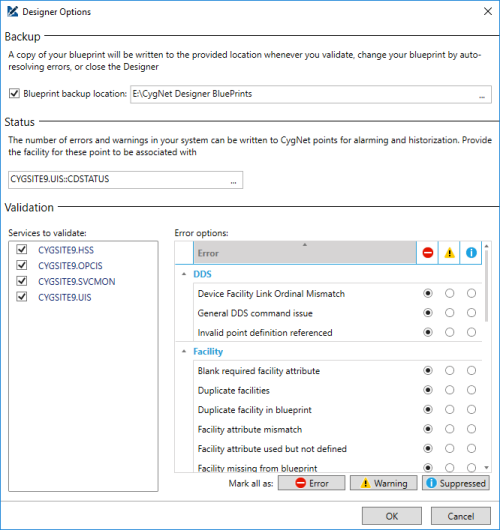
This topic describes how to configure the options for CygNet Designer: blueprint backup location, status point for alarming and historization, and the validation settings.
The Designer Options dialog box is available via the Options ( ) button in the toolbar.
|
CygNet Designer Options |
Backup
Your blueprints are valuable and so we want to protect them. Therefore an option is available to automatically backup your .blu file as you work on it. A copy of the file will be written to the Blueprint backup location every time you validate your system, auto-resolve errors, or close the Designer.
Status
The results of a validation using the CygNet Designer can be written to status points for alarming, notification, and historical analysis. The facility selected here will have the necessary points added when validation is run.
Validation
Here you specify which current value services you want to validate against. You can validation across multiple services and multiple sites on your current CygNet domain.
Error Options
Here you determine how you want to categorize your results, either as an Error ( ), Warning (
 ), or Suppressed (
 ). Use these distinctions to help narrow your focus when reviewing your results or creating alarms based on validation status.


