Configuring a Report Module Schedule
A report schedule is created by the ReportScheduler_schedule.csf Studio screen that is provided as part of the Report Module installation.
- Click New to open the Schedule dialog box where the schedule properties are configured
- Click Edit to open the Schedule dialog box to modify schedule properties for previously created schedules
The CxHmiAEJobScheduler Schedule dialog box will return an XML string that describes the schedule the user created. This string can be used with CxAEJobScheduler to create associated MSS tasks and HSS points to trigger Jobs to be run on the configured pattern.
See CxAEJobScheduler for more information about creating and running Jobs.
Schedule Properties
Schedules as configured via CxHmiAEJobScheduler Schedule dialog box have their properties separated into two sections, General and Recurrence properties.
General
- Description — The name for the schedule. The character limit for this field is 60.
- Start date — The date and time at which this schedule should begin.
- Active — Indicates whether or not the schedule will currently trigger the Setpoint on its associated HSS points based on the recurrence pattern. An active schedule will trigger the value change; an inactive schedule will not.
Recurrence
Recurrence patterns are broken down into three categories: Every, Day of the week, and Monthly.
Every
|
Schedule Every |
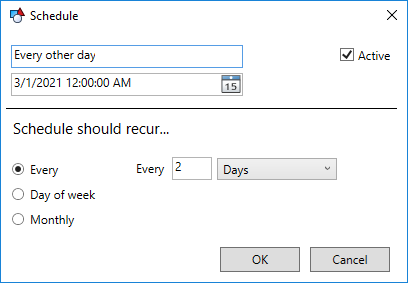
This pattern triggers based on a recurrence period. The period can be set to seconds, minutes, hours, days, weeks, or months.
Day of the week
|
Schedule Day of the week |
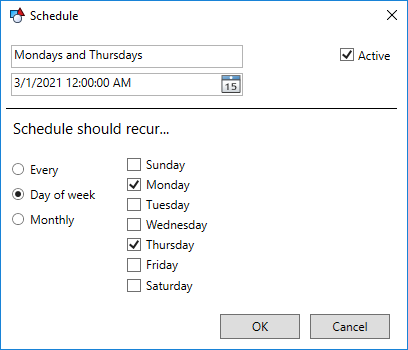
This pattern triggers based on the days of the week.
Monthly
|
Schedule Monthly |
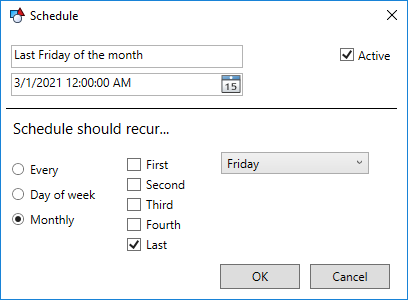
This pattern triggers based on the First, Second, Third, Fourth, or Last week day of the month.
Schedule Reports to Run
Once you have a schedule configured you can assign one or more reports to run on that schedule.
Select the schedule on the left and then click Add to open the Select Reports to Schedule dialog box. Pick the report you want to run on the schedule you created. Now your report will run on the defined schedule.


