Configuring Reports — History
The History page of the New/Edit Report Configuration dialog box defines the time period and rollup settings for historical data.
|
History period and rollups |
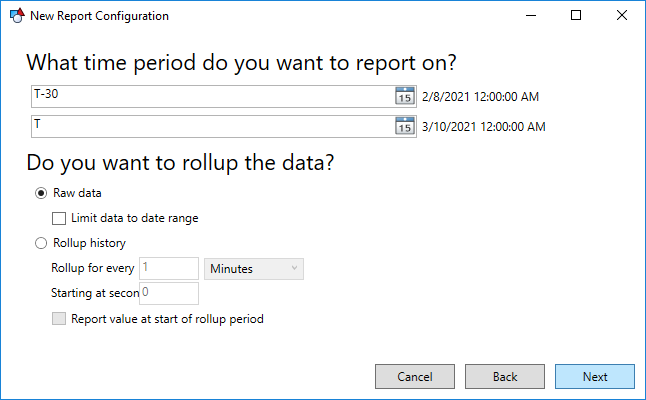
History Period
For historical reports, you must specify a range for the historical data and whether or not that data should be rolled-up.
The date range can be absolute (e.g., 6/1/2013 12:00:00AM) or relative (e.g., T-30).
Relative Date and Time formats
Today (T) Wildcards
The T wildcard can be used to represent today. The date can be adjusted using an integer (T, T+3, T-7).
Example
- T represents today at midnight
- T-1 is yesterday at midnight
- T+1 is tomorrow at midnight
Note: The T wildcard cannot be used with Component Wildcards.
Component Wildcards
Component wildcards can be used to describe or adjust a particular date and time.
Syntax
Component Adjustment Value
Example
|
d-7 H=6 |
This example sets the date and time to seven days ago (d-7) at 6:00 a.m. (H=6).
Component Options
The components are case-sensitive. Date components are lowercase; time components are UPPERCASE. The component options are the following:
| Component | Description |
|---|---|
| y | Year |
| m | Month |
| d | Day |
| H | Hour |
| M | Minute |
| S | Second (note that milliseconds are not maintained) |
Adjustment Options
The adjustment options are the following:
| Adjustment | Description |
|---|---|
| - | Subtract from the reference |
| + | Add to the reference |
| = | Equals the reference |
Value Options
The value options are the following:
| Type | Description |
|---|---|
| Integer | Subtract from the reference |
| L or l | Indicates last day of the month. Can only be used with the "d" (Day) component. |
History Rollups
The Report Module utilizes the CygNet VHS iterator for historical data. If the historical report is using Raw data, you can optionally limit the data to the date range. The CygNet VHS iterator will, in most cases, report a value prior to the specified date range. This "extra" value is intended to show you what the value was at the start of the date range, which is typically a value prior to the specified date range. If you don't want this value to be displayed, use this option to suppress it.
If the historical report is using Rollup history, you must specify the rollup period and units (seconds, minutes, hours, days) and what hour of the day to use to start.
See History Rollups for more information about rollup properties.
Click Next to move to the next page of the New/Edit Report Configuration dialog box.


