Configuring Reports — History Format
The History Format page of the New/Edit Report Configuration dialog box defines the format or layout to use for historical reports. Historical reports can use one of two formats: One value per row or Group all values by facility.
One value per row
|
One value per row |
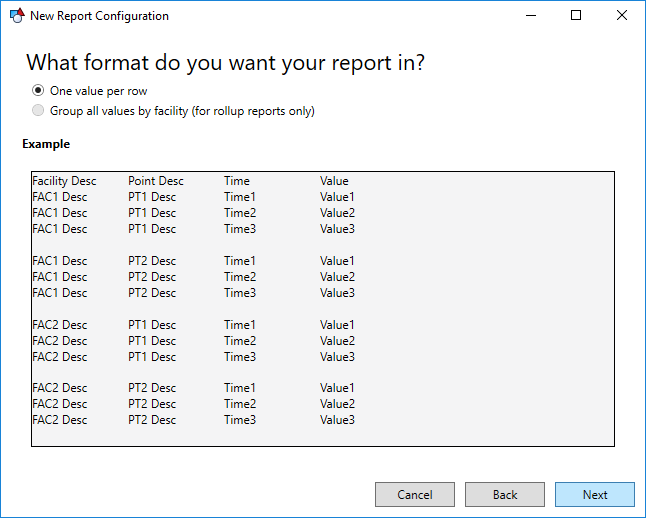
This report format separates historical data by point value. Each row is a single value for a single point at a specific point in time. Each point value will be iterated for each facility.
The columns seen in the example above will be added by default to your report if this format is selected, but they can be changed.
Click Next to move to the next page of the New/Edit Report Configuration dialog box.
Group all values by facility
|
Group all values by facility |
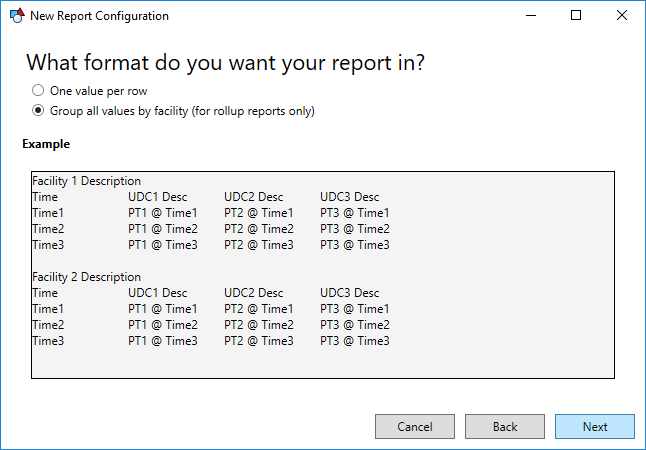
This format breaks the values down per facility, displaying all values for a certain time on the same row. Because of this requirement to have values fall on the same time interval, this format is only applicable for historical rollup reports.
The option to "Suppress section descriptions" will remove the facility descriptions before each section of data to provide a flat format producing a report like this:
|
Group all values by facility — Suppress section descriptions |
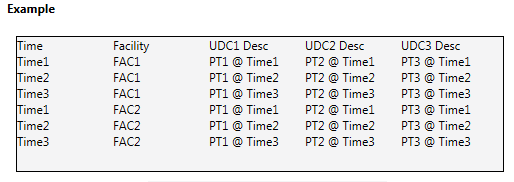
Since this report is organized by time, the initial column must always be Time. This will be added to your report when this format is selected.
Click Next to move to the next page of the New/Edit Report Configuration dialog box.


