CygNet Domain Connection Utility
The CygNet Domain Connection utility (CygConn.exe) is used to define Domain IDs for a client computer, and to connect the computer to an ARS on a domain. You can also set the preferred ARS or forced ARS to connect to. Note that you must configure the Preferred ARS for replication to function properly. See below for more information.
Also see Address Resolution for more information regarding Domain IDs and inter-component communications.
The CygNet Domain Connection utility file (CygConn.exe) is stored in the CygNet\Utilities directory on the host server.
Starting CygNet Domain Connection
Installing and Launching
To install and launch (start) the application or utility using version management:
- Use CygNet Client Installer to install and launch the application. Once installed you can use CygNet Client Installer to start the application.
-OR-
- If previously installed, click Start > All Programs > CygNet > <name of the application or utility> or double-click the desktop shortcut.
Alternatively, browse to the CygNet\Utilities directory using Windows Explorer and double-click the program icon. You can also start an application or utility from a command line. These methods do not provide version management.
The CygNet Domain Connection dialog box appears. The utility lists the Domain IDs that have been defined for the computer, and information regarding the last ARS on each domain to which the client computer connected.
|
CygNet Domain Connection |
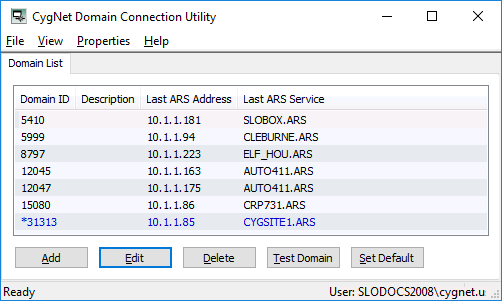
The utility stores the list of domains and ARS information in the computer’s registry, although different information is stored in different locations. If you are a member of the Administrators group on the computer, the Default Domain and Last ARS Address are stored in HKEY_CURRENT_USER:
|
HKEY_CURRENT_USER\Software\Visual Systems, Inc.\CygNet\Dcl\Domains |
The Preferred ARS Address and Forced ARS Address are stored only in HKEY_LOCAL_MACHINE for both admin and non-admin users:
|
HKEY_LOCAL_MACHINE\SOFTWARE\Visual Systems, Inc.\CygNet\Domains and HKEY_LOCAL_MACHINE\SOFTWARE\Wow6432Node\Visual Systems, Inc.\CygNet\Domains |
A non-Administrator cannot set these values.
Domain Properties
The properties of a Domain ID are described in the table below.
| Property | Description |
|---|---|
|
Domain ID |
A list of the Domain IDs that have been added to the client computer. |
|
Description |
This option is not implemented. |
|
Last ARS Address |
The Last ARS Address is the IP address of the ARS on the Domain ID to which the computer last connected. |
|
Last ARS Service |
The name of the Last ARS Service on the Domain ID to which the computer last connected. |
|
The Preferred ARS Address is the IP address on which to attempt to connect to the ARS on a domain. If the preferred ARS is stopped, the client will attempt to connect to another ARS on the same domain. The preferred ARS specifies the IP address of the ARS to which you prefer clients connect. On the host server, this is generally the IP address of the host machine. If an ARS is not running on this address, then the host machine will check its registry for other possible addresses. This address is primarily configured in the CygNet Domain Connection Utility, but also in the Network Settings of the CygNet Host Manager. Note: For replication to function correctly on separate subnets, you must configure the Preferred ARS for the domain ID of the source service where replicated data is being pulled. Multiple Preferred ARS Addresses You may need to configure multiple preferred ARS addresses per domain so that clients can communicate on a domain across a subnet. When configured on a host machine, each ARS broadcasts its presence to all of the ARS services specified as preferred ARS addresses on startup and every five minutes after that. When searching for an ARS on a domain from that host, clients will attempt to find an ARS on each specified preferred IP address simultaneously. If one of the preferred ARS services on a different subnet fails over or becomes unavailable for another reason, clients will still be able to communicate with other configured preferred ARS addresses on that same domain. |
|
|
Forced ARS Address |
The Forced ARS Address is the one and only IP address on which the machine can connect to an ARS. If the ARS at this address is not available, CygNet communication will not be available. This option is not generally recommended because it excludes the chance of the client connecting with another ARS on the domain. This option takes precedence over the Preferred ARS Address. The Forced ARS address is primarily configured in the CygNet Domain Connection Utility. |
|
Default Domain |
The Domain that a CygNet client uses when it starts. If you have a client application open and change the Default Domain, that client will continue use the domain that was the Default when it was started. All new instances of the client use the new Default. The Default Domain is indicated with an asterisk (*). |
CygNet Domain Connection Utility and UAC
Note that performing domain connection tasks with User Account Control (UAC) enabled will require administrator-level permission by selecting Run as administrator in the file menu. Standard users are limited to adding and removing settings for their user account only. See CygNet and User Account Control for more information.
Configuring RUDP Fragmentation Settings
The CygNet Domain Connection utility can be used to change the RUDP fragment size for CygNet messages between a CygNet client and the CygNet services (both client-to-service and service-to-client). The RUDP Fragment Sizes setting is found under Properties > Advanced Network Settings. See Configuring Advanced Network Settings for more information about CygNet Messaging and RUDP Fragmentation.
Menu Options
The following table lists and defines command options accessed using the CygNet Domain Connection utility menu bar.
| Option | Description |
|---|---|
|
File > Exit |
Select to quit the CygNet Domain Connection utility. |
|
View > Status Bar |
Hide or Show the status bar. The status bar displays the following information:
|
|
Properties > Advance Network Settings |
Select to access the Client Advanced Network Settings options. See Configuring Advanced Network Settings for more information. |
|
Help > About CygConn |
Displays an About CygNet Domain Administration Utility dialog box to view application information. Available information includes the following:
In addition to information about the application, the About box includes the following buttons:
|
More:
 CygNet Domain Connection Utility Tasks


