Modem Bank EIE
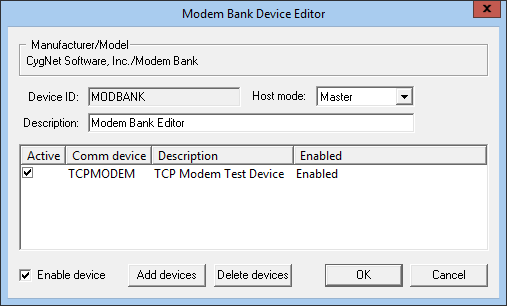
The Modem Bank EIE provides a method for a user to define a bank of TCP Modems. The TCP Modems must be defined in the DDS before they can be added to the modem bank.
|
Modem Bank EIE Device Editor |
For information about overriding communication device settings from the remote device, see Overriding Communication Settings.
To Add a Modem to the Modem Bank
- Open the properties of the Modem Bank communication device.
- Click Add devices. The Select Modem Bank Devices dialog box displays a list of modems.
- Click on the modem to add to the bank. Use Ctrl+Click to add multiple modems.
- Click OK.
- Save the modem bank communication device.
To Remove a Modem from the Modem Bank
- Open the properties of the Modem Bank communication device.
- Click on the modem to delete from the bank. Use Ctrl+Click to add multiple modems.
- Click Delete devices.
- Save the Modem Bank communication device.
A 64-bit version of this EIE is available. See 64-bit Device Drivers.
Properties
The properties box of the Modem Bank Device Editor communication device displays which modems have been added and if they are active and enabled.
If the modem is Active, the UIS uses it to communicate to devices. If it is not active, the UIS does not use it. If a modem is listed as Disabled, its Enable device property is not checked. You must edit the configuration of the modem to enable it. The Modem Bank EIE does not attempt to use a modem that is disabled.
The following table lists and describes properties from the Modem Bank Device Editor dialog box.
| Property | Description | ||||||
|---|---|---|---|---|---|---|---|
|
Device ID |
The unique identifier of an instance for this device. This free-form name must be unique in the DDS and the FAC. That is, it must be a name not used by any other communication device, import/export device, remote device, or facility. CygNet naming standards for device ID are as follows:
|
||||||
|
Description |
A free-form description of the device. 32 character maximum. |
||||||
|
Host mode |
Specifies the mode that an individual modem must be configured for. That is, the host mode of an individual modem must match the host mode of the Modem Bank, or it will not be used. Master This default mode allows any message to be sent. NonMaster This mode is remote device EIE-specific. It is not designed to allow write messages to be sent to an RTU. However, because each remote device EIE specifies what a write message is, you may still be able to send some write messages. |
||||||
|
Enable device |
Select whether to enable or disable the device. The default setting is disabled. If an invalid configuration is detected, the device will automatically be disabled. The device can be re-enabled after the invalid configuration is fixed. |
||||||
| Add devices | Click to add a modem to the Modem Bank. The Select Modem Bank Devices dialog box displays a list of modems. | ||||||
| Delete devices | Click to delete a modem from the Modem Bank. |


