OPC Comm EIE
The OPC Comm EIE communication device provides a connection between an OPC remote device EIE and an OPC server. The interface allows a user to display and edit data used to identify and configure a connection to an OPC server.
Note: The OPC Comm device can only be paired with the OPC remote device EIE, the OPC Lufkin remote device EIE, or the OPC Weatherford remote device EIE. The devices are non-functional without this exact combination.
See OPCIS vs OPC EIEs for a feature-by-feature comparison of the OPCIS with the OPC EIEs (OPC EIE, OPC Comm EIE, OPC Lufkin EIE, and OPC Weatherford EIE) to help you decide which OPC option best suits the requirements of your enterprise.
|
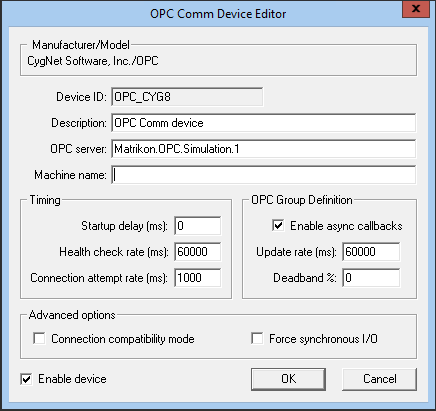
OPC Comm EIE Device Editor |
A 64-bit version of this EIE is available. See 64-bit Device Drivers.
Properties
The following table lists and describes properties for the OPC Comm Device Editor dialog box.
| Property | Description | ||||||
|---|---|---|---|---|---|---|---|
|
Device ID |
The unique identifier of an instance for this device. This free-form name must be unique in the DDS and the FAC. That is, it must be a name not used by any other communication device, import/export device, remote device, or facility. CygNet naming standards for device ID are as follows:
|
||||||
|
Description |
A free-form description of the device. 32 character maximum. |
||||||
|
OPC server |
The name of the OPC server (either the PROGID or CLSID from the registry) with which the comm device is communicating. |
||||||
|
Machine name |
The OPC_MACHINE_NAME keyword specifies the name of the remote computer on which the OPC server is running. Both UNC (for example, \\SERVER or SERVER) and DNS (for example, server.com or IP address) formats are acceptable. Note: The machine name may be blank if the server is running on the same machine as the UIS. |
||||||
| Timing | |||||||
|
Startup delay (ms) |
Specifies the delay time (in milliseconds) to allow an OPC server to initialize before OPC groups are defined. The default value is 0. |
||||||
|
Health check rate (ms) |
Specifies the rate (in milliseconds) at which the OPC Comm EIE performs a health check of the OPC server. The default value is 1000. |
||||||
|
Connection attempt rate (ms) |
Specifies the connection attempt rate (in milliseconds) for the OPC Comm EIE to connect with the OPC server. The default value is 60000. |
||||||
| OPC Group Definition | |||||||
|
Enable async callbacks |
When Enable asynchronous callbacks is selected, the OPC server will perform asynchronous callbacks and push data to the OPC EIE as it retrieves changed values from the remote device. |
||||||
|
Update rate (ms) |
The value selected for the Update rate (ms) for asynchronous callbacks determines the following behavior:
The default value is 60000 milliseconds. |
||||||
|
Deadband % |
The Deadband % is an OPC standard capability that requests that an OPC server only report value changes that exceed a configured percentage. Type a percentage value for the OPC Group Definition. The default value is 0. |
||||||
| Advanced options | |||||||
|
Connection compatibility mode |
When selected, the Connection compatibility mode is enabled for the device. If connection compatibility mode is enabled, every health check will also perform a read from cache for one data item from every group the device is subscribed to, to verify that the OPC connection is still active. This check will keep the connection from becoming inactive thereby reducing disconnect/reconnect occurrences, will detect when connections are lost, and will automatically re-establish the connection and subscriptions when disconnection does occur. |
||||||
|
Force synchronous I/O |
When selected, synchronous I/0 communication is forced for the device. Select this option if the OPC server does not support asynchronous communication. When set the OPC Comm device will override the value of the SyncIO parameter in the UIS command component parameters for each OPC EIE. See the following: |
||||||
|
Enable device |
Select whether to enable or disable the device. The default setting is disabled. If an invalid configuration is detected, the device will automatically be disabled. The device can be re-enabled after the invalid configuration is fixed. |
||||||


