Configuring Advanced Settings
The SonicMQ Advanced page allows the device configuration to be exported to or loaded from an XML file.
See Schema Example to view a sample schema used to define the exported CygNet SCADA data.
See Export Example to view sample exported data.
|
SonicMQ EIE - Advanced Page |
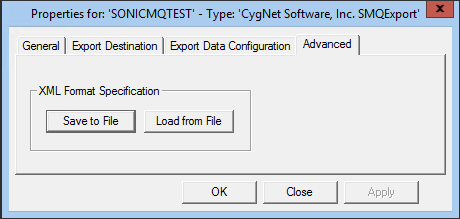
The properties for each section of this page are described below.
| Property | Description |
|---|---|
|
Save to File |
Click Save to File to save the device configuration to an XML definition file. Navigate to the desired file location, type the file name, and click Save. |
|
Load from File |
Click Load from File to import the device configuration from a previously saved XML definition file. Navigate to the desired file, select it, and click Open. |
Schema Example
SonicMQ Export Schema
 Click here to see an example of the SonicMQ Export Schema
<?xml version="1.0" ?>
<schema targetNamespace="https://CygNetETM.com/Schemas" Namespace="https://www.w3.org/2001/XMLSchema" Namespace:cyg="https:/CygNetETM.com/Schemas" Namespace:xsd="https://www.w3.org/2001/XMLSchema" elementFormDefault="qualified" attributeFormDefault="unqualified">
<element name="CygNetExportData">
<complexType>
<sequence>
<element name="ExportResults" type="cyg:exportResultsType" />
<element name="RootGroup" type="cyg:rootGroupType" />
</sequence>
<attribute name="hosttime" type="xsd:dateTime" use="required" />
<attribute name="exportdevice" type="xsd:string" use="required" />
<attribute name="filtersource" type="xsd:string" use="required" />
<attribute name="filter" type="xsd:string" use="required" />
</complexType>
</element>
<complexType name="exportResultsType">
<sequence>
<element name="ExportResult" type="cyg:exportResultType" minOccurs="0" maxOccurs="unbounded" />
</sequence>
</complexType>
<complexType name="exportResultType">
<simpleContent>
<extension base="xsd:string">
<attribute name="type" use="required" >
<simpleType>
<restriction base="xsd:NMTOKEN">
<enumeration value="error"/>
<enumeration value="warning"/>
<enumeration value="message"/>
</restriction>
</simpleType>
</attribute>
<attribute name="code" type="xsd:string" use="required" />
</extension>
</simpleContent>
</complexType>
<complexType name="rootGroupType">
<sequence>
<element name="Property" type="cyg:propertyType" minOccurs="0" maxOccurs="unbounded" />
<element name="SubGroup" type="cyg:subGroupType" minOccurs="0" maxOccurs="unbounded" />
</sequence>
<attribute name="level" type="xsd:NMTOKEN" fixed="0" use="required" />
<attribute name="type" type="xsd:string" use="required" />
</complexType>
<complexType name="subGroupType">
<complexContent>
<extension base="cyg:subGroupInstType">
<sequence>
<element name="SubGroup" type="cyg:subGroupType" minOccurs="0" maxOccurs="unbounded" />
</sequence>
</extension>
</complexContent>
</complexType>
<complexType name="subGroupInstType">
<sequence>
<element name="Property" type="cyg:propertyType" minOccurs="0" maxOccurs="unbounded"/>
<element name="Point" type="cyg:pointType" minOccurs="0" maxOccurs="unbounded"/>
</sequence>
<attribute name="level" type="xsd:decimal" use="required" />
<attribute name="type" type="xsd:string" use="required" />
<attribute name="id" type="xsd:string" use="required" />
</complexType>
<complexType name="propertyType">
<simpleContent>
<extension base="xsd:string">
<attribute name="name" type="xsd:string" use="required" />
<attribute name="desc" type="xsd:string" use="required" />
</extension>
</simpleContent>
</complexType>
<complexType name="pointType">
<sequence>
<element name="Property" type="cyg:propertyType" minOccurs="0" maxOccurs="unbounded" />
</sequence>
<attribute name="id" type="xsd:string" use="required" />
<attribute name="pointintime" type="xsd:dateTime" use="optional" />
</complexType>
</schema>
Export Example
The following example shows exported data from the SonicMQ Export EIE.
Click here to see an example of the SonicMQ Export
<?xml version="1.0" ?>
<cyg:CygNetExportData Namespace="https://CygNetETM.com/Schemas" Namespace:xsi="https://www.w3.org/2001/XMLSchema-instance" Namespace:cyg="https://CygNetETM.com/Schemas" Namespace:dt="urn:schemas-microsoft-com:datatypes" xsi:schemaLocation="https://CygNetETM.com/Schemas CygNetETM.xsd" hosttime="2023-07-08T22:42:00+00:00" filtersource="TEST1.GRP" filter="Export Hierarchy [View By Facility Type]" exportdevice="D-LINEPACK_PIPE">
<cyg:ExportResults />
<cyg:RootGroup type="Generic" level="0">
<cyg:SubGroup level="1" type="Generic" id="F_MTR_STAT" />
<cyg:SubGroup level="1" type="Generic" id="EXPDEV" />
<cyg:SubGroup level="1" type="Generic" id="SEGMENT">
<cyg:SubGroup level="2" type="Facility" id="TEST1.UIS::CS6BTO7">
<cyg:Property name="facility_attr15" desc="Facility Attribute 15">CS6B_CS7</cyg:Property>
<cyg:Point id="TEST1.UIS::CS6BTO7.V--EH1" pointintime="2023-07-08T21:59:59+00:00">
<cyg:Property name="value" desc="Value">251.654557</cyg:Property>
<cyg:Property name="status" desc="Status">3</cyg:Property>
<cyg:Property name="longdescription" desc="Long Description">Pack Last Hour</cyg:Property>
<cyg:Property name="timestamp" desc="Timestamp">2023-06-28T15:58:46+00:00</cyg:Property>
<cyg:Property name="units" desc="Units">MMCF</cyg:Property>
<cyg:Property name="uniformdatacode" desc="Uniform Data Code">V--EH1</cyg:Property>
</cyg:Point>
<cyg:Point id="TEST1.UIS::CS6BTO7.VD--EH1" pointintime="2023-07-08T21:59:59+00:00">
<cyg:Property name="value" desc="Value">0.9077</cyg:Property>
<cyg:Property name="status" desc="Status">3</cyg:Property>
<cyg:Property name="longdescription" desc="Long Description">Pack Delta Last Hour</cyg:Property>
<cyg:Property name="timestamp" desc="Timestamp">2023-06-28T15:58:46+00:00</cyg:Property>
<cyg:Property name="units" desc="Units">MMCF</cyg:Property>
<cyg:Property name="uniformdatacode" desc="Uniform Data Code">VD--EH1</cyg:Property>
</cyg:Point>
</cyg:SubGroup>
<cyg:SubGroup level="2" type="Facility" id="TEST1.UIS::CS7TO8A">
<cyg:Property name="facility_attr15" desc="Facility Attribute 15">CS7_CS8A</cyg:Property>
<cyg:Point id="TEST1.UIS::CS7TO8A.V--EH1" pointintime="2023-07-08T21:59:59+00:00">
<cyg:Property name="value" desc="Value">225.11182</cyg:Property>
<cyg:Property name="status" desc="Status">3</cyg:Property>
<cyg:Property name="longdescription" desc="Long Description">Pack Last Hour</cyg:Property>
<cyg:Property name="timestamp" desc="Timestamp">2023-06-28T15:58:46+00:00</cyg:Property>
<cyg:Property name="units" desc="Units">MMCF</cyg:Property>
<cyg:Property name="uniformdatacode" desc="Uniform Data Code">V--EH1</cyg:Property>
</cyg:Point>
<cyg:Point id="TEST1.UIS::CS7TO8A.VD--EH1" pointintime="2023-07-08T21:59:59+00:00">
<cyg:Property name="value" desc="Value">1.878878</cyg:Property>
<cyg:Property name="status" desc="Status">3</cyg:Property>
<cyg:Property name="longdescription" desc="Long Description">Pack Delta Last Hour</cyg:Property>
<cyg:Property name="timestamp" desc="Timestamp">2023-06-28T15:58:46+00:00</cyg:Property>
<cyg:Property name="units" desc="Units">MMCF</cyg:Property>
<cyg:Property name="uniformdatacode" desc="Uniform Data Vode">VD--EH1</cyg:Property>
</cyg:Point>
</cyg:SubGroup>
<cyg:SubGroup level="2" type="Facility" id="TEST1.UIS::CS8BTO9">
<cyg:Property name="facility_attr15" desc="Facility 15">CS8B_CS9</cyg:Property>
<cyg:Point id="TEST1.UIS::CS8BTO9.V--EH1" pointintime="2023-07-08T21:59:59+00:00">
<cyg:Property name="value" desc="Value">93.454057</cyg:Property>
<cyg:Property name="status" desc="Status">3</cyg:Property>
<cyg:Property name="longdescription" desc="Long Description">Pack Last Hour</cyg:Property>
<cyg:Property name="timestamp" desc="Timestamp">2023-06-28T15:58:46+00:00</cyg:Property>
<cyg:Property name="units" desc="Units">MMCF</cyg:Property>
<cyg:Property name="uniformdatacode" desc="Uniform Data Code">V--EH1</cyg:Property>
</cyg:Point>
<cyg:Point id="TEST1.UIS::CS8BTO9.VD--EH1"pointintime="2023-07-08T21:59:59+00:00">
<cyg:Property name="value" desc="Value">-0.130121</cyg:Property>
<cyg:Property name="status" desc="Status">3</cyg:Property>
<cyg:Property name="longdescription" desc="Long Description">Pack Delta Last Hour</cyg:Property>
<cyg:Property name="timestamp" desc="Timestamp">2023-06-28T15:58:46+00:00</cyg:Property>
<cyg:Property name="units" desc="Units">MMCF</cyg:Property>
<cyg:Property name="uniformdatacode" desc="Uniform Data Code">VD--EH1</cyg:Property>
</cyg:Point>
</cyg:SubGroup>
<cyg:SubGroup level="2" type="Facility" id="TEST1.UIS::CS9TOHNT">
<cyg:Property name="facility_attr15" desc="Facility Attribute 15">CS9_HNT</cyg:Property>
<cyg:Point id="TEST1.UIS::CS9TOHNT.V--EH1" pointintime="2023-07-08T21:59:59+00:00">
<cyg:Property name="value" desc="Value">88.576585</cyg:Property>
<cyg:Property name="status" desc="Status">3</cyg:Property>
<cyg:Property name="longdescription" desc="Long Description">Pack Last Hour</cyg:Property>
<cyg:Property name="timestamp" desc="Timestamp">2023-06-28T15:58:46+00:00</cyg:Property>
<cyg:Property name="units" desc="Units">MMCF</cyg:Property>
<cyg:Property name="uniformdatacode" desc="Uniform Data Code">V--EH1</cyg:Property>
</cyg:Point>
<cyg:Point id="TEST1.UIS::CS9TOHNT.VD--EH1" pointintime="2023-07-08T21:59:59+00:00">
<cyg:Property name="value" desc="Value">0.625417</cyg:Property>
<cyg:Property name="status" desc="Status">3</cyg:Property>
<cyg:Property name="longdescription" desc="Long Description">Pack Delta Last Hour</cyg:Property>
<cyg:Property name="timestamp" desc="Timestamp">2023-06-28T15:58:46+00:00</cyg:Property>
<cyg:Property name="units" desc="Units">MMCF</cyg:Property>
<cyg:Property name="uniformdatacode" desc="Uniform Data Code">VD--EH1</cyg:Property>
</cyg:Point>
</cyg:SubGroup>
</cyg:SubGroup>
</cyg:RootGroup>
</cyg:CygNetExportData>

