Configuring the Export Data
The SonicMQ Export Data Configuration page defines the information to be included in the export.
|
SonicMQ EIE - Export Data Configuration Page |
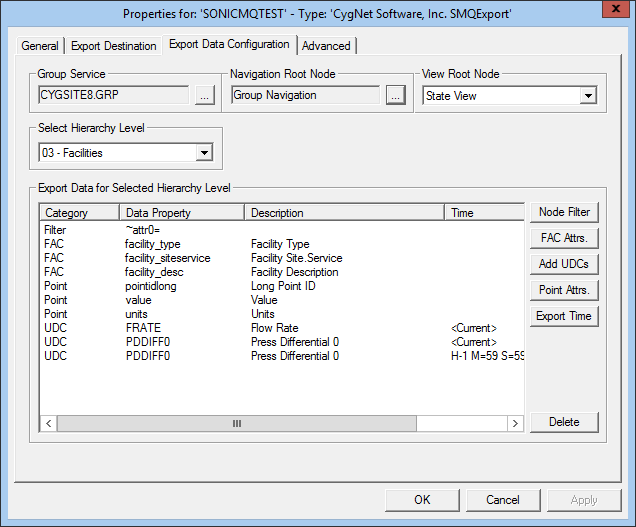
The properties for each section of this page are described below.
| Property | Description |
|---|---|
|
Group Service |
The name of the Group Service from which to get group information. |
|
Navigation Root Node |
The navigation root to be traversed. |
|
View Root Node |
The navigation root's view node to be traversed. |
|
Select Hierarchy Level |
The level in the hierarchy. |
|
Export Data for Selected Hierarchy Level |
|
|
Node Filter |
Sets the filter criteria on group attributes. Click Node Filter to open the Select Filter Criteria dialog box, where you can filter on group attributes. |
|
FAC Attrs. |
Specifies the facility attributes to include in the export. Click FAC Attrs. to open the Select Point Attributes dialog box, where you can select the attributes to include. |
|
Add UDCs |
Specifies the UDCs to include in the export. Click Add UDCs to open the Select UDC by Category dialog box, where you can select UDCs to include. |
|
Point Attrs. |
Specifies the point attributes to include in the export. Click Point Attrs. to open the Select Point Attributes dialog box, where you can select the attributes to include. |
|
Export Time |
Sets the export date and time for UDC items. Select a UDC item from the list, click Export Time to open the Select date and Time dialog box to set the absolute or relative export time. |
|
Delete |
Deletes a selected item from the list of data to export. |


