Array Data Group
An array data group enables you to display related register data in an array (in other words, a table). Usually such register data is intended by a field device manufacturer to be displayed or consumed as an index or array. A single data group can include a combination of array and non-array data, but it can include only one array. An array data group is always read only.
There are two types of array data groups in CygNet:
- Non-Historical Array: A non-historical array retrieves multiple values at once for the same data group element. The values retrieved for one data group element can be correlated with another data group element's values to create a two-dimensional array or table where each column is a data group element and each row is a correlation of values. Non-historical array data does not receive point processing by CygNet because a current value cannot simultaneously contain multiple values. Non-historical array data is only displayed in the DDS.
- Historical Array: A historical array retrieves multiple values at once for the same data group element. It also retrieves a set of timestamps that correlate with the value(s). The values retrieved for one data group element can be correlated with another data group element's values to create a two-dimensional array or table where each column is a data group element and each row is a correlation of values. Historical array data receives point processing by CygNet because a timestamp and a value combine to form a unique historical entity. This data is displayed in the DDS, but it is also used by other services, like the UIS, VHS, and PNT.
|
AutoCom EIE Array Diagram |
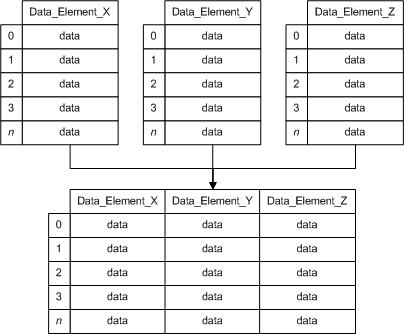
See the following subsections for more information:
- Example – Non-Historical Array
- Structure and Components – Non-Historical Array
- Example – Historical Array with Struct Data Type
- Structure and Components – Historical Array with Struct Data Type
For more information, see Device Template Files.
Example – Non-Historical Array
|
<PrgReg niceName="Program Registers" hasArray="true"> <dgElements secLev="4"> <RegUs desc="UShort (698)" type="ui2" regNum="698" arrSize="32"/> <RegS desc="Short (730)" type="i2" regNum="730" arrSize="32"/> <RegUl desc="ULong (762)" type="ui4" regNum="762" arrSize="16"/> <RegL desc="Long (778)" type="i4" regNum="778" arrSize="16"/> </dgElements> </PrgReg> |
Structure and Components – Non-Historical Array
|
<DataGroup hasArray="true"> <dgElements> <DEID arrRegOff=""arrSize=""/> </dgElements> </DataGroup> |
Example – Historical Array with Struct Data Type
|
<!-- The data group in the example below is an event log containing up to 200 records. Each record is made up of a timestamp, card event ID, card event description, and two kinds of event information. AutoCom specifies that the data that makes up an event-log record is grouped together on the field device within a single register. This setup requires the use of a struct data type in the block element in order to break up the event-record data into its constituent parts. In the example below, data retrieval begins at register number 65100 and ends at register 67099. Each register in the block is 10 bytes in length; the 10 bytes are structured to represent different kinds of event data. The structOff attribute used in data group elements maps data from the 10 bytes of data in a register to the correct data group elements. --> <EventLog niceName="Event Log" hasHistory="true" isOldToNew="false"> <dgElements arrSize="200"> <DateTime desc="Event Time" structOff="1:0" type="r8" sourceType="ui4" cvtF="TimeSeconds" isUTC="true"/> <EventId desc="Card Event ID" structOff="1:4" type="ui2" hidden="true"/> <Event desc="Card Event" type="string" ref="EventId" mapVal="EEventId"/> <EvtInfo1 desc="Event Info 1" structOff="1:6" type="ui2"/> <EvtInfo2 desc="Event Info 2" structOff="1:8" type="ui2"/> </dgElements> <readBlocks> <block1 regNum="65100" regCnt="200" type="struct" len="10"/> </readBlocks> </EventLog> |
Structure and Components – Historical Array with Struct Data Type
|
<DataGroup hasHistory="true"> <dgElements arrSize=""> <DEID structOff=""/> </dgElements> <readBlocks> <block regNum="" regCnt="" type="struct" len=""/> </readBlocks> </DataGroup> |


