Configuring Device Failover
Communication failover allows messages on a remote device to be retried on secondary and tertiary communications devices in the event the primary or secondary communication lines fail. The purpose of configuring multiple communication paths to a given remote device (RTU/PLC) is to provide high availability of communication to the remote device through an available, redundant, and fault-tolerant communication infrastructure.
See the following subsections for more information:
- How Failover Works
- Failover Control
- Failover Preconditions
- Failback
- Communication Configuration Properties
- Associated System UDCs
- Associated MSS Command Parameters
For information about failover and scripting, see CxDds.
How Failover Works
All valid communication paths that can be configured as a primary path are also configurable as alternate communication paths. Each communication path must be assigned a specific priority to indicate the sequence by which alternate paths can be used. When communication paths are shared between remote devices, default communication settings are configurable for the shared path, but the ability to override relevant settings for each remote device instance is also available. Examples of communication settings that are overridden at the remote device are initialization strings for modem connections and response timeout settings for a TCP/IP communication path.
Communication paths can be shared between multiple remote devices, but failover operations only function in relation to a specific remote device. For example, if a failure were detected on a certain communication line and failover were to be applied, remote devices communicating correctly on their primary communication path could mistakenly be moved to an alternate path. This would reduce the efficiency of the polling system.
Typically, alternate communication paths either do not perform as well as the primary communication path or are more expensive to employ. To address this issue, failback mechanisms are available so that when the primary communication path becomes available again, poll attempts to the remote device are routed back to the primary path.
The switch from primary to secondary or tertiary communication line is determined at the end of the message processing cycle. If the current message fails and the number of seconds since the last successful I/O to the field device is greater than the Initial fail (sec) value, failover occurs. If Subsequent fail (sec) is also in effect, the time interval it represents is measured from the last time that the remote device was restored to the primary communication channel, not from the last successful I/O. The time since the last successful I/O to the remote device is reset whenever there is a successful I/O exchange with the remote device or whenever the remote device is reloaded.
During failover, the system moves all pending poll attempts for the affected remote device from the current communications path to the next alternate communication path in the configured sequence. The message executing at the time of the failure is also forwarded for completion if that message qualifies for execution under NonMaster mode operations or if the Retry in-progress control message on failover box is selected. By default, messages requiring Master mode (for instance, messages that update the RTU) are not retried because it is too risky.
Failover Control
Failover control may be either manual or automatic. Failover control mainly takes place on the Communication Configuration dialog box.
Automatic Failover
The remote device can be configured to automatically failover from primary to secondary or secondary to tertiary, depending on the communication failure history of the remote device, and to subsequently switch back (see Failback) to the original communication device based on a preconfigured timer.
Note: When observing an automatic failover operation, be aware that communication success history and related timers are evaluated per remote device even if multiple remote devices share the same communication device. Also, be aware that failover retries take precedence over regular polling retries.
To use automatic failover, you must set a time interval for each communication path that indicates the maximum elapsed time following a failed poll attempt before automatic failover initiates. A value of 0 for the Initial fail (sec) parameter indicates that failover occurs immediately on each poll attempt failure. For poll attempts that issue multiple messages, failure state is determined when any message fails; this prevents the remaining parts of the poll from being sent. The time since the last successful poll attempt to the remote device is reset whenever there is a successful poll attempt to the remote device or whenever the remote device is reloaded.
If a remote device is configured for automatic failover and the currently active communication path status indicates that the communication device cannot be utilized (for instance, the device is disabled), automatic failover initiates immediately, regardless of the configured time intervals. Similarly, failing over to a specific alternate communication path does not take place if the status for the destination communication device indicates that the alternate path cannot be used, regardless of whether the remote device is configured for manual or automatic failover.
Manual Failover
Remote devices that are configured for manual failover require user intervention to initiate and determine the failover process. Under manual control, a remote device can be forced to use either the primary, secondary, or tertiary communication line as the active line.
Failing over to a specific alternate communication path does not take place if the status for the destination communication device indicates that the alternate path cannot be used, regardless of whether the remote device is configured for manual or automatic failover.
Failover Preconditions
Failover never occurs if the target device is in any of the following states:
- eCOMMSTATE_UNKNOWN
- eCOMMSTATE_PAUSED
- eCOMMSTATE_DISABLED
- eCOMMSTATE_NOT_READY
- eCOMMSTATE_ERROR
- eCOMMSTATE_IP_CONNECTING
Failover is attempted without respect to the state of the controlling timer fields if failover is enabled in CUisRemoteDeviceManagerImpl and the current communication device is in any of the following states:
- eCOMMSTATE_UNKNOWN
- eCOMMSTATE_PAUSED
- eCOMMSTATE_DISABLED
- eCOMMSTATE_NOT_READY
- eCOMMSTATE_ERROR
- eCOMMSTATE_IP_CONNECTING
Failback
Failback describes the process of restoring the active communication path of a remote device from an alternate path to a primary path after failover occurs.
Note: Strictly speaking, failback in a CygNet system is always an automated event.
Automatic Failback
A remote device must be configured to failback in one of two ways:
- It must be configured to failback to the Primary communication path only.
- It must be configured to failback by trying each available path starting with the Primary communication path and then attempting, in priority, each of the other available paths until a successful poll is achieved.
The automatic failback option enables you to set a time interval to indicate the maximum elapsed time after failover on a primary communication line and before failback to that line occurs. When the timer exceeds the Retry primary (sec) value, the remote device switches back to the Primary communications device.
The switch back to the primary communication line from the secondary or tertiary communication line is made solely by the Retry primary (sec) timer. This timer is evaluated before message execution begins, so there are no extra considerations for the currently executing message. The operation of this timer is not affected in any way by the communications success or failure history on the secondary or tertiary line.
Manual Failback
The reconnection process for remote devices that are configured for manual failover support the manual selection of any of the configured paths as the currently active path. Failover and failback for a manually configured remote device are synonymous, and the considerations for currently executing poll attempts must not be performed when manually failing back.
Communication Configuration Properties
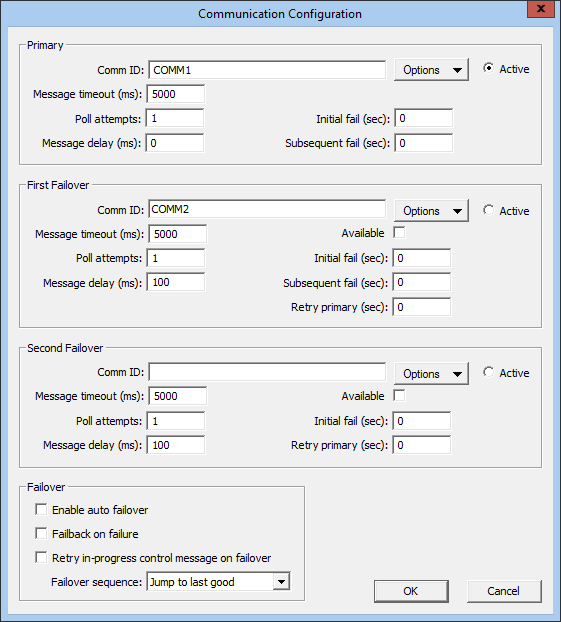
The Communication Configuration dialog box enables you to make advanced failover settings for up to 3 communication devices. The primary reason for alternate communication devices is to provide failover support. To access the Communication Configuration dialog box, open the Device page of a remote device and under Communications, click Advanced.
|
| Sample Communication Configuration Dialog Box |
Properties
The following table lists and describes the fields found on the Communication Configuration dialog box.
| Property | Description |
|---|---|
|
Primary |
|
|
Comm ID |
Device ID |
|
Options |
This button provides several communications-oriented options. Options are as follows:
Note: The Override settings option is not available for IoT or OPC devices. |
|
Active |
Select Active to assign a communication device as your active communication device. By default, this is your Primary communication device; but you can manually set the First Failover or Second Failover communication device. This setting is only to be used when Enable auto failover is unchecked. |
|
Message timeout (ms) |
The time (in milliseconds) to wait between attempts to send messages to the field device before marking the attempt as failed. |
|
Poll Attempts |
The number of poll attempts allowed before marking the poll as failed. |
|
Initial fail (sec) |
Specifies the number of seconds to wait since the last successful communication sequence before a message failure activates the failover process. A value of 0 means that failover will occur immediately on communication failure. See Note below table. |
|
Message delay (ms) |
The delay (in milliseconds) to wait before sending a message to the field device. |
|
Subsequent fail (sec) |
This setting comes into effect after a remote device has failed over and been restored. It performs the same function as the Initial fail (sec) value, but remains in effect only as long as the original channel (Primary or First Failover) continues to fail. As soon as there is successful communication with the original channel (Primary or First Failover), the Initial fail (sec) value comes back into effect as the determinant of failover behavior. See Note below table. Note: Not available for the Second Failover device. |
|
First Failover / Second Failover— additional properties |
|
|
Available |
Check this box to make First Failover and/or Second Failover devices available for failover. Leaving this box unchecked for secondary and/or tertiary devices means that they cannot be failovered to; they are in effect inactive. |
|
Retry primary (sec) |
Specifies the number of seconds to wait before setting the remote device back to the primary communication channel. A value of 0 causes a switch back to Primary for the next message execution cycle. |
|
Failover |
|
|
Enable auto failover |
Check this box to enable automatic failover capabilities. Doing so activates the three related timer control fields (Initial fail (sec), Subsequent fail (sec), and Retry primary (sec)). You can manually override these automatic settings at any time. |
|
Failback on failure |
Check this box to failback after a failover has occurred. |
|
Retry in-progress control message on failover |
Check this box if you want a Retry In Progress message to appear when failover occurs. |
|
Failover Sequence |
Jump to last good— Select this option if you want failover to first go to the last known functional communication line. Try in order— Select this option if you want failover to go in order of priority from First Failover to Second Failover. |
Note: For the MQTT Comm EIE, these settings work in conjunction with the Connection timeout (sec) and Reconnect interval (sec) settings. See MQTT Comm EIE for more information.
Associated System UDCs
There are five system UDCs that can be used to populate points on a per remote device basis to help track the configuration of the communication device and the operation of the failover process.
| UDC | UDC Description | Description |
|---|---|---|
|
SYDEVCOMID |
Device Comm ID |
The device ID of the currently active communication device. |
|
SYDEVCOMLN |
Curr Comm Line |
The currently active communication line. 1 for primary, 2 for secondary, 3 for tertiary. |
|
SYDEVPCOM |
Primary Comm ID |
The name of the configured primary communication device. |
|
SYDEVPRFO |
Primary Comm Failover |
This point is set to 1 whenever the RTU has failed over from primary to secondary based on the Initial fail (sec) setting. It is not reset to 0 until there is successful communication with the primary communication device. |
|
SYDEVSCOM |
Secondary Comm ID |
The name of the configured secondary communication device. |
Associated MSS Command Parameters
The COMM NAME command parameter type is called Curr. Comm ID. It represents the currently active communication device. Existing schedules tied to this parameter type need to be evaluated carefully before implementing failover. The resolve list for this parameter type varies based on the current failover state.
Three command parameter types are available: Primary Comm ID, Secondary Comm ID, and Tertiary Comm ID. They represent the primary, secondary, or tertiary communication devices. Switching Curr. Comm ID (or COMM NAME) to Primary Comm ID is a way to preserve the functionality of existing MSS entries that are tied to communication device identity.


