Emerson ROCPlus User Programs
User programs provide the Emerson ROCPlus hardware device with extended functions and applications (such as gas chromatograph support or liquid calculations).
CygNet provides varying degrees of support for user programs. Many are fully supported in the form of predefined TLP definitions, data groups, dialogs, and tie-ins to the CygNet measurement system. Other standard Emerson user programs will be detected and may have TLP definitions, but do not have full CygNet support. The following table provides a list of Emerson ROCPlus user programs that are recognized by CygNet, along with an Emerson document reference.
| Emerson ROCPlus User Program | Emerson Document Reference |
|---|---|
| 300 Emulation | Form A6152 for ROC800 devices |
| Field Bus | Form A6268 for ROC800 devices |
| Gas Chromatograph | Form A6145 for ROC800 devices |
| Keypad Display | Form A6162 for ROC800 devices |
| Liquid Allocation | Form A6224 for ROC800 devices |
| Level Sensor | Form A6142 for ROC800 devices |
| V-Cone | Form A6149 for ROC800 devices |
For a complete list of the standard Emerson user programs and their TLP definitions, refer to the Emerson Process Control website or contact an Emerson representative.
CygNet cannot provide support for third-party user programs since there is not a standard definition of the user-defined points. However, a customer can build his own data groups in the device template file using the configurable TLP model, or build data groups with the DDS editor by using the Generic TLP data group. The Generic TLP data group is used to define or override any TLP definition to specify the attributes, such as data type, in order to support third-party user program TLPs. Prior to v8.2.0, third-party or unsupported TLPs were required to have a data type of float.
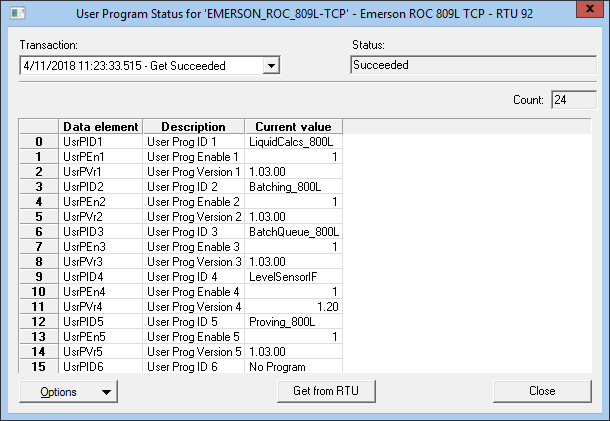
CygNet has two data groups that supply information on the user programs installed on a device. The User Program Status data group provides a list of installed user programs.
Note: The attribute minUProgVer can be configured in the device template file to specify the minimum user program version supported for the specified TLP of the DEID. This attribute is used in conjunction with the UserProgramToPointType definition in the device template file that defines the relationship between a user program ID and a point type.
Note: If the user program version information has not been successfully retrieved from the field device, any TLP using the minUProgVer attribute will be excluded. To retrieve the user program version information, poll the "ROC Config" (RtuConfig) data group or the "User Program Status" (UserPgStat) data group.
Example
|
<LiqMeter niceName="Liquid Meter Run Configuration" devDG="false" autoAdd="0" maxCnt="6" baseOrd="1" ordLabel="Meter#" majorRev="1" minorRev="1" cfgTLP="true" cfgModel="800L" readOpCode="167" writeOpCode="166"> <dgElements tlpType="204" secLev="4"> <FlowInc desc="Flow Increment" tlpParm="252" type="r8" readOnly="true" minUProgVer="1.03"/> <HisSeg desc="History Segment" tlpParm="253" type="ui1" minUProgVer="1.03"/> </dgElements> </LiqMeter> <UserProgramToPointType> <UserProgram ID="LiquidCalcs_800L" PointType="204"/> </UserProgramToPointType> |
|
User Program Status Data Group |
The User Program Configuration data group provides the device configuration of each user program, including whether it’s enabled.
|
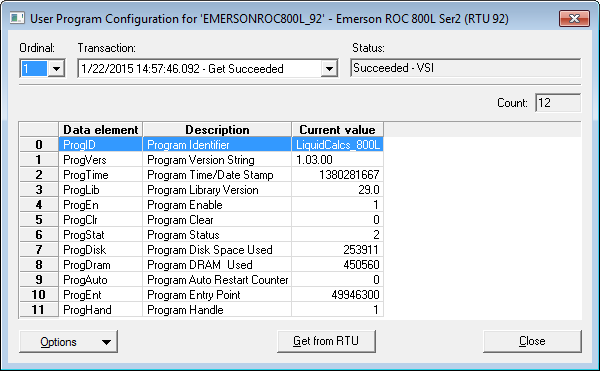
User Program Configuration |