Editor – Device Page
Use the Device page to view, select, and modify general device settings for a remote device. These settings are the minimum required for remote device functionality. The Device page of a remote device editor typically contains settings unique to its field device type(s) or to the EIE itself.
|
Click the thumbnail to see an example |
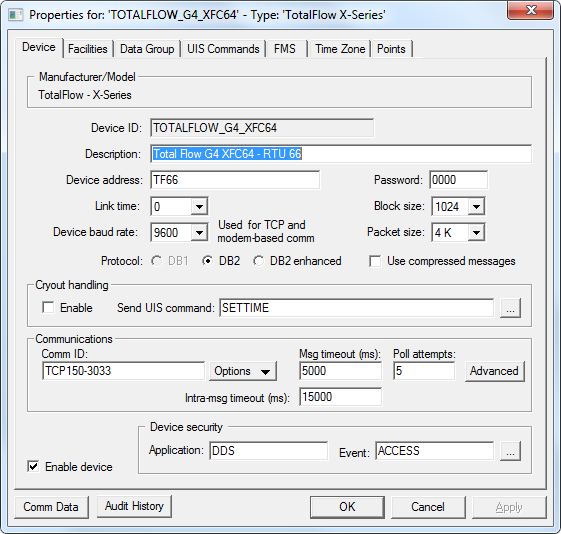
For more information, see Remote Device Editors.
Device Properties
The following table lists and describes specialized Device page properties for this device. See Device Page for common properties.
| Property | Description | ||||||||||||
|---|---|---|---|---|---|---|---|---|---|---|---|---|---|
|
Device ID |
The unique identifier of an instance for this device. This free-form name must be unique in the DDS and the FAC. That is, it must be a name not used by any other communication device, import/export device, remote device, or facility. CygNet naming standards for device ID are as follows:
|
||||||||||||
|
Description |
Displays a user-defined description of the remote device. A free-form description of the device. 32 character maximum. |
||||||||||||
|
Device address |
The unique identifier of an instance of a device. |
||||||||||||
|
Password |
Must match the password configured on the field device. |
||||||||||||
|
Link time |
How frequently (in seconds) a device wakes up to listen for incoming requests. For the Totalflow EIE, this is 0, 1, 2, or 4 seconds, where 0 effectively means a constant listen. For the API to connect with a device, it must send its request long enough for a device to hear it. The Link time setting must match the link time configured on the field device. |
||||||||||||
|
Block size |
The size of blocks, or discrete portions, of a packet. The Totalflow API can be configured to re-request a single block of a packet if the original request returns a defective block. |
||||||||||||
|
Device baud rate |
Device baud rate helps determine initial request format and maximum time allowed to await a response. If your communication device is direct serial or serial radio, Device baud rate is set by the communication device. In this case, changing the setting on the Totalflow remote device editor has no effect on your setup. All other communication device types use the Device baud rate set on the remote device editor, unless no setting is chosen. If no setting is chosen, the Totalflow remote device uses the baud rate expected from the communication device. The Device baud rate setting must match the baud rate configured on the field device. |
||||||||||||
|
Packet size |
The size of individual message transactions from the field device. |
||||||||||||
|
Protocol |
Select the appropriate supported protocol for your Totalflow device: DB1, DB2 or DB2 Enhanced.
Register-based and trend-based data groups are not supported by the DB1 protocol. Register-based and trend-based data groups are supported by the DB2 protocol as well as the DB2 Enhanced protocol, but their uses are device specific. |
||||||||||||
|
Use compressed messages |
Message compression is only available for Totalflow G4 and later devices. |
||||||||||||
|
Cryout handling |
|||||||||||||
|
Enable |
Check this box to process cryouts received from a field device. |
||||||||||||
|
Send UIS command |
The UIS command issued on cryout. It can be a single command or a group of commands. Add and configure commands on the UIS Commands page. UIS commands function in addition to a manufacturer's specified cryout responses, which are hard coded into the device driver. |
||||||||||||
| Communications | |||||||||||||
|
Comm ID |
The name of the communication device this remote device uses. Click the Options button to select from the choices in the drop-down menu. See Communication Devices. |
||||||||||||
|
Options |
This button provides several communications-oriented options. Options are as follows:
|
||||||||||||
|
Msg timeout (ms) |
Msg timeout (ms) displays the time in milliseconds a remote device waits for a valid response from an associated field device before timing out. This setting is not the same as similar settings on the currently active communication device and device failover settings. But these settings work in conjunction with one another. |
||||||||||||
|
Poll attempts |
The number of times a remote device attempts to poll an associated field device until a valid response is received within the message timeout limit. If a poll is successful, no more poll attempts are made. If a poll is unsuccessful, the remote device continues to attempt polls until a valid response is received or until the Poll attempts setting is reached, whichever comes first. |
||||||||||||
|
Advanced |
Click to access advanced communication device failover settings. |
||||||||||||
|
Intra-msg timeout (ms) |
The time a host waits for more data from a field device after it has received header data. This timeout occurs when a partial response was received. |
||||||||||||
|
Enable device |
Select whether to enable or disable the device. The default setting is disabled. If an invalid configuration is detected, the device will automatically be disabled. The device can be re-enabled after the invalid configuration is fixed. |
||||||||||||
| Device security | |||||||||||||
|
Application |
Defines the ACS security application name used to validate the users of this device. See Applications, Events, Permissions. |
||||||||||||
|
Event |
Defines the ACS security event used to validate users of this device. Click … to select the security event. See Applications, Events, Permissions. |
||||||||||||
|
Comm Data |
Enables you to open a modeless Communications Data Viewer dialog box. |
||||||||||||
|
Audit History |
Enables you to view the audit trail for the device. |
||||||||||||


