Configuring Gas Load Settings
The System Gas Load Settings dialog box is where you configure gas load units and several storage UDCs for Energy and Volume values used by meters or meter groups. It is also where you set primary and secondary forecast override UDCs for Energy and Volume values. It is also where you configure Validation and Filling Rules for input data.
To Configure Gas Load Settings
- Click the System Settings page of the ELF Editor.
- Configure the system properties as described in Configuring System Settings.
- Click Gas Load Settings to view the System Gas Load Settings dialog box.
- Configure the settings using the properties described below.
|
System Gas Load Settings |
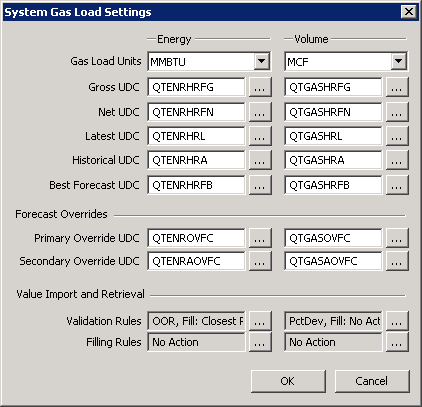
The properties for each section on the System Gas Load Settings dialog box are described below.
Energy and Volume Units and UDCs
| Parameter | Description |
|---|---|
|
Gas Load Units |
The base units used by all corresponding points that store Energy and/or Volume values. The value of the Gas Load Units corresponds to one of the valid units or description for the Energy or Volume category for the Primary Units field in the PNT record. See PNT Engineering Units for more information. |
|
Gross UDC |
The Uniform Data Code (UDC) used by meters or meter groups to store the "gross" gas load forecast values to a point associated with their linked facility in the SCADA system. Click … to select an ELF-Related UDC. |
|
Net UDC |
The Uniform Data Code (UDC) used by meters or meter groups to store the "net" gas load forecast values to a point associated with their linked facility in the SCADA system. Click … to select an ELF-Related UDC. |
|
Latest UDC |
The Uniform Data Code (UDC) used by meters or meter groups to store the "latest" forecast gas load values to a point associated with their linked facility in the SCADA system. Click … to select an ELF-Related UDC. |
|
Historical UDC |
The Uniform Data Code (UDC) used by meters or meter groups to store the "historical" gas load values to a point associated with their linked facility in the SCADA system. Click … to select an ELF-Related UDC. |
|
Perfect Forecast UDC |
The Uniform Data Code (UDC) used by meters or meter groups to store the results of the variance analysis process. This UDC represents the forecast values generated based upon actual or "perfect" weather inputs and can be used to compare a forecasted trend with that of actual gas load to assess neural network forecasting accuracy. Click … to select an ELF-Related UDC. |
Forecast Overrides
In order to allow forecasted hourly values to be overridden with externally provided (imported) forecast values, so that the best gas load values for meters or meter groups with a known gas load schedule are used as the forecast, up to two override sources must be configured for Energy and Volume values.
See Configuring Value Adjustment for more information about forecast overrides.
| Parameter | Description |
|---|---|
|
Primary Override UDC |
The first Uniform Data Code (UDC) used by meters or meter groups to retrieve the override values from a point associated with their linked facility in the SCADA system. Click … to select an ELF-Related UDC. |
|
Secondary Override UDC |
The secondary Uniform Data Code (UDC) used by meters or meter groups to retrieve the alternate override values from a point associated with their linked facility in the SCADA system. Click … to select an ELF-Related UDC. |
Value Import and Retrieval
| Parameter | Description |
|---|---|
|
Specifies the system-level data validation rules for the associated data item type. Click … to configure Validation Rules. See Configuring Data Validation Rules. |
|
|
Specifies the system-level data filling rule for missing data for the associated data item type. Click … to select a Filling Rule. See Configuring Data Filling Rules. |
More:
 Configuring Data Validation Rules
Configuring Data Filling Rules


