Energy Load Forecasting
Once a neural network definition has been successfully trained and made available to the energy load forecasting process, the ELF system uses the trained neural network definition to generate energy load forecast values for its associated meter or meter group. Neural network definitions are used to generate "gross" forecasts based on their configured forecast inputs values associated with the meter or meter group assigned to the neural network definition.
Forecasting Process Flow
The diagram below shows the forecasting process flow.
|
Forecasting Process Flow |
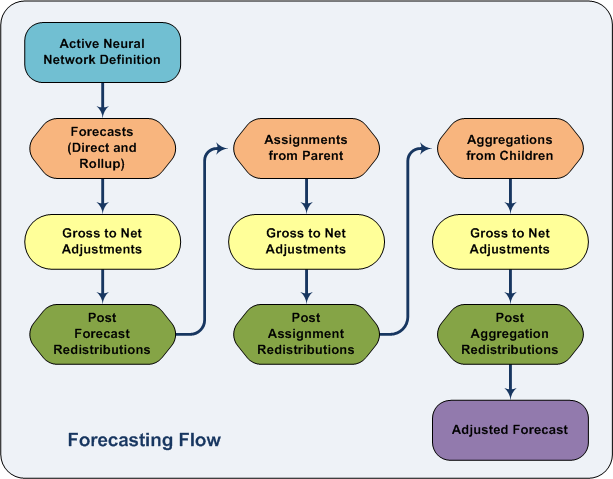
The energy load forecasting process utilizes the "gross" energy load values calculated to perform all direct forecasts, rollup forecasts, assignments from parents, aggregations from children, redistributions, and adjustments, that are dependent upon the new "gross" energy load forecast value in the following order.
- Identify all qualified neural network definitions for a given forecast hourly range.
- Verify that the specified forecast input data is available and valid for all qualified neural network definitions.
- Verify that proper storage is configured for all energy load forecast output values.
- Transform all input data based upon "lag effect" settings specified in the neural network definitions.
- Generate "gross" energy load forecast values for all qualified neural network definitions.
- Perform all relevant meter and meter group adjustments producing associated "net" energy load forecast values.
- Perform any relevant redistribution rules configured to run after the initial forecast step.
- Perform all relevant assignments from the meter groups' "net" energy load forecast values to their children's "gross" energy load forecast values.
- Perform all meter and meter group adjustments required by these newly assigned "gross" energy load forecast values producing associated "net" energy load forecast values.
- Perform any relevant redistribution rules configured to run after the assignment step.
- Perform all relevant aggregations from the "net" energy load forecast values of the children of meter groups to the groups' "gross" energy load forecast values.
- Perform all meter group adjustments required by these newly assigned "gross" energy load forecast values producing associated "net" energy load forecast values.
- Perform all relevant redistributions as defined in the system's redistribution rules configured to run after all other reassignments have been performed.
Value Assignment Type
Value assignments are the different ways in which a meter or meter group can receive its forecasted values. The method of assignment is indicated by the Value Assignment Type attribute for the meter or meter group (configured on the System Settings page). The Value Assignment types in the ELF system are described below.
Direct Forecast
Direct forecast is the process by which a meter or meter group’s gross forecast value is generated by a neural network. Once the input data has been retrieved and manipulated as described above, the normalized inputs are fed into the associated neural network engine. The resulting output of the calculation will be the gross forecast value.
Rollup Forecast
Rollup forecast is the process where a meter group's gross forecast values can be assigned based on the rollup of the actual historical gas load values of the group's children.
See Viewing Historical Value Rollup Rules for more information.
Assignment from Parent
A meter or meter group can be assigned a forecast value from its parent group instead of directly forecasting its own value. In some situations it might be more useful to perform forecasting at a group level, and then assign forecast values down to child meters.
See Configuring Assignment From Parent for more information.
Aggregation from Children
If a meter group is not directly forecasting its own forecast value, it can be assigned a value based on an aggregation of the forecasts of its children. This may be useful in displaying a forecast value for a logical grouping that does not have any meaningful associated input data, and thus no calculated forecast. An aggregation that is representative of child meter or meter groups may be useful for reporting purposes.
Group aggregation configuration is made in the form of an arithmetic expression that supports the addition, subtraction, multiplication, division, absolute value, and parenthesis operators. The operands of the expression can be a constant value term or a meter or meter group facility tags. In the case of a facility tag, the net forecast value for the meter or meter group is substituted. Any meter or meter group facility tags contained in the expression must be child facilities of the target group.
Grouping and aggregation are methods that can be used to create a multi-directional meter representation. For example, a group can be created with a receipt and delivery meter as children, and an aggregation can be setup for the group that subtracts the receipt meter’s forecast from the delivery meter’s forecast.
See Configuring Aggregation From Children for more information.
Redistribution
Redistributions allow a meter or meter group to retrieve its gross forecast value from another meter or meter group’s net forecast value. For example, this can be useful when a newly created meter is not ready to have an associated trained neural network. For the time being, it can receive a forecast value from a meter in a similar weather location.
The ELF system support two types of redistribution: by expression and balancing.
- Expression Redistribution — Expression redistribution configuration is made in the form of an arithmetic expression of the same sort as described for Aggregation. The difference for redistributions is that there is no restriction on the particular meter or meter group facilities referenced as operands in the expression. Expression redistributions can be configured to occur at various points in the order of forecasting operations: after all direct forecasting, after all assignments from parent groups, or after all group aggregation. See Configuring Expression Redistribution for more information.
- Balancing Redistribution — Balancing Redistribution allows you to conditionally distribute a calculated forecast value for a group of meters based on whether the difference of two summed sets of meters is positive or negative. Balancing redistributions can be configured to occur at various points in the order of forecasting operations: after all direct forecasting, after all assignments from parent groups, or after all group aggregation. See Configuring Balancing Redistribution for more information.
Value Adjustments
Value adjustments are configured on a meter or meter group basis for a specified time period. An adjustment occurs whenever a meter or meter group’s gross point value is set by any of the described Value Assignment methods. The adjustment will be applied to the gross forecast value immediately upon the gross value being assigned, and output to the meter or meter group’s net forecast point. This will ensure that all adjustments are completed before redistributions are processed.
Three adjustment types are available:
- Net = Gross - Copy the gross forecast to the net forecast value.
- Net = Linear Equation - The two required parameters will be the numeric coefficients A and B in the linear formula: net = A * gross + B.
- Net = Overridden Forecast Value - It is possible to override forecasted hourly values with externally provided forecast values, so that the best gas load values for meters or meter groups with a known gas load schedule are used as the forecast. Two override sources are supported (primary and secondary), one each for Energy and Volume values, to allow for a staged override of forecast values. The override sources can be prioritized and configured to indicate the time interval to override with the lower priority source, after the higher priority source has been used for a specified time interval.
See Configuring Value Adjustment for more information.
Forecasting Tasks
An energy load forecasting task is completed as an entire body of work for all effective neural network definitions. The forecast process for all neural network definitions is triggered by one of the following methods.
- Forecasting on demand by the execution of a direct user command for all qualified neural network definitions.
- Forecasting can be scheduled to execute for all qualified neural network definitions.
Configuration
- Forecasting commands are configured on the UIS Commands page of the ELF Editor. See Configuring UIS Commands.
- Value Assignment for a meter or meter group is configured on the Meter/Groups Settings dialog box. See Configuring Meters/Meter Group Assignment Settings.
- Direct Forecast is configured on the Meter/Groups Settings dialog box. See Configuring Meters/Meter Group Assignment Settings.
- Rollup Forecast is configured on the Edit Historical Value Rollup Rule dialog box. See Viewing Historical Value Rollup.
- Assignment from Parent is configured on the Assignment Rules for Children dialog box. See Configuring Assignment From Parent.
- Aggregation from Children is configured on the Edit Aggregation Rule dialog box. See Configuring Aggregation From Children.
- Redistribution is configured on the Edit Redistribution Rule dialog box. See Configuring Expression Redistribution.
- Balancing Redistribution is configured on the Edit Balancing Redistribution Rule dialog box. See Configuring Balancing Redistribution.
- Value Adjustment is configured on the Adjustment Rules dialog box. See Configuring Value Adjustment.
- The Forecasting log can be viewed on the Device page. Configuring the ELF Device.
To address questions or circumstances beyond the scope of the CygNet Help, Additional CygNet Resources are available.


