Business Object Builder Installation
The CygNet Business Object Builder (CygBOB) can be installed using the CygNet Client Installer (CInstall.exe) for installation on workstations using CygNet, or using the CygNet Business Object Builder Installation application for installation on workstations not using CygNet.
Before You Install
For successful installation of the CygNet Business Object Builder (CygBOB), minimum hardware and software requirements must be met. See the CygNet v9.8 System Requirements for more information. The following applications must be installed prior to installing CygBOB:
- Microsoft Edge browser
- MSXML 6.0
- Microsoft Visual C++ Redistributable for Visual Studio 2015-2019 (x86) - v14.28.29325 or later
- Microsoft .NET Framework, in accordance with the CygNet system requirements.
- ODBC must be installed on the server running the UIS and the Enterprise Operations EIE.
To Install CygNet Business Object Builder on Workstations Using CygNet
- Open the CygNet Client Installer (Start Menu > All Programs > CygNet > CygNet Client Installer). The CygNet Client Installer/Launcher dialog box will be displayed.
|
Business Object Builder Installation |
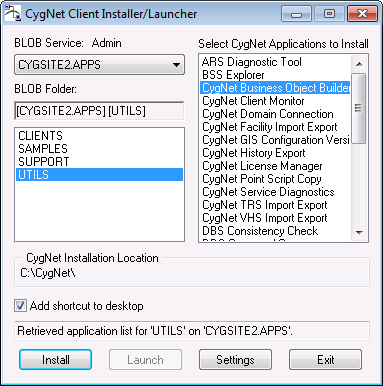
- On the Blob Service: Admin drop-down menu, select the APPS Service.
- In the Blob Folder list select UTILS.
- In the Select CygNet Applications to Install list select CygNet Business Object Builder.
- Click the check box adjacent to Add shortcut to desktop to select/clear this feature.
- Click Install. A confirmation message will be displayed asking if you want to start the utility.
- Select Yes to start CygNet Business Object Builder.
To Install CygNet Business Object Builder on Workstations Not Using CygNet
- In the Setup Folder, double-click to select the CygNetBusinessObjectBuilderSetup application. The CygNet Business Object Builder installation dialog box will be displayed.
- Follow instructions provided by the Installation application to guide you through installation of the CygNet Business Object Builder.
See Troubleshooting Enterprise Objects for more information.


