History Operations
| Read Operations | Description |
|---|---|
|
Returns value history records for specified points, based on parameters. |
|
|
Returns point value data for a set of history records associated with a specified set of reference times. The returned record set will show if no data is available for one of the specified reference times within the tolerance range, and indicate where the closest values are located, for troubleshooting purposes. |
GetHistoryValues
Given a service name (VHS, UIS or CVS), a point tag, optional beginning/end times and/or rollup specifications, and a list of historical point attributes to return, this operation will return an XML response containing a list of history entry timestamps, each with the point attributes requested. Because the list of history entries may be lengthy, a maximum number of entries can be specified to limit the size of the response XML. If the number of matching entries exceeds the maximum specified, the response XML will include the timestamp and optional ordinal (necessary if there is more than one entry at the same timestamp) of the next entry. To continue the operation, the same request must then be repeated, with the additional inclusion of the timestamp and/or ordinal from the last request. The return XML will indicate success or failure.
Usage
The following table lists and describes all of the child elements of the request node (<GetHistoryValuesReq>).
| Element Name | Required | Description |
|---|---|---|
|
SvcName |
Yes |
The Site.Service to which to connect. This parameter must specify the name of a VHS, UIS, or CVS Site.Service. If a UIS or CVS is specified, the service will resolve to its associated VHS. |
|
Tag |
Yes |
The point tag for which to retrieve history. |
|
HistoryParameters |
No |
A set of parameters which specify the maximum number of entries to return, the time range for alarms to retrieve, rollup information, and, if applicable, the time of the next entry to retrieve (if the request is a continuation from a previous request). |
|
AttrsToExport |
Yes |
Indicates which attribute values to include for each history value in the response. Values include:
Note: If <AttrsToExport> is left empty, it will return <PointValue> and <PointTimestamp> by default. |
Target Services
The service name node (<SvcName>) must specify the name of a VHS, UIS, or CVS Site.Service. If a UIS or CVS is specified, the service will resolve to its associated VHS.
Examples
Request
The following example represents the first request in a series of continuations.
<?xml version="1.0"?>
<CygNetEnterpriseOperations xmlns="https://CygNetSCADA.com/Schemas/CygNetEnterpriseObjectsnnn">
<GetHistoryValuesReq>
<SvcName>CYGDEMO.SVCMON</SvcName>
<Tag>CYGDEMO.SVCMON:TEST1</Tag>
<HistoryParameters>
<EarliestTime>2023-09-01T00:00:00Z</EarliestTime>
<LatestTime>2023-09-14T00:00:00Z</LatestTime>
<RollupType>Calc Last</RollupType>
<RollupPeriod>42</RollupPeriod>
<RollupUnits>Hours</RollupUnits>
<MaxEntries>5</MaxEntries>
</HistoryParameters>
<AttrsToExport>
<PointValue/>
<PointTimestamp/>
</AttrsToExport>
</GetHistoryValuesReq>
</CygNetEnterpriseOperations>Response
The following example represents a successful response, including a continuation element (<NextEntry>).
<?xml version="1.0" encoding="UTF-8"?>
<CygNetEnterpriseOperations xmlns="https://CygNetSCADA.com/Schemas/CygNetEnterpriseObjectsnnn">
<GetHistoryValuesResp>
<HistoryEntry>
<PointValue>138.438</PointValue>
<PointTimestamp>2023-09-01T19:00:00.000Z</PointTimestamp>
</HistoryEntry>
<HistoryEntry>
<PointValue>138.438</PointValue>
<PointTimestamp>2023-09-01T20:00:00.000Z</PointTimestamp>
</HistoryEntry>
<HistoryEntry>
<PointValue>138.438</PointValue>
<PointTimestamp>2023-09-01T21:00:00.000Z</PointTimestamp>
</HistoryEntry>
<HistoryEntry>
<PointValue>138.438</PointValue>
<PointTimestamp>2023-09-01T22:00:00.000Z</PointTimestamp>
</HistoryEntry>
<HistoryEntry>
<PointValue>138.438</PointValue>
<PointTimestamp>2023-09-01T23:00:00.000Z</PointTimestamp>
</HistoryEntry>
<NextEntry>
<Time>2023-09-02T00:00:00.000Z</Time>
</NextEntry>
<OperationResults success="true" resp_timestamp="2023-11-10T01:36:51.137Z" exec_duration="PT0.030S" />
</GetHistoryValuesResp>
</CygNetEnterpriseOperations>Request
The following example represents the next request in a series of continuations, based on the <NextEntry> element from the above response.
<?xml version="1.0"?>
<CygNetEnterpriseOperations xmlns="https://CygNetSCADA.com/Schemas/CygNetEnterpriseObjectsnnn">
<GetHistoryValuesReq>
<SvcName>CYGDEMO.SVCMON</SvcName>
<Tag>CYGDEMO.SVCMON:TEST1 </Tag>
<HistoryParameters>
<EarliestTime>2023-09-01T00:00:00Z</EarliestTime>
<LatestTime>2023-09-14T00:00:00Z</LatestTime>
<RollupType>Calc Last</RollupType>
<RollupPeriod>42</RollupPeriod>
<RollupUnits>Hours</RollupUnits>
<MaxEntries>5</MaxEntries>
<NextEntry>
<Time>2023-09-02T00:00:00.000Z</Time>
</NextEntry>
</HistoryParameters>
<AttrsToExport>
<PointValue/>
<PointTimestamp/>
</AttrsToExport>
</GetHistoryValuesReq>
</CygNetEnterpriseOperations>Response
The following example represents a successful response, continuing from the time specified in the <NextEntry> element in the above request.
<?xml version="1.0" encoding="UTF-8"?>
<CygNetEnterpriseOperations xmlns="https://CygNetSCADA.com/Schemas/CygNetEnterpriseObjectsnnn">
<GetHistoryValuesResp>
<HistoryEntry>
<PointValue>138.438</PointValue>
<PointTimestamp>2023-09-02T00:00:00.000Z</PointTimestamp>
</HistoryEntry>
<HistoryEntry>
<PointValue>138.438</PointValue>
<PointTimestamp>2023-09-02T01:00:00.000Z</PointTimestamp>
</HistoryEntry>
<HistoryEntry>
<PointValue>138.438</PointValue>
<PointTimestamp>2023-09-02T02:00:00.000Z</PointTimestamp>
</HistoryEntry>
<HistoryEntry>
<PointValue>138.438</PointValue>
<PointTimestamp>2023-09-02T03:00:00.000Z</PointTimestamp>
</HistoryEntry>
<HistoryEntry>
<PointValue>138.438</PointValue>
<PointTimestamp>2023-09-02T04:00:00.000Z</PointTimestamp>
</HistoryEntry>
<NextEntry>
<Time>2023-09-02T05:00:00.000Z</Time>
</NextEntry>
<OperationResults success="true" resp_timestamp="2023-11-10T01:36:57.810Z" exec_duration="PT0.031S" />
</GetHistoryValuesResp>
</CygNetEnterpriseOperations>The following example represents an unsuccessful response.
<?xml version="1.0" encoding="UTF-8"?>
<CygNetEnterpriseOperations xmlns="https://CygNetSCADA.com/Schemas/CygNetEnterpriseObjectsnnn">
<GetHistoryValuesResp>
<OperationResults success="false" resp_timestamp="2023-07-30T22:13:21.196Z" exec_duration="PT0.002S">
<OperationResult type="ERROR" code="50003">Security check failed for ACS application ENTOPS and event ACCESS0</OperationResult>
<OperationResult type="ERROR" code="50208">You are not permitted to execute this operation</OperationResult>
</OperationResults>
</GetHistoryValuesResp>
</CygNetEnterpriseOperations>
GetHistoryRecordSet
Given a set of reference times, tolerance range, and a set of point tags, this operation will return an XML response containing a set of point data associated with the specified reference times. If the retrieved record set contains no data for a specified reference time within the tolerance range, that information is also included in the response. Because the set of records sets may be lengthy, a maximum number of entries can be specified to limit the size of the response XML. The reference time of the record set can be specified either by low and high interval or by point tag. Reference time can be filtered by facility ID and/or point UDC, or other facility and point attributes. Point selection can be filtered by facility type and/or point UDC, or other facility and point attributes. Unreliable data can be included or excluded in the response. The return XML will indicate success or failure.
Note: This operation was added to the v8.0.1+ Enterprise Operations schema, which must be enabled on the Native Operations page of the Enterprise Operations EIE.
Usage
The following table lists and describes the child elements of the request node (<GetHistoryRecordSetReq>).
| Element Name | Required | Description |
|---|---|---|
|
ReturnExtendedErrorReport |
No |
Indicates whether to included the times of the previous and following values for missing values in the response. |
|
IncludeUnreliable |
No |
Indicates whether to include unreliable data in the response. See Request Example Five below. |
|
MaxRecs |
Yes |
The maximum number of history records to return in the response. Note: The "history record set" is the entire set of "history records" returned in the response. The response always contains one and only one "history records set" that is composed of multiple "history records" up to the number specified in MaxRecs. |
|
RestartInfo |
No |
This element indicates whether there is any more data to fetch for this request. It is necessary to pass into a second request to continue an operation that did not get all of the data requested. The contents of <RestartInfo> is for internal use only. See Response Example below. |
|
SvcName |
No |
The Site.Service to which to connect. This parameter must specify the name of a VHS, UIS, or CVS Site.Service. If a UIS or CVS is specified, the service will resolve to its associated VHS. |
|
TimeTolerance |
Yes |
The tolerance or range before or after each reference time to return in the response for the history record set. Tolerance can be a single value (using <Tolerance>) or a tolerance range (using <ToleranceRange> to specify a different value for before and after the reference time (using <LowLimit> and <HighLimit>). Refer to the Duration Data Type for more information about specifying time intervals in XML. Examples<Tolerance>PT90S</Tolerance> returns any value within 90 seconds of the reference time. <Tolerance>PT0S</Tolerance> returns exactly the reference time (zero seconds tolerance). <ToleranceRange> <LowLimit>PT1M</LowLimit> <HighLimit>PT3M</HighLimit> </ToleranceRange> returns any value 1 minute before or 3 minutes after the reference time. Note: See the diagram and the notes that follow for more information about how values are included in a returned record set. See Request Example One and Request Example Two below. |
|
ReferenceTime |
Yes |
The reference timestamp for the history record set to return in the response. Reference time can be specified in two ways:
Optionally, PointReference can include a <TimeBound> element, so that the set of reference times used is the timestamps of all the values for that point within the range. <TimeBound> is specified with a <LowLimit> and a <HighLimit>, as follows: Copy
PointReference
Filtering by PointReferenceTime by point can be filtered by any facility attribute (for example, facility ID) or any point property (for example, point UDC).
See Request Example Four below. |
|
PointsSet |
Yes |
The list of point tags for which to retrieve missing values. Filtering PointSelectionPointsSet can be filtered by any facility attribute (for example, facility ID) or any point property (for example, point UDC) in the same manner as ReferenceTime.
See Request Example Five below. |
|
AttrsToExport |
Yes |
Indicates which attribute values to include for each history record in the response. Values include:
Note: If <AttrsToExport> is left empty, it will return <PointValue> and <PointTimestamp> by default. |
Data Examples
The following diagram shows how values within tolerance ranges are returned for the GetHistoryRecordSet operation. See the Notes after the diagram for more information.
|
Click the thumbnail to see a |
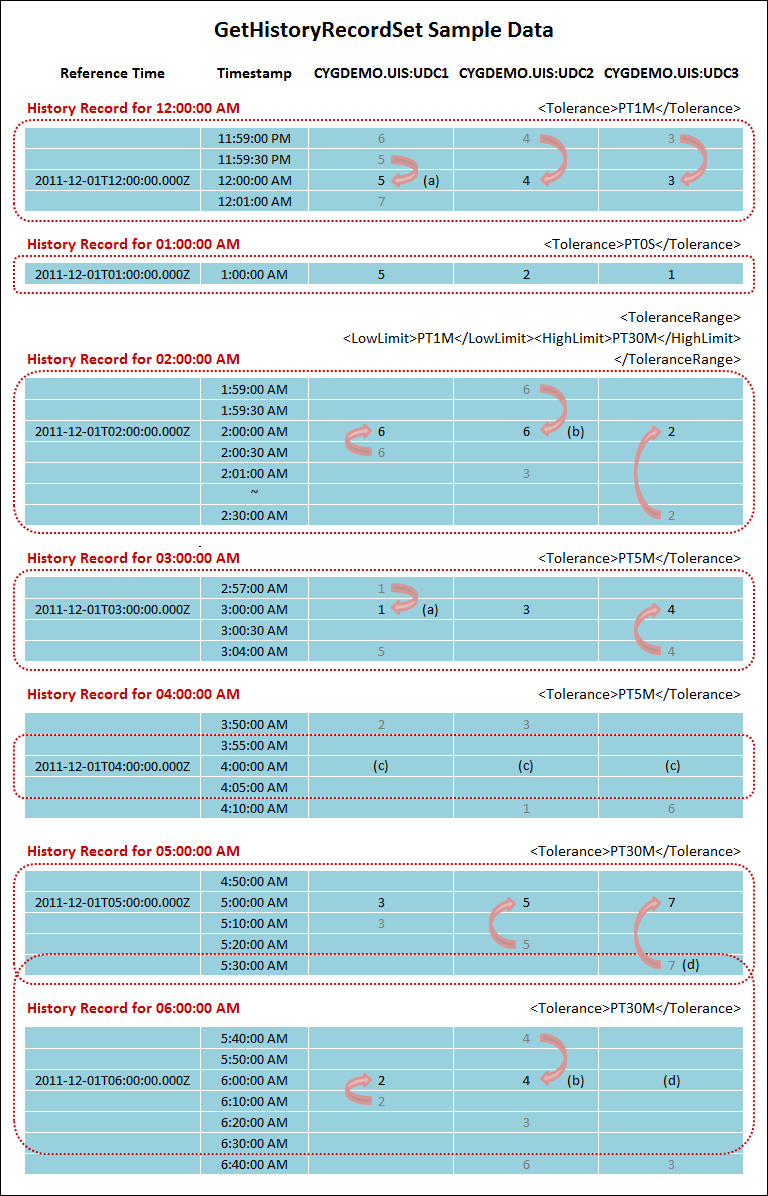
Diagram Notes
(a) Multiple Values Qualify — If two or more values fall within the requested tolerance range for a target reference time, the value in the closest timestamp is used, unless the value has already been used for a previous record. In the first example above, the value for 11:59:30 PM (5) is the closest, hence it is returned for the GetHistoryRecordSet operation.
(b) Two Values of Equal Distance — If two values within the requested tolerance range are equal distance from the target reference time, the earlier value will be used. In the above example, the values for 01:59:00 AM (6) and 02:01:00 AM (3) are equal distance from the target reference time. The value for 01:59:00 AM (6) is the earlier value, hence it is returned for the GetHistoryRecordSet operation.
(c) Missing Values — If no timestamps within the requested tolerance range contain values, the GetHistoryRecordSet operation returns a <MissingValue> and indicates where the closest <PreviousTime> or <FollowingTime> is located, if the ReturnExtendedErrorReport element was set to "true" in the request. See the Response Example below.
(d) Overlapping Tolerances — If a value falls within two overlapping tolerance ranges, the value included in the first tolerance range will be returned in the first record. The second record will not return that value, because the value has already been used for a previous record. In the example above, the value for 05:30:00 AM (7) falls within two tolerance ranges, but will be returned in the record for 05:00:00 AM only. The response for the 06:00:00 AM record will return a <MissingValue> and will indicate that the next <FollowingTime> is located at 06:40:00 AM (3).
Request Example One - TimeTolerance and ReferenceTime by Interval and PointsSet
The following request illustrates the use of an equal 1-minute tolerance range for <TimeTolerance>, <ReferenceTime> by <Interval> and <PointsSet> by <PointTag>.
<?xml version="1.0"?>
<CygNetEnterpriseOperations xmlns="https://CygNetSCADA.com/Schemas/CygNetEnterpriseObjectsnnn" >
<GetHistoryRecordSetReq>
<MaxRecs>1000</MaxRecs>
<TimeTolerance>
<ToleranceRange>
<LowLimit>PT1M</LowLimit>
<HighLimit>PT1M</HighLimit>
</ToleranceRange>
</TimeTolerance>
<ReferenceTime>
<IndexReference>
<LowLimit>2023-02-01T01:00:00Z</LowLimit>
<HighLimit>2023-06-01T11:00:00Z</HighLimit>
<Interval>PT1H</Interval>
</IndexReference>
</ReferenceTime>
<PointsSet>
<PointsList>
<PointTag>HOUSTON.UIS:GHRTEST1_GHRUDC1</PointTag>
<PointTag>HOUSTON.UIS:GHRTEST1_GHRUDC2</PointTag>
<PointTag>HOUSTON.UIS:GHRTEST1_GHRUDC3</PointTag>
</PointsList>
</PointsSet>
<AttrsToExport/>
</GetHistoryRecordSetReq>
</CygNetEnterpriseOperations>Request Example Two - Fixed TimeTolerance
The following request illustrates the use of a 90-second <TimeTolerance>.
<?xml version="1.0"?>
<CygNetEnterpriseOperations xmlns="https://CygNetSCADA.com/Schemas/CygNetEnterpriseObjectsnnn" >
<GetHistoryRecordSetReq>
<MaxRecs>1000</MaxRecs>
<TimeTolerance>
<Tolerance>PT90S</Tolerance>
</TimeTolerance>
<ReferenceTime>
<IndexReference>
<LowLimit>2023-02-01T01:00:00Z</LowLimit>
<HighLimit>2023-06-01T11:00:00Z</HighLimit>
<Interval>PT1H</Interval>
</IndexReference>
</ReferenceTime>
<PointsSet>
<PointsList>
<PointTag>HOUSTON.UIS:GHRTEST1_GHRUDC1</PointTag>
<PointTag>HOUSTON.UIS:GHRTEST1_GHRUDC2</PointTag>
<PointTag>HOUSTON.UIS:GHRTEST1_GHRUDC3</PointTag>
</PointsList>
</PointsSet>
<AttrsToExport/>
</GetHistoryRecordSetReq>
</CygNetEnterpriseOperations>Request Example Three - ReferenceTime by Point
The following request illustrates the use of a PointTag for the <ReferenceTime>.
<?xml version="1.0"?>
<CygNetEnterpriseOperations xmlns="https://CygNetSCADA.com/Schemas/CygNetEnterpriseObjectsnnn" >
<GetHistoryRecordSetReq>
<MaxRecs>1000</MaxRecs>
<TimeTolerance>
<Tolerance>PT0S</Tolerance>
</TimeTolerance>
<ReferenceTime>
<PointReference>
<PointTagSpec>
<PointTag>HOUSTON.UIS:GHRTEST1_GHRUDC1</PointTag>
</PointTagSpec>
</PointReference>
</ReferenceTime>
<PointsSet>
<PointsList>
<PointTag>HOUSTON.UIS:GHRTEST1_GHRUDC1</PointTag>
<PointTag>HOUSTON.UIS:GHRTEST2_GHRUDC2</PointTag>
<PointTag>HOUSTON.UIS:GHRTEST3_GHRUDC3</PointTag>
</PointsList>
</PointsSet>
<AttrsToExport/>
</GetHistoryRecordSetReq>
</CygNetEnterpriseOperations>Request Example Four - Filtered ReferenceTime
The following request illustrates the use of a filter for using a point tag for the <ReferenceTime>.
<?xml version="1.0"?>
<CygNetEnterpriseOperations xmlns="https://CygNetSCADA.com/Schemas/CygNetEnterpriseObjectsnnn" >
<GetHistoryRecordSetReq>
<MaxRecs>1000</MaxRecs>
<TimeTolerance>
<Tolerance>PT0S</Tolerance>
</TimeTolerance>
<ReferenceTime>
<PointReference>
<PointTagSpec>
<PointFilter>
<FacilityFilter>
<SingleExpr compare="EQ">
<FacilityId>GHRTEST1</FacilityId>
</SingleExpr>
</FacilityFilter>
<ForEachFacilityPointFilter>
<PointConfigFilter>
<SingleExpr compare="EQ">
<PointUniformDataCode>GHRUDC1</PointUniformDataCode>
</SingleExpr>
</PointConfigFilter>
</ForEachFacilityPointFilter>
</PointFilter>
</PointTagSpec>
</PointReference>
</ReferenceTime>
<PointsSet>
<PointsList>
<PointTag>HOUSTON.UIS:GHRTEST1_GHRUDC1</PointTag>
<PointTag>HOUSTON.UIS:GHRTEST2_GHRUDC2</PointTag>
<PointTag>HOUSTON.UIS:GHRTEST3_GHRUDC3</PointTag>
</PointsList>
</PointsSet>
<AttrsToExport/>
</GetHistoryRecordSetReq>
</CygNetEnterpriseOperations>Request Example Five - Filtered PointSelection
The following request example illustrates the use of a filter for <PointsSelection>.
<?xml version="1.0"?>
<CygNetEnterpriseOperations xmlns="https://CygNetSCADA.com/Schemas/CygNetEnterpriseObjectsnnn" >
<GetHistoryRecordSetReq>
<IncludeUnreliable>true</IncludeUnreliable>
<MaxRecs>1000</MaxRecs>
<TimeTolerance>
<Tolerance>PT90S</Tolerance>
</TimeTolerance>
<ReferenceTime>
<IndexReference>
<LowLimit>2023-02-01T01:00:00Z</LowLimit>
<HighLimit>2023-02-06T11:00:00Z</HighLimit>
<Interval>PT30M</Interval>
</IndexReference>
</ReferenceTime>
<PointsSet>
<PointsSelection>
<FacilityFilter>
<SingleExpr compare="EQ">
<FacilityType>WELL</FacilityType>
</SingleExpr>
</FacilityFilter>
<ForEachFacilityPointFilter>
<PointConfigFilter>
<SingleExpr compare="EQ">
<PointUniformDataCode>GHRUDC1</PointUniformDataCode>
</SingleExpr>
</PointConfigFilter>
</ForEachFacilityPointFilter>
</PointsSelection>
</PointsSet>
<AttrsToExport>
<PointValue/>
<PointTimestamp/>
</AttrsToExport>
</GetHistoryRecordSetReq>
</CygNetEnterpriseOperations>Response Example
The following example represents a successful response showing point values and timestamps <PointValue> and when values are missing <MissingValue>.
<?xml version="1.0" encoding="UTF-8"?>
<CygNetEnterpriseOperations xmlns="https://CygNetSCADA.com/Schemas/CygNetEnterpriseObjectsnnn">
<GetHistoryRecordSetResp>
.
.
.
<HistoryRecord reference_time="2023-02-01T09:00:00.000Z">
<Point point_tag="HOUSTON.UIS:GHRTEST1_GHRUDC1">
<PointValue>1</PointValue>
<PointTimestamp>2023-02-01T09:00:59.000Z</PointTimestamp>
</Point>
<Point point_tag="HOUSTON.UIS:GHRTEST2_GHRUDC2">
<PointValue>1</PointValue>
<PointTimestamp>2023-02-01T09:00:59.000Z</PointTimestamp>
</Point>
<Point point_tag="HOUSTON.UIS:GHRTEST3_GHRUDC3">
<PointValue>1</PointValue>
<PointTimestamp>2023-02-01T09:00:59.000Z</PointTimestamp>
</Point>
</HistoryRecord>
<HistoryRecord reference_time="2023-02-01T10:00:00.000Z">
<Point point_tag="HOUSTON.UIS:GHRTEST1_GHRUDC1">
<PointValue>2</PointValue>
<PointTimestamp>2023-02-01T10:00:58.000Z</PointTimestamp>
</Point>
<Point point_tag="HOUSTON.UIS:GHRTEST2_GHRUDC2">
<PointValue>2</PointValue>
<PointTimestamp>2023-02-01T10:00:58.000Z</PointTimestamp>
</Point>
<Point point_tag="HOUSTON.UIS:GHRTEST3_GHRUDC3">
<PointValue>2</PointValue>
<PointTimestamp>2023-02-01T10:00:58.000Z</PointTimestamp>
</Point>
</HistoryRecord>
.
.
.
<HistoryRecord reference_time="2023-03-14T16:00:00.000Z">
<Point point_tag="HOUSTON.UIS:GHRTEST1_GHRUDC1">
<MissingValue>
<PreviousTime>2023-02-06T19:00:49.000Z</PreviousTime>
<FollowingTime></FollowingTime>
</MissingValue>
</Point>
<Point point_tag="HOUSTON.UIS:GHRTEST2_GHRUDC2">
<MissingValue>
<PreviousTime>2023-02-06T19:00:49.000Z</PreviousTime>
<FollowingTime></FollowingTime>
</MissingValue>
</Point>
<Point point_tag="HOUSTON.UIS:GHRTEST3_GHRUDC3">
<MissingValue>
<PreviousTime>2023-02-06T19:00:49.000Z</PreviousTime>
<FollowingTime></FollowingTime>
</MissingValue>
</Point>
</HistoryRecord>
</HistoryRecords>
<RestartInfo complete="false" record_count="1000">
<RestartTime>40616.6666666642</RestartTime>
<RestartTime>40580.7922337963</RestartTime>
<RestartTime>40580.7922337963</RestartTime>
<RestartTime>40580.7922337963</RestartTime>
</RestartInfo>
<OperationResults success="true" resp_timestamp="2023-12-01T22:46:07.570Z" exec_duration="PT1.230S" />
</GetHistoryRecordSetResp>
</CygNetEnterpriseOperations>

