Device Page
Use the Device page to specify device, logging and security information.
|
Enterprise Operations EIE - Device Page |
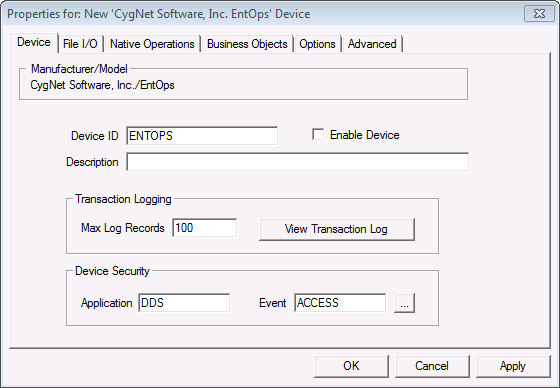
Options are as follows.
Device Settings
| General | Description | ||||||
|---|---|---|---|---|---|---|---|
|
Manufacturer/Model |
Manufacturer and model of the Enterprise Operations device. |
||||||
|
Device ID |
The unique identifier of an instance for this device. This free-form name must be unique in the DDS and the FAC. That is, it must be a name not used by any other communication device, import/export device, remote device, or facility. CygNet naming standards for device ID are as follows:
|
||||||
|
Description |
A free-form description of the device. 32 character maximum. |
||||||
|
Enable Device |
Select whether to enable or disable the device. The default setting is disabled. If an invalid configuration is detected, the device will automatically be disabled. The device can be re-enabled after the invalid configuration is fixed. Note: The device cannot be enabled until all required fields are defined. |
Transaction Logging
| Transaction Logging | Description |
|---|---|
|
Max Log Records |
The maximum number of transaction history records that can be maintained for the device. Each UIS command executed by the device will generate a single transaction log. If the device is setup for active monitoring, one transaction will be created whenever a new file is detected. If multiple files are detected at the same time, it will still result in one transaction. |
|
View Transaction Log |
Click to view transaction and status log entries. |
Device Security
| Device Security | Description |
|---|---|
|
Application and Event |
Defines the security application and security event name that governs the device’s administrative security. Clicking in the text field, or clicking the browse button, allows the choices to be edited. Administrative security defines who can view or edit the device configuration or delete the device from the DDS. The defaults are DDS (Application) and ACCESS (Event) and the users and their permission levels are defined in the Access Control Service (ACS). If you create a custom Application/Event, the tasks and authorization levels are the same as those of the DDS ACCESS Event. For example, you must have Level 1 (Read) authorization to view the device properties. See Security for more information. Note: The ACS governs operational security for each service using the ID specified by the User ID Override on the Options page. |


