Auto Run a CygNet Excel Export Report
The Auto Run option provides a method for a report to run automatically. This allows reports to be scheduled using third-party schedulers such as Microsoft’s Scheduled Tasks.
Note: Microsoft Excel Macro Security must be set to "Enable all Macros" for Auto Run without operator intervention. See Installing and Configuring CygNet Excel Export.
Click on the cell of each parameter or property to view help for the item.
|
Auto Run |
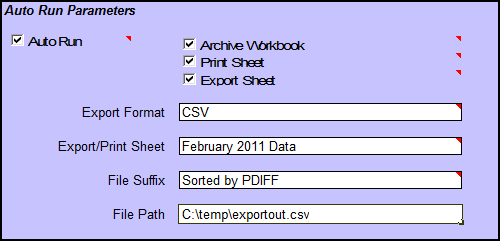
Auto Run Parameters
Auto Run can be used by itself or with any combination of the Archive Workbook, Print Sheet, and Export Sheet options.
| Parameters | Description |
|---|---|
|
Auto Run |
When Auto Run is used alone, the following actions occur when the report is opened:
If the Auto Run options are not enabled, Microsoft Excel will remain open after the data is retrieved. |
|
Archive Workbook |
Select to archive the entire .xls workbook. Specify the archive folder using the File Path property.
|
|
Print Sheet |
Prints the worksheet specified by Export/Print Sheet property to the default printer of the computer from which the report was run.
|
|
Export Sheet |
Exports the worksheet specified by Export/Print Sheet property to the folder specified by the File Path property.
Note: Due to a limitation in Microsoft Excel, you cannot export a worksheet that contains references to other worksheets. |
Auto Run Properties
| Properties | Description |
|---|---|
|
Export Format |
The format of the file produced by Auto Run. The export file format types are CVS, TXT, HTML, and XLS. HTML format publishes the Print Area. |
|
Export/Print Sheet |
The name of the worksheet exported or printed with Export/Print Sheet. Leave blank to use the default CygNet Data worksheet. |
|
File Suffix |
Specifies text to append to the file name for Archive Workbook or Export Sheet. |
|
File Path |
Specifies the path/folder to which Archived files and Export Sheets are written. If this property is blank, the Archive/Export is saved to the folder from which the report was run. Note: The specified file path/folder must exist. The application will not create it. |
More:
 Opening a File Without Auto Run


