Facility Attributes
The properties of a facility are its ID, description, and attributes. Facility attribute values can be used to define polling schedules, to create groups, and can be included on CygNet Studio screens and in reports. Some CygNet facility attributes are determined by the Facility service, but most attribute names and descriptions are configured by the CygNet administrator.
Up to 124 attributes can be used to describe a facility:
- 42 free-form text attributes
- 1 free-form text attribute used as a simple facility comment
- 60 table attributes whose values must be selected from a list to ensure standardized data entry
- 20 yes/no attributes.
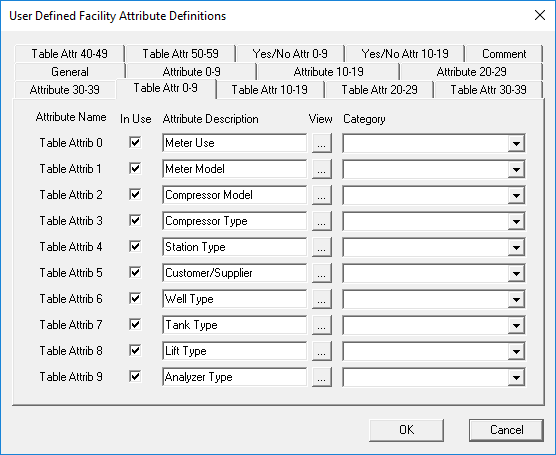
|
| User-Defined Global Facility Attributes |
Facility Attribute Configuration
The attribute names are user-configurable and are global to the Facility Service. Use names that are generic when possible. For example, if you name an attribute as "Type" this would apply only to RTUs. A better name would be "Remote Equip Type" which could be applied to RTUs or PLCs. For table attributes, you must define the table entries.
The properties of a facility are its attributes. Attributes are descriptive elements. For example, the facility might belongs to the Andrews field office (determined by a facility attribute to describe Field Offices) in Texas (determined by a facility attribute to describe States). The facility is on route 13a (determined by a facility attribute to describe Routes) and the person in charge of the facility is Bob (determined by a facility attribute to describe Operators). It is a Totalflow 6400x (determined by a facility attribute to describe Remote Equipment Types) that communicates using a radio (determined by a facility attribute to describe Comm Methods). The serial number of the device is 23UWED12X-333 (determined by a facility attribute to describe Serial Numbers). This facility is on a shared lease (determined by a facility attribute to describe Yes/No). The radio (determined by a facility attribute to describe Comm Methods) is a Freewave radio (determined by a facility attribute to describe Comm Equipment Types) on repeater 2 (determined by a facility attribute to describe Repeaters).
Not every attribute will apply to every facility. In the example above, the Repeater attribute does not apply to the RTU, and the Remote Equipment Type attribute does not apply to the radio.
Facility Attribute Types
Facility attributes can be enabled/disabled and their descriptions user-defined. Facility attributes in CygNet are grouped into four types: General, Text, Table-driven and Yes/No.
A General attribute is an attribute that describes generic facility properties. Some are determined by CygNet but most are user defined.
A Text attribute is a free-form text field. Use this field for items that do not have consistent data entry, such as a serial number or other unique identifier. The length of the text attributes vary between 20 and 300 characters.
A Table-driven attribute is a table-driven field. Use this field for items that require standard data entry, such as a state attribute. If you used a text attribute for state and one user-typed "TX" and the other user-typed "Texas" the system would recognize the values as different. A better option would be to use a table attribute where the only option would be "Texas." A table entry has both the entry and its description. Either one can be used when displaying or reporting the attribute information. The tables are stored in the Table Reference Service. The table name for a table attribute is SYSFCTxx, where xx represents the attribute number. For example, SYSFCT03 represents Table Attrib 03.
The Yes/No attribute is an attribute for which the value is either set or not set. Yes/No attributes are for yes or no situations.
Internal attributes are generically identified (for example, Table Attrib 0). You can assign a descriptive name to them. When doing so, keep in mind that attributes are global to the Facility Service, so use broad-based attribute names. If you define an attribute as "PLC Type" this would apply only to PLCs. A better name in this instance might be "Remote Equipment Type" because it could apply to PLCs or RTUs.
More:
 Configuring Facility Attributes
Applying the Same Attributes to Multiple FAC Services


