Nodes in a Tree View
The Group Manager utility displays group nodes in a hierarchical tree structure. These nodes are grouped in Description, Category, and Node ID columns. Some of these nodes are user defined and others are defined by the Group Manager utility according to their position within the hierarchy.
When properties information about a node exists, right-click the node and select Properties or select a node and double-click it. To display available commands for a node, right-click the node to display a node context menu. For information about interacting with the nodes described below, see User Interface.
|
Sample Nodes in the Group Manager Tree |
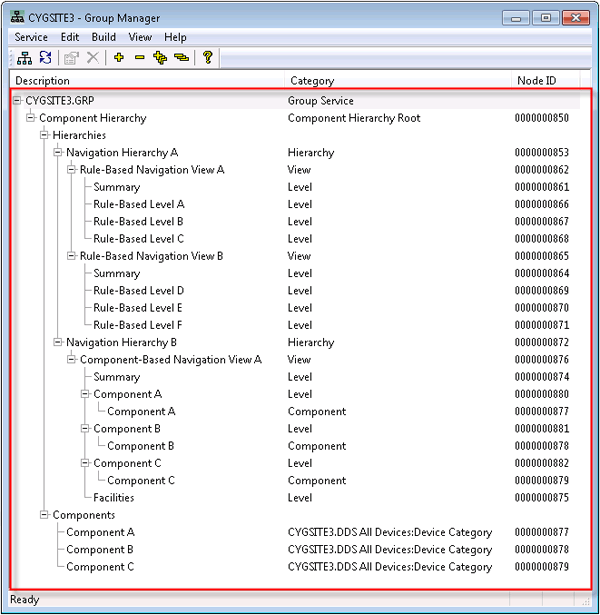
Group Manager Nodes
The following table lists and describes the Group Manager nodes.
| Node | Description |
|---|---|
| Description | |
|
[MYSITE.GROUPSERVICE] |
Strictly speaking, this is not a node because no corresponding node record appears in the GRP. It is displayed as a node in the Group Manager tree, but it is only a visual placeholder for the actual GRP service to which this hierarchy belongs. |
|
Component Hierarchy |
The component hierarchy root is the base of all navigation hierarchies and components in a component hierarchy. Its primary value is as a container for hierarchies and constituent components. If you choose to use rules only instead of components, its value is unimportant. More than one component hierarchy root can be added to a GRP to suit different organizational needs. |
|
Hierarchies |
A class within your component hierarchy under which all user-created hierarchies reside. This node is for organizational purposes only. You can add navigation hierarchies at this level; they appear as children to the Hierarchies node. |
|
Navigation Hierarchy |
A class beneath Hierarchies that enables navigation between views. You can create multiple views in the same navigation hierarchy. You can also create multiple navigation hierarchies based on the same rules and/or components. An advantage of creating multiple views for one navigation hierarchy is when using the Group Navigation Bar Tool in CygNet Studio. View options can be selected from the drop-down menu in CygNet Studio to provide additional options for filtering and displaying data. |
|
Each unique hierarchy is called a view because it is one possible perspective or view of a collection of defined attributes. Multiple views may be created within a navigation hierarchy to provide different methods of filtering and displaying relevant data. Additionally, you can link views together, making one stand-alone view a child view of another stand-alone view. |
|
|
(Hierarchy) Level |
A (hierarchy) level represents a prioritized node within a view. For instance, a view with 5 levels has levels prioritized in descending order from Hierarchy Level 1 down to Hierarchy Level 5. A level can be defined by a rule or rules, or by a component. Both rules and components cannot exist within the same view or level, but a navigation hierarchy can support both rule-based and component-based levels. If a level is component based, a child component generates along with the parent level. Once the component level is added, you can link other existing components to the same level. |
|
Components |
Like the Hierarchies node above, the Components node classifies items of a distinct type. In this case, it holds components. Components are made up of Device Definition Service (DDS) and Facility Service (FAC) attributes. DDS components are properties of a remote device that reside only in the DDS, such as device ID, device manufacturer, and device category. FAC components are the descriptive attributes of a facility. Most facility attributes are user-defined. By default, a Component list only includes facilities that have a value assigned to an attribute. However, you can include facilities that have blank values. In such cases, another placeholder labeled (blank) is included at the attribute value level. |
| Category | |
|
Group Service |
Identifies the actual GRP to which the displayed hierarchies and components belong. |
|
Component Hierarchy Root |
The component hierarchy root is the base of a hierarchical group. |
|
Hierarchy |
Class beneath Hierarchies that enables navigation between various actual hierarchies. |
|
View |
Represents a user-defined view of rule-based or component-based levels. |
|
Level |
The (hierarchy) level represents the level at which facility data enters a group hierarchy. |
|
Component |
Components are Device Definition Service (DDS) and Facility Service (FAC) attributes. |
| Node ID | |
|
[##########] |
The Node ID is a unique numerical identifier assigned to the particular node in a group hierarchy. It is assigned by the system, not by a user. It corresponds to the Data Key displayed in the GRP. |


