Configuring History Export Values
The Values page specifies the source (VHS) of the values, the time range, and has an option to enable rollup data and, if applicable, the rollup period.
Rollup type is specified on a per tag basis on the Tags page. You do not have to apply a rollup to all tags.
|
Values page |
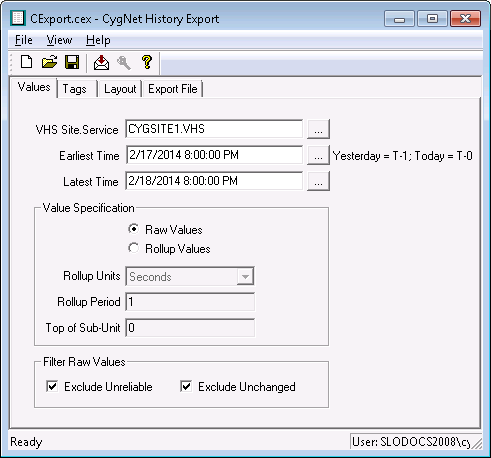
The following table lists and describes fields found on the Values page of the CygNet History Export utility.
| Property | Description |
|---|---|
|
VHS Site.Service |
The name of the Value History Service from which to retrieve data. Use … to select the service. |
|
Date/Time Range |
The date range can be specific or you can use date wildcards. A date wildcard allows the export to be dynamic and eliminates the need to edit the date parameters every time the export is run. The date wildcard is "T" (for "today"). You can subtract from T to go back. T-7 represents seven days ago. Therefore, a range of “T-7 to T” would be seven days ago to today. Note: See Date and Time Wildcards for more information about using wildcards. |
|
Value Specification |
Specifies the type of values to include in the report.
Rollup Units and Rollup Period specify the period to which the data will be calculated or thinned. Rollup Types are defined on the Tags page. Example 1If you set the Rollup Type to Raw or any Calculated type, and the date range on the report is 14 days, and you set the Rollup Units to Minutes and the Rollup Period to 30, the data would be rolled up to 30 minute periods for the 14 days.
Example 2If you set the Rollup Type to any thinned type, and the date range on the report is 14 days, and you set the Rollup Units to Minutes, and the Rollup Period to 30, the raw data would be thinned to data values for every 30 minute period for the 14 days:
Top of Subunit is an offset from the normal date/time. It provides a method to allow for start of day, time zone, or scheduling differences. For example, if you are using a rollup period of 1 day, and your data day starts at 8:00 A.M. (instead of midnight), you can offset the period by entering an "8" in this field. Note that this field uses 24-hour time. |
|
Filter Raw Values |
|
|
Exclude Unreliable |
When the UIS cannot communicate with a device, the last known values from the device are marked as unreliable. When Exclude Unreliable is enabled, only reliable data is exported. |
|
Exclude Unchanged |
By default, data is reported to the historian on an exception basis (value or status change). If you override this setting for a tag by using the reporting options in the Point Service (PNT), the history service may have unchanged data. When Exclude Unchanged is enabled, only changed values are exported. |


